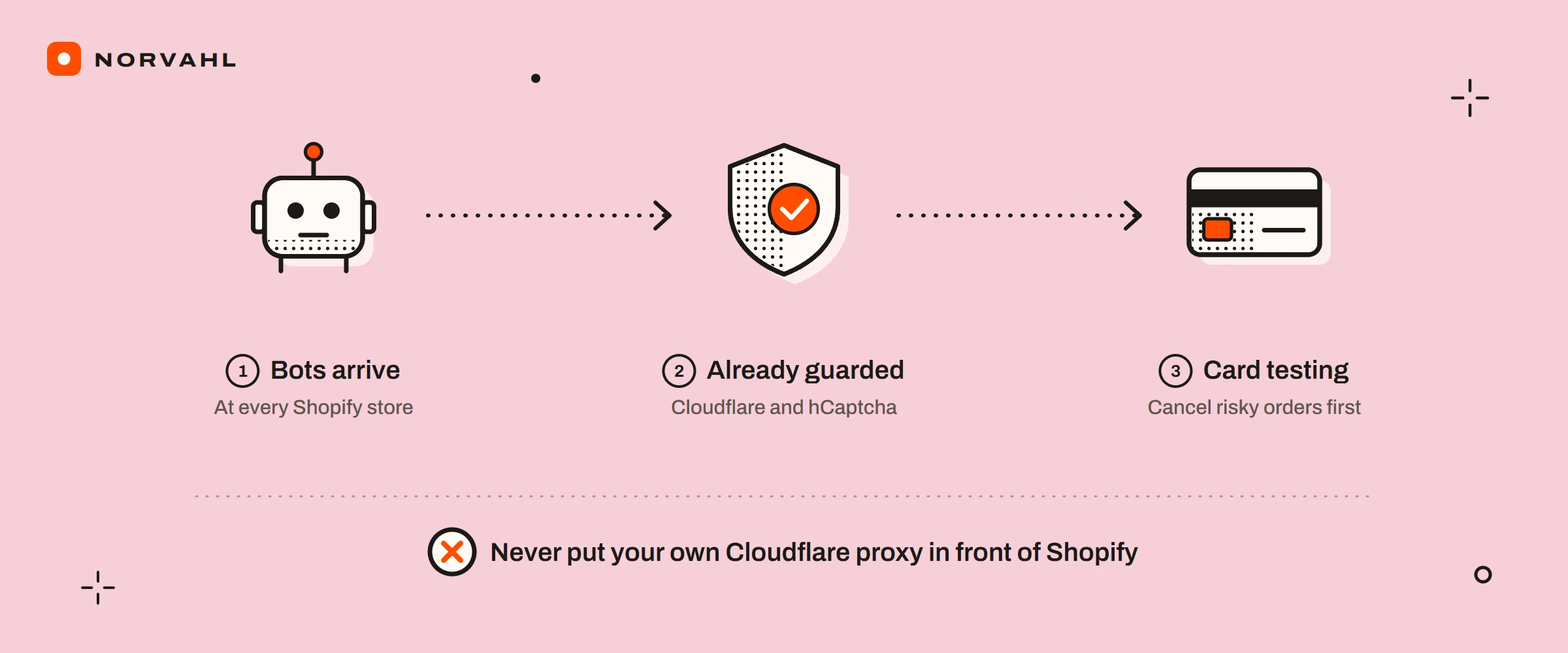
Most of Shopify bot protection is already switched on, and the owner's job is knowing where it stops. Shopify's page on bots says every request to your online store passes through Cloudflare first, which is always active and needs no action from you. Your contact, comment and account forms get hCaptcha by default. The one extra reserved for Plus is protection for the checkout during sales.
What those defaults leave to you is the part that costs money: fake accounts in your customer list, card testing through your checkout, spam orders, and analytics that count bots as visitors. Each has a fix on a standard plan, and most of those fixes are Shopify settings rather than apps. Apps still have a place, and the section on them shows how to test whether one earns the script it adds to your pages.
The short version
- Every store sits behind Cloudflare and has hCaptcha on its forms. Keep both hCaptcha boxes ticked under Online Store, then Preferences.
- Read your real traffic with the Human or bot session filter in your sessions reports. It covers sessions from 7 October 2025.
- For fake accounts, turn on double opt-in and delete the profiles in bulk or with Flow.
- For card testing and spam orders, cancel risky orders before you fulfil them and use manual capture. Shopify Payments blocks some attempts on its own.
- Never put your own Cloudflare proxy in front of Shopify, which Shopify does not support.
- Checkout bot protection for timed sales is Plus only.
The Shopify bot protection every store already has#
Two layers come with every plan. The first is Cloudflare, in front of the whole store. Shopify's bots page says its firewall and DDoS protection shield your store from the majority of automated traffic. A visitor may occasionally see a Cloudflare check asking them to verify their connection first. The second layer is hCaptcha, a CAPTCHA service that checks form submissions on contact, comment and customer account pages.
The only extra that page lists for Plus is protection for the checkout during sales, which has its own section further down. Everything else here is available below Plus, though Shopify's card testing protection needs Shopify Payments.
Shopify spam protection and its two hCaptcha settings#
The setting lives under Online Store, then Preferences, in the Spam protection section, according to Shopify's preferences page. It has two boxes: one for contact and comment forms, and one for the login, create account and password recovery pages. Both are on by default, so if either box is empty, someone cleared it. Tick it again unless you know the reason.
The check runs invisibly when a form is sent. Only a submission that looks suspicious gets a puzzle or an "I'm a human" box to click. Two details are worth knowing before you change anything:
- Older guides still say Shopify uses Google's reCAPTCHA. Shopify moved storefront forms to hCaptcha in 2024, and its developer changelog says that from the week of 28 October 2024, a form submission carrying a reCAPTCHA token gets a 400 error. There is no switching back.
- Shopify says hCaptcha is not compatible with custom code or apps that add their own CAPTCHA, and that customers might run into problems if you use both. A CAPTCHA app added on top risks problems on the very forms it was meant to protect.
If your store uses Shopify's current customer accounts, customers sign in with a one-time six-digit code, and the preferences page says that sign-in does not use hCaptcha.
Is your traffic real? The Human or bot session filter#
Since October 2025, Shopify's reports can separate bots from people. Shopify's bot filtering page explains that each event in a visit, such as a click to a product or the start of a checkout, is checked against a set of criteria. Shopify then classifies the whole session as Human or Bot.
To use it, open a sessions report under Analytics, then Reports. Add Human or bot session as a dimension to see both side by side, or add it as a filter set to Human to see only people.
Know its limits before you trust the new conversion rate:
- It applies only to sessions-related metrics, such as sessions, conversion rate and visitor counts. Fake customers and fake orders stay where they are.
- It classifies data from 7 October 2025 onwards and cannot reclassify older sessions, so a comparison that reaches back before that date is not like for like.
- It is not available for headless or Hydrogen storefronts, and Shopify says some sophisticated traffic might not be classified straight away.
Shopify fake customer accounts from bots#
Shopify has not published why fake accounts appear, but merchants have described them in detail. In a Shopify Community thread that ran from May 2023 to February 2024, owners reported between 5 and 50 fake accounts a day, later hundreds. The accounts had gibberish names, junk email addresses and no orders. Marketing consent was switched on for them, and one owner said welcome emails to those addresses took the store's spam complaint rate from almost nothing to 5 percent.
In Shopify's developer community, a thread that ran from January 2025 to August 2026 describes bots posting straight to Shopify's public account endpoint. The customers they create arrive without a first name, a last name or both, even though the form requires them. Posters suspect the hCaptcha tokens are bought from solving services. A Shopify staff member passed the report to internal product teams, and no public fix had been announced by the last reply.
So treat fake signups as something you manage, not something one setting ends:
- Keep hCaptcha on for your login and create account pages.
- Move off legacy customer accounts. Shopify deprecated them on 26 February 2026, with no more updates or support and a final shutdown date still to be announced. Shopify has not said the upgrade stops fake profiles, so make the move for support reasons and do not count on it for this.
- Turn on double opt-in under Settings, then Notifications, then Customer notifications, in the Marketing double opt-in section. A new subscriber then has to click a link in an email before your marketing reaches them, so a signup that never confirms never gets your campaigns. Shopify's page on collecting contact details covers the setting.
- Delete the fakes in bulk. In Customers, select them, open the menu next to Bulk edit and choose Delete customers. Shopify's customer management page says a profile linked to any order cannot be deleted, so anyone who has bought from you stays put.
- Automate the clean-up with Flow, which Shopify lists from the Basic plan up. Its Delete customer action can run when a customer is created, after a condition that matches the pattern your fake accounts share. Test that condition against a week of real signups first, because a rule that is too broad deletes real people who have not ordered yet. Some guides say Flow cannot delete customers, but Shopify's Flow reference lists the action.
Shopify spam emails are three different problems#
A search for Shopify spam emails can mean one of three problems, and each has its own fix.
The first is spam sent through your own contact form, often sales pitches. That is what the contact form hCaptcha box is for. A merchant answering in Shopify's community said it helps a lot but does not block every message, which is as much as any CAPTCHA can promise.
The second is fake email pretending to be Shopify, some of it threatening to close your store. Shopify's phishing page says it sends email only from @shopify.com, @email.shopify.com, @em.shopify.com and @shopify-billpay.melio.com. Mail from a Gmail, Yahoo, Apple Mail or Hotmail address is not from Shopify, and Shopify never asks for sensitive information by email. Forward anything suspicious to phishing@shopify.com.
The third is your store's own emails reaching strangers. In a February 2024 thread, an owner found that people who had never visited the store were getting account activation emails from it, and some reported the store as spam. The owner suspected bots signing up with harvested addresses, which is the fake account problem above. Shopify has published nothing on it.
How to stop Shopify spam emails#
If the problem is your own order or marketing emails landing in customers' spam folders, that is a sending problem rather than a bot problem. The fix is your domain's email records, starting with SPF, DKIM and DMARC. The guide on Cloudflare Email Routing shows how those records fit together on a real domain.
When bots are behind it, the steps are short. Keep both hCaptcha boxes on. Turn on double opt-in so fake signups never become subscribers. Clear the fake profiles in bulk and let Flow keep clearing them. Report fake Shopify emails to phishing@shopify.com and never click their links.
Shopify spam orders and bot attacks#
Shopify's fraud prevention page describes card testing, where someone uses automated scripts to check whether stolen card details are valid. From your admin, that can look like a run of fake checkouts or small spam orders, and it is what posters in the threads below suspected.
Shopify takes some of it off your hands. Checkout attempts it identifies as suspected card testing or bot activity are left out of your abandoned checkouts. Shopify's fraud analysis page adds that Shopify Payments can block some high risk attempts before an order exists, and the abandoned checkout's timeline then reads "Blocked due to high risk of fraud". When many orders or failed payments come from one IP address in a short time, that address goes on a temporary blocklist that clears itself within 6 to 24 hours.
Shopify's own figure is that its machine learning blocks about 90 percent of card testing attacks on guest credit card checkouts, from a June 2026 post on its enterprise blog. That applies to stores using Shopify Payments, and it is Shopify describing its own product. Shopify lists card testing protection only for stores on Shopify Payments, so if you take cards through another provider, ask that provider what it blocks.
Merchants describe the attacks that get through. One store reported over 1,000 abandoned bot carts a day in 2025, with made-up addresses. Another saw checkouts from "James James" and "Will Will" on products priced at zero. When attempts like these reach you as orders:
- Cancel high risk orders before you fulfil anything.
- Use manual payment capture, so you can review a suspicious order before any money is collected.
- Block the email addresses and IP addresses behind the attack with Shopify's Fraud Control app, and cancel repeating patterns with a Flow rule. The guide on the Shopify Fraud Filter app walks through both.
- If bots keep checking out a product priced at zero, set it to draft. That helped one merchant in the James James thread, for a while.
Cancelling does not make an attack free, and Shopify's fraud prevention page is plain about why. Cancelling or voiding an order can lower the chance of a chargeback, but it does not stop the cardholder's bank from filing one. An authorisation hold can show on the real cardholder's statement even when nothing is captured, and if they report it, their bank can raise a chargeback against your store. Every chargeback counts toward your chargeback rate whether you win or lose, and a surge of declines can push up your decline rate for real customers after the attack stops.
Can you put Cloudflare in front of a Shopify store?#
No, and the forum answers that suggest it are wrong for Shopify. Shopify's domain troubleshooting page says Cloudflare proxy setups, including Orange-to-Orange, are not supported. It names the damage as certificate provisioning failures, reduced resiliency and lower bot detection accuracy. Your store already runs behind Shopify's own Cloudflare, and a second layer in front of it makes Shopify worse at telling bots from people.
I run my own site on Cloudflare and write about its rules, and I still would not proxy a Shopify store through it. Country rules and firewall rules are the right tool for a WooCommerce store or any site you host yourself, and the guide on Cloudflare geo blocking covers them.
Shopify bot protection apps, and whether one is worth its script#
Two apps show up in the results for this search. Their App Store listings showed the following on 15 September 2026:
| App | Rating | Price | What it adds to your store |
|---|---|---|---|
| Blockify Fraud Filter, Blocker | 4.9 from 1,694 reviews | Free with 4 block or redirect rules, then 9.99, 19.99 or 39.99 dollars a month | Script tags on your storefront, with VPN and proxy blocking from the 9.99 plan |
| Negate, Bot Protection | 4.5 from 59 reviews | 19, 49 or 299 dollars a month | Script tags on your storefront, sold on blocking bots before they fire your marketing pixels |
Before you pay, know what a storefront script can reach. It runs on the pages a visitor loads. The fake signups merchants describe post straight to Shopify's endpoint, and card tests run through Shopify's checkout rather than your theme. A script on your storefront pages is badly placed to stop either. An app can keep bots from polluting your pixels and block visitors by network, but it is unlikely to stop the attacks that cost money.
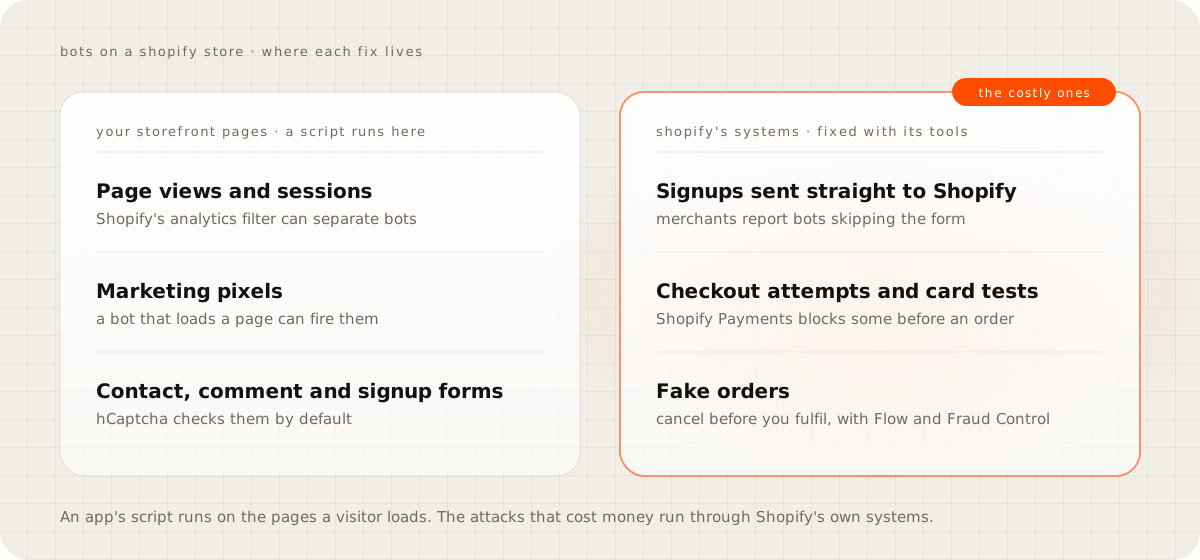
That is also why merchants in the fake accounts thread report trying bot and fraud apps and still getting fake accounts. It does not mean the apps did nothing. The fix for fake accounts is in your customer list and marketing settings, and the fix for card testing is on the payment side. Negate's pitch of filtering bots out of analytics also now overlaps Shopify's own filter for sessions, which costs nothing extra.
Every script also has a speed cost, and neither listing says what its script weighs, so measure it. Run PageSpeed Insights a few times on your home page and one product page before you install, then again after, and compare the ranges and the third-party code findings. On Resin Rock's store, removing five dead apps and eight pixels was one part of taking mobile PageSpeed from 59 to between 91 and 95. The Resin Rock case study breaks that down.
Shopify Plus bot protection#
On Plus, Shopify offers bot protection for the checkout during a sale, and Plus Support has to switch it on before it appears under Settings, then Bot protection. Shopify's page on selling to bots says it blocks known bots from the checkout and slows down bot activity, with reCAPTCHA or hCaptcha as the challenge. Its limits are firm. It covers the Online Store channel only, lasts up to 60 minutes per event, protects up to 500 products or all of them, and runs one event at a time. Shopify suggests scheduling it for the same time as your flash sale.
If your business depends on limited drops that bots buy out, that is a real reason to look at Plus. For a store that sells steadily, a checkout shield for a timed event does little, and the steps above are a better use of the time.
Where to start on your store#
Start with the quick checks. Open Online Store, then Preferences, and confirm both hCaptcha boxes are ticked. Add the Human or bot session filter to a sessions report and note your real conversion rate. Turn on double opt-in.
Then clear what is already there. Filter your customer list to profiles with no orders, select the obvious fakes and delete them, and set up the Flow rule once you know the pattern they share. If a bot app is installed, run the before-and-after PageSpeed test and decide whether it has earned its place.
Questions people ask
Does Shopify have bot protection?
Yes. Shopify says every request to an online store passes through Cloudflare first, and hCaptcha is on by default for contact, comment and customer account forms. Extra bot protection for the checkout during sales is only for stores on the Plus plan.
How do I stop fake customer accounts on Shopify?
Keep hCaptcha on for your account pages, turn on double opt-in so unconfirmed signups never get your marketing, and delete fake profiles in bulk or with Flow's Delete customer action. Merchants report bots posting straight to Shopify's account endpoint, and no fix had been announced by August 2026.
Can I use reCAPTCHA instead of hCaptcha on Shopify?
Not on storefront forms. Since the week of 28 October 2024, Shopify rejects form submissions that carry a reCAPTCHA token, and it warns that CAPTCHA apps can clash with hCaptcha. reCAPTCHA is still an option only in Plus checkout bot protection.
Does Shopify filter bots out of analytics?
For sessions, conversion rate and visitor counts, yes, with the Human or bot session filter. It classifies data from 7 October 2025 onwards, cannot reclassify older sessions, and is not available for headless or Hydrogen stores.
Can I put Cloudflare in front of my Shopify store?
No. Shopify says Cloudflare proxy setups, including Orange-to-Orange, are not supported and can cause certificate failures and lower bot detection accuracy. Your store already runs behind Shopify's own Cloudflare.
Sources
- Protecting your store from bots, Shopify Help Center
- Setting your online store preferences, Shopify Help Center
- Breaking changes to CAPTCHA protection on storefront forms, Shopify developer changelog
- Bot filtering in Shopify analytics and reports, Shopify Help Center
- Legacy customer accounts are deprecated, Shopify Changelog
- Collecting customer contact information, Shopify Help Center
- Managing customers, Shopify Help Center
- Delete customer action, Shopify Flow reference
- Protect your account against phishing, Shopify Help Center
- Preventing fraud, Shopify Help Center
- Reviewing orders with fraud analysis, Shopify Help Center
- How Shopify's machine learning blocks card testing attacks, Shopify Enterprise blog
- Troubleshooting issues with domains connected to Shopify, Shopify Help Center
- Protecting your store from selling to bots, Shopify Help Center