Cloudflare Email Routing gives your domain working addresses for nothing, and it does half of what a business needs from email. It receives. Mail sent to hello@ or orders@ on your domain arrives in the Gmail or Outlook inbox you already use. It cannot send, and Cloudflare's own Postmaster page says so: no sending and no replying from your domain. Most setup guides skip past that part.
My own domain runs this way. Mail to hello@norvahl.com comes in through Cloudflare's routing servers and lands in a Gmail inbox, and my replies leave through Gmail under the same address. I read the domain's public records on 15 September 2026 to write this, and the receiving half is sound. The replying half has two problems. A reply sent through Gmail cannot pass DMARC for your domain, and Google has scheduled the Gmail feature that sends it to be switched off in January 2027.
Below is the whole setup: routing mail in, the SPF record that Cloudflare locks, and the ways to reply that will still work next year.
The short version Email Routing is the right tool for receiving. Onboard the domain, verify the inbox that should get the mail, and add one rule per address. Cloudflare writes and locks the records it needs, so release the lock on the SPF record before you merge another sender into it. Replies through Gmail's Send mail as work today, fail DMARC for your domain and are due to go in January 2027. Keep your DMARC record at p=none while you use them, and move replies to a proper mailbox or a sending service before then.
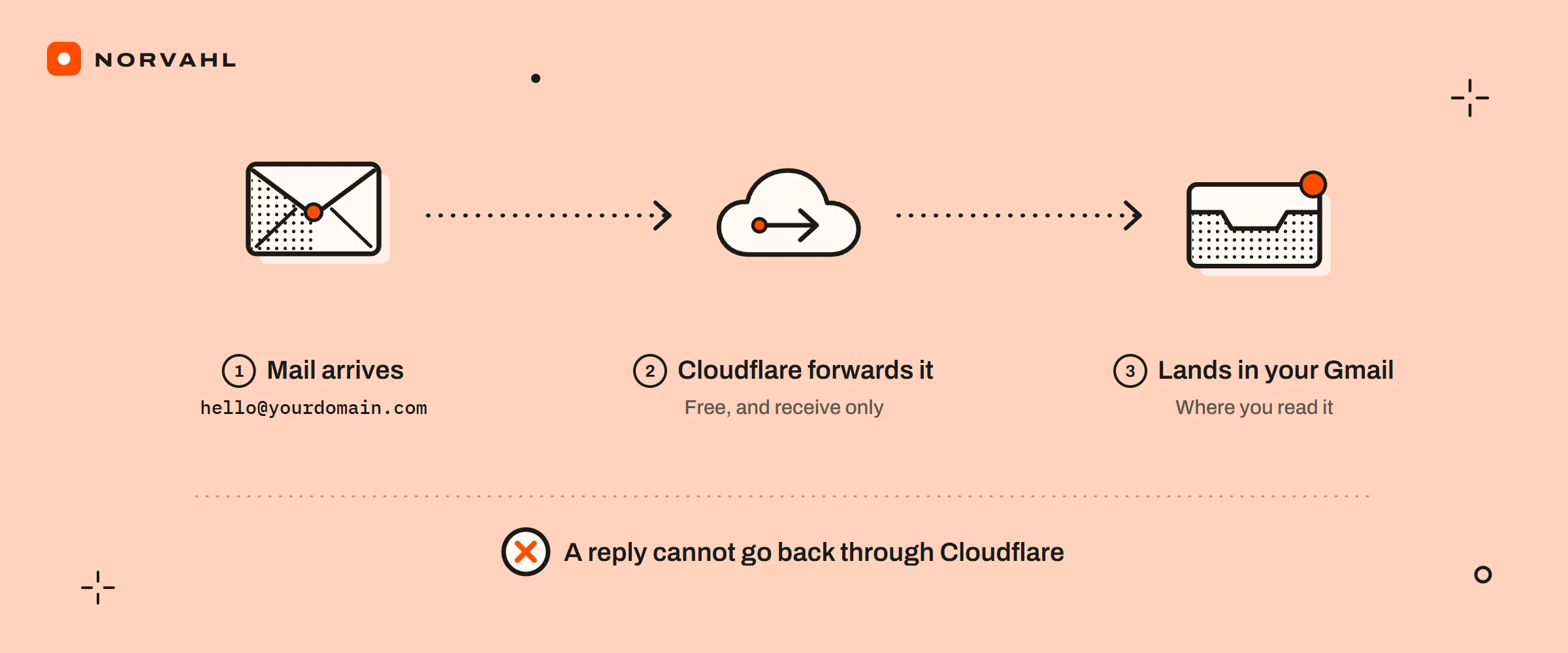
What Email Routing does, and what it cannot do#
Email Routing is a forwarder with rules. A message for your domain reaches one of Cloudflare's mail servers, a rule you wrote decides where it goes, and Cloudflare passes it on. The rule can send it to an email address you have verified, hand it to a Worker (a small program that runs on Cloudflare), or drop it. Cloudflare's pricing page lists routing as unlimited on the free plan and on the paid one.
The limits sit well above what one business needs. Cloudflare's limits page allows 200 routing rules per domain, 200 destination addresses per account, and 25 MiB for an incoming message. A catch-all rule sends everything addressed to the domain, misspelled names included, to one inbox. Subaddressing, where yourname+invoices@ reaches yourname@, is a switch in the settings.
What it leaves out surprises people later. There is no mailbox at Cloudflare, only the forward. There is no sending. And when Cloudflare cannot deliver a message, it does not pass the bounce back, so the sender never learns the mail was lost.
How to set up Cloudflare Email Routing#
Before you start, check where the domain's mail goes today. Email Routing needs Cloudflare's own MX records, and Cloudflare's domain configuration page says it cannot run beside an external mail server. If people already have mailboxes on the domain at Google Workspace, Microsoft 365 or your web host, turning routing on takes the mail away from them.
- In the Cloudflare dashboard, open Compute, then Email Service, then Email Routing, and choose Onboard Domain. Pick the domain and read the records it proposes before you confirm.
- Under Destination Addresses, add the inbox that should receive the mail. Cloudflare sends it a message; open it and select Verify email address. Until you do, every rule that points at that inbox stays switched off.
- Create a routing rule for each address you want: the custom address, such as hello or orders, the action Send to an email, and the verified inbox.
- Add a catch-all only if you want every stray address as well. It brings the spam that guesses at names along with the customers who mistype yours.
- Test from an account that is not the destination. Gmail files a message you sent to yourself under Sent and All Mail, never the inbox. I ran into it with my own contact form's receipt, and it looks exactly like a broken setup.
The records Email Routing adds#
Onboarding writes three kinds of record, and Cloudflare assigns the values, so copy nothing from a guide, this one included. On my domain, read through Google's public DNS on 15 September 2026, they are:
- Three MX records, pointing to route1, route2 and route3.mx.cloudflare.net, with priorities 31, 39 and 100.
- One TXT record at the root, the SPF record. Cloudflare writes it as
v=spf1 include:_spf.mx.cloudflare.net ~all, and mine carries a second include, which the next section explains. - One TXT record at
cf2024-1._domainkey, the DKIM key Cloudflare signs forwarded mail with.
A fourth record is yours to add, because Email Routing does not write it. DMARC lives at _dmarc, and mine reads v=DMARC1; p=none; rua=mailto:hello@norvahl.com. The p=none is deliberate, for a reason that belongs to replies.
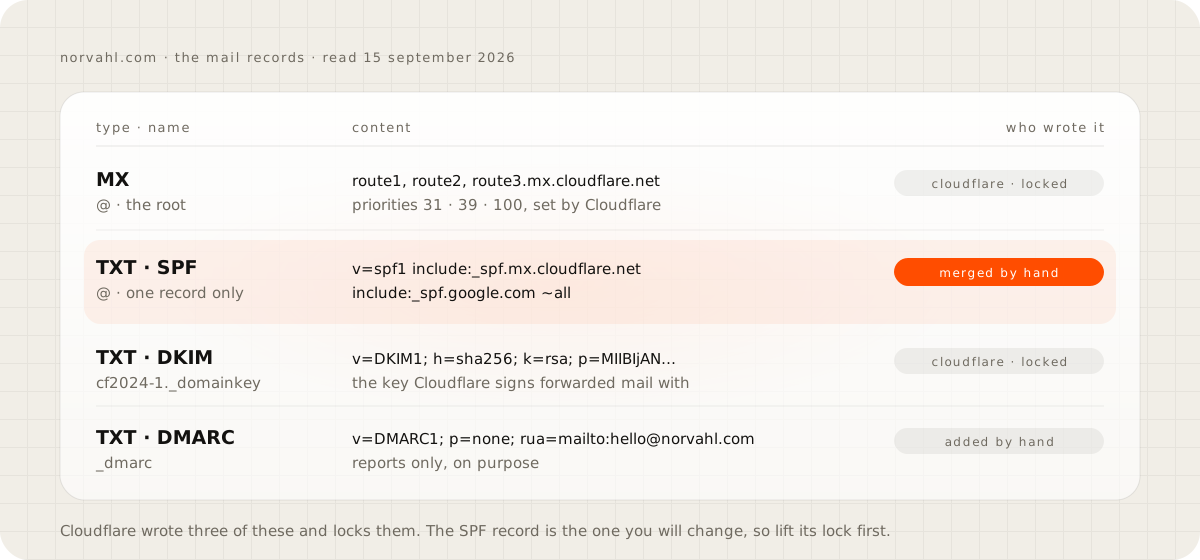
Cloudflare locks the records it manages, so a stray edit on the DNS page cannot break your mail. The same lock is why the first attempt to edit the SPF record fails.
How to add or edit the SPF record in Cloudflare#
A domain gets one SPF record. Two TXT records that both start with v=spf1 do not add together. RFC 7208, the SPF standard, returns a permanent error when it finds more than one, and receivers then treat your mail as unauthenticated. A new sender is never a new record. It goes into the one you have.
- If Email Routing manages the record, release its lock first. Open Compute, Email Service and Email Routing, choose the domain and open Settings. Find the SPF record under DNS records and use the lock button beside it.
- Open the domain's DNS Records page and select Edit on the TXT record at the root whose content starts with
v=spf1. If there is no such record, select Add record, choose TXT, and use @ as the name for the root. - Put every service that sends as your domain into that one record, one
include:each, before the ending. Cloudflare's own example for routing plus Google isv=spf1 include:_spf.mx.cloudflare.net include:_spf.google.com ~all. - Save, give it a few minutes, and look the record up from outside the dashboard with any DNS lookup tool. You should see exactly one line that starts with
v=spf1.
The record also has a budget. SPF allows ten DNS lookups for each check and fails outright past that. Every include spends at least one. When I expanded both of mine on 15 September 2026, Cloudflare's include listed its address ranges directly and so did Google's, so my record spends two of its ten. Other services can spend more, because their include often points at further includes, and each of those counts.
End the record with ~all unless you are certain the list is complete. The tilde version asks receivers to treat any other sender with suspicion. The minus version, -all, tells them outright that other senders are not allowed, which is right only when nothing is missing.
A note on my own record. Google's include does nothing for the replies I send through free Gmail. SPF checks the address in the message's envelope, and Gmail puts my Gmail address there instead of hello@. The include counts when Google sends with the domain as the return address, which is what a Google Workspace account does. It costs one lookup, so it does no harm, and on a free Gmail account you can leave it out.
Can you reply or send from Cloudflare Email Routing?#
Not from Email Routing itself. A reply you write in Gmail leaves from Gmail, as your Gmail address, unless you set Gmail up to send as the routed address. In September 2026 there are four ways to reply as your domain, and they differ in cost, in whether the reply passes DMARC, and in how long they will last.
| Route | Cost | Passes DMARC for your domain | The catch |
|---|---|---|---|
| Gmail's Send mail as, through smtp.gmail.com | Free | No | Google removes Send as for outside addresses in January 2027 |
| Google Workspace or Microsoft 365 | A monthly price per user | Yes | A real mailbox replaces routing, and the MX records move |
| Cloudflare Email Sending | The paid Workers plan: 3,000 emails a month, then 0.35 dollars per 1,000 | Yes, Cloudflare aligns SPF and DKIM | Public beta since April 2026, and Cloudflare says it is for transactional mail |
| A sending service, used from a mail app | Set by the provider | Yes, with its DKIM record on your domain | One more account, and a mail app to send from |
For one or two people who mostly receive, the first route is fine today under p=none. The rest of this guide shows how to run it safely until January. For a team, or for anyone whose replies carry quotes and invoices that have to land, the second route is the one I would pay for.
Why replies sent through Gmail fail DMARC#
DMARC asks one thing of every message that claims to come from your domain: did SPF or DKIM pass for that same domain? A reply that Gmail sends as hello@ can pass both checks, for gmail.com. SPF passes because Gmail's servers are allowed to send for Gmail, and any DKIM signature Gmail adds is for gmail.com. Neither is your domain, so DMARC fails for yours.
Your own DNS shows why. My domain has no DKIM key for Google: a lookup of google._domainkey.norvahl.com returns nothing, so no message Gmail sends can carry a norvahl.com signature. The only DKIM key on the domain is Cloudflare's, and Cloudflare uses it for the mail it forwards.
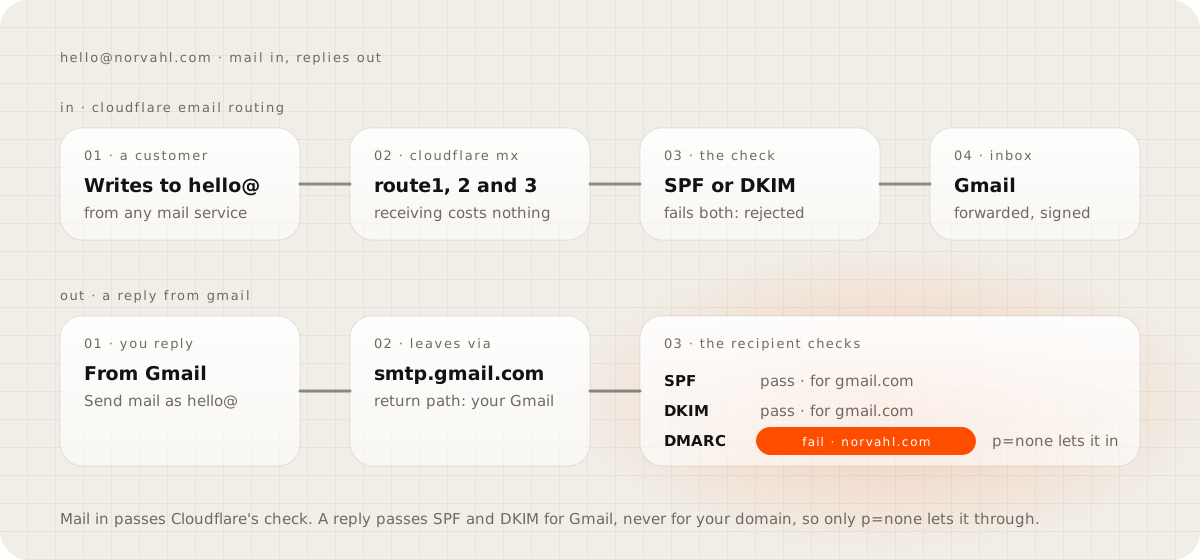
That is why my DMARC record says p=none, which asks receivers to deliver the mail and send reports. At p=quarantine the same replies would be treated as suspicious, and at p=reject receivers would be told to refuse them. The shortcut people take is to read that a strict DMARC policy protects a domain, raise theirs, and then find their own replies in customers' spam folders.
This matters more than it did two years ago. Google's sender guidelines have asked every sender for SPF or DKIM since February 2024. Google's guidelines FAQ says it began ramping up enforcement, rejections included, in November 2025. A business sending fewer than 5,000 messages a day to Gmail is outside the alignment rule Google sets for bulk senders. Its own DMARC policy still tells every receiver how to treat a reply that fails.
What happens when Gmail removes Send as in January 2027#
Google's help page on third-party email accounts in Gmail sets out three steps. A notice period begins in the third quarter of 2026. Through the third and fourth quarters, Send as for third-party accounts keeps working, though Gmail may restrict new configurations. In January 2027 Gmail removes it.
The page names addresses such as @hotmail.com and @yahoo.com. It keeps Send as only for Google-hosted identities: other Gmail addresses, and aliases on a Google Workspace account. It never mentions custom domains either way. An address that Cloudflare routes into Gmail is not hosted by Google, so I would plan for it to stop. I would also expect a brand new setup to be refused before January.
Two related features end on the same date. Gmailify and POP fetching were the other ways people pulled a domain's mail into Gmail. By Google's page on those changes, both closed to new users after the first quarter of 2026 and stop for everyone in January 2027. Mail forwarded into Gmail keeps arriving, so the receiving half of this setup is safe.
The plan is short. Keep Email Routing for incoming mail. Before January, move replies to a route from the table that passes DMARC. Once they pass, raise the DMARC policy one step at a time, with the reports open.
If you set up Gmail's Send mail as now#
The route still works for accounts that already use it, and Google documents the steps on its Send mail as help page. You need 2-Step Verification on the Gmail account and an app password. Google does not offer app passwords to accounts that sign in with security keys alone, to Advanced Protection, or to work and school accounts.
- Create the app password at myaccount.google.com/apppasswords.
- In Gmail, open Settings, then See all settings, then Accounts and Import, and next to Send mail as choose Add another email address.
- Enter your name and the routed address, then the SMTP server
smtp.gmail.com, your full Gmail address as the username, and the app password. - Gmail sends a confirmation to the routed address. It arrives through Email Routing; open it and confirm.
Google revokes app passwords when the account's password changes. If replies as your domain stop working after a password change, that is the reason.
Why forwarded mail goes to spam or never arrives#
Most routing failures start on the sender's side, and a rule Cloudflare added in 2025 made several of them silent.
- Since 3 July 2025, by Cloudflare's changelog, Email Routing rejects mail that passes neither SPF nor DKIM instead of forwarding it. A website form that sends each enquiry as the visitor's own address is the classic case. The message claims to come from gmail.com while it leaves your web host, so it fails both checks, and the lead never reaches you.
- Cloudflare applies the sender's own DMARC policy on the way in. A sender at p=reject whose mail fails authentication is refused.
- A destination that was never verified keeps its rules switched off, and nothing arrives.
- A sending server on a block list is refused with a 554 error that names the list.
- Gmail can slow down a forwarder that delivers a lot of spam, answering with a temporary error about an unusual rate of unsolicited mail. A catch-all makes that more likely.
Because Cloudflare does not pass bounces back, a sender with any of these problems believes the mail arrived. When a customer says they wrote and you have nothing, ask them to send it again from a different address before you change a single record.
"Why not just pay for Google Workspace?"#
For plenty of businesses that is the right answer, and I would tell you so on a call. If more than one person answers the mail, or the replies carry quotes and invoices that have to land, a mailbox on your own domain is worth its monthly price. Email Routing then comes off.
Routing earns its place in a narrower case: one or two people, a few addresses, mostly incoming mail, and an inbox you already have. The mistake is staying on it after that stops being true. You can tell when customers find your replies in spam, when a team forwards one inbox around, or when nobody dares to touch the DMARC record. Once several people answer one address, the problem becomes who replies to whom, which is the guide on one inbox for every channel.
Check your own setup this week#
Send a message from an outside account to your routed address, and reply to it from Gmail. In the copy that reaches the outside account, open the full headers (in Gmail, Show original). Read the SPF, DKIM and DMARC lines, and note which domain each one passed for. If DMARC says fail and your DMARC record is stricter than p=none, set it back to p=none today. Then put a date in your calendar well before January 2027 to move your replies.
Questions people ask
Can I send email with Cloudflare Email Routing?
No. Email Routing receives and forwards, and Cloudflare's documentation says it does not support sending or replying from your domain. Cloudflare's separate Email Sending service can send. It runs on the paid Workers plan, has been in public beta since April 2026, and Cloudflare says it is for transactional mail.
Is Cloudflare Email Routing free?
Yes. Cloudflare lists routing as unlimited on both the free and the paid Workers plans. Sending is what costs money: Email Sending includes 3,000 emails a month on the paid plan, then 0.35 dollars per 1,000.
Can I use Cloudflare Email Routing with Google Workspace or Microsoft 365 on the same domain?
No. Email Routing needs Cloudflare's MX records, and Cloudflare says it cannot be used with external mail servers, so a domain receives through one or the other. Moving to Workspace means releasing the lock on Cloudflare's records, adding Google's, and removing Cloudflare's once mail arrives at the new mailbox.
What should my SPF record be with Cloudflare Email Routing and Gmail?
One TXT record that starts with v=spf1, lists every service that sends as your domain, and ends with ~all. Cloudflare's own example is v=spf1 include:_spf.mx.cloudflare.net include:_spf.google.com ~all. Google's include only counts when Google sends with your domain as the return address, which is what Google Workspace does.
Will Gmail's Send mail as keep working with my domain after January 2027?
Plan for it to stop. Google's help page says Send as for third-party addresses will be fully removed in January 2027 and keeps it only for Google-hosted identities. An address that Cloudflare routes into Gmail is not hosted by Google.
Sources
- Postmaster, Cloudflare Email Service docs
- Domain configuration, Cloudflare Email Service docs
- Limits, Cloudflare Email Service docs
- Pricing, Cloudflare Email Service docs
- Mail authentication requirements for Email Routing, Cloudflare changelog
- Learn about changes to third-party email account support in Gmail, Gmail Help
- Send emails from a different address or alias, Gmail Help
- Email sender guidelines, Google Workspace Admin Help