People ask "what are Shopify Payments" when they reach the payments screen in their admin, and the answer is simpler than the fees around it. Shopify Payments is the card processing built into Shopify. Switch it on and your store takes cards, Shop Pay and wallets without signing up with a separate payment company or pasting keys anywhere. It is offered in 40 countries and regions. The strongest reason to switch it on is the fee Shopify charges when you take payments through anyone else, which on the Basic plan is 2 percent of every order.
When I set up a Shopify store, this is the first decision on the payments screen, and the numbers below are the ones I would put in front of the owner. One order, priced four ways, with and without Shopify Payments, at the rates Shopify, PayPal and Stripe publish.
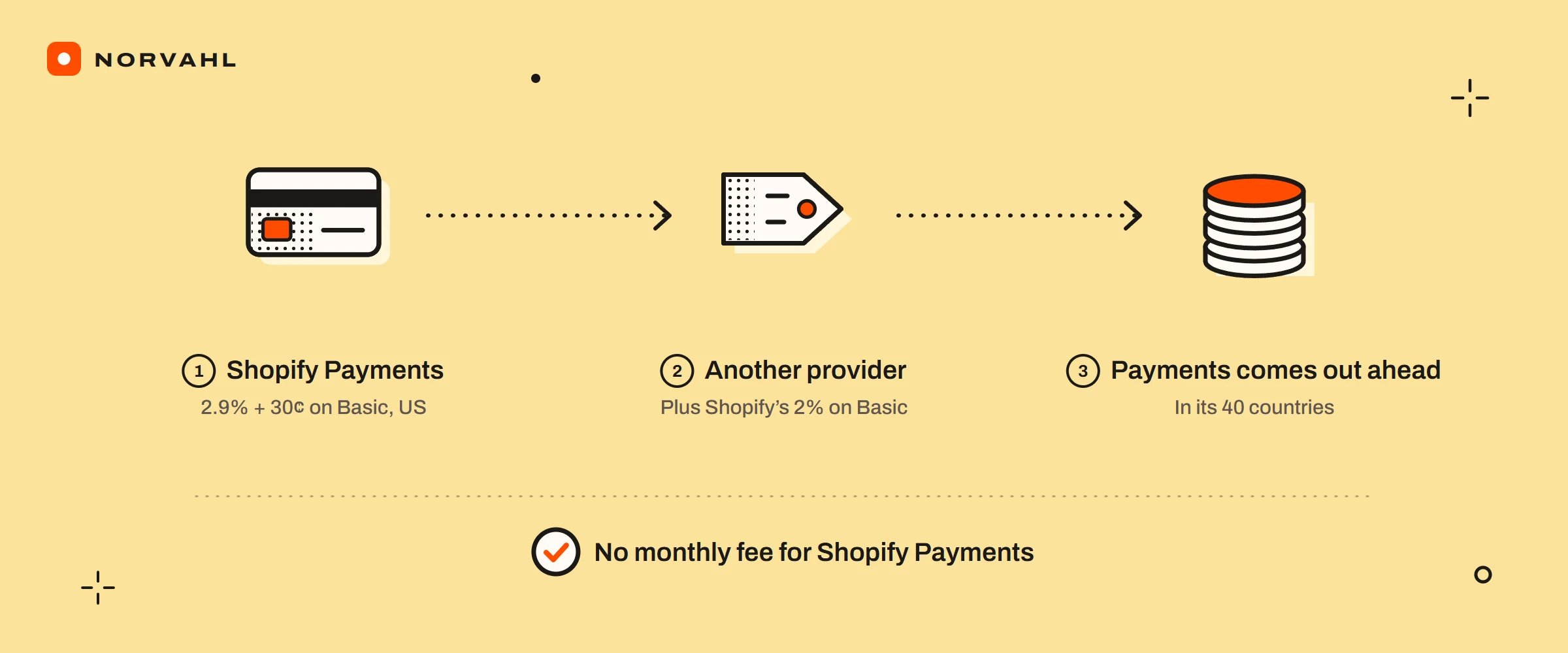
The short version Shopify Payments is Shopify's own way to take cards, processed by companies such as Stripe, PayPal and Adyen depending on your country, with no monthly fee. On Basic in the US an online card payment costs 2.9 percent plus 30 cents. Use another provider and Shopify adds its own fee on top of that provider's rate: 2 percent on Basic, 1 on Grow, 0.6 on Advanced and 0.2 on Plus. That fee is why Shopify Payments wins in the 40 countries where it is offered. Inside those countries, standalone Stripe is not an option.
What are Shopify Payments?#
Shopify Payments is a payment service Shopify runs on top of established processors. Shopify's processor list names who moves the money in each country. In the United States that is Stripe and PayPal. In Canada, Australia, Japan and Mexico it is Stripe, and in the UK and the EU it is Stripe, PayPal and Adyen.
You never deal with those companies directly. Shopify's help page says there is no separate provider account to set up and no credentials to enter, and that two-step authentication on your Shopify account is required. Shop Pay, the saved-details checkout many shoppers already use, comes with it: Shopify's Shop Pay page says it is included as part of Shopify Payments.
How does Shopify Payments work?#
A customer pays at your checkout, the processor authorises the card, and the money lands in your Shopify Payments balance. Shopify then pays it out to your bank account after a settlement period that counts business days only. In the United States the minimum settlement time is 3 business days, by Shopify's US payouts page. Payments captured on a Friday, Saturday or Sunday go out together as one payout.
The same page says payouts typically reach your bank 3 to 5 business days after a payment is captured, and there is no minimum payout amount in the US. A new store waits longer: settlement starts slower and can come down to the minimum as you fulfil orders on time. The settlement times for other countries, and how to read a payout that sits in pending, are in the guide on how long Shopify takes to pay out.
Shopify Payments options, from cards and wallets to PayPal#
With Shopify Payments on, your checkout takes cards, Shop Pay, Shop Pay Installments and wallets, and you can add PayPal and manual methods beside it. Shopify's PayPal page says PayPal Express Checkout is the standard integration, PayPal Wallet is offered only in France and the United States, and Venmo is for customers in the US. Manual methods such as cash on delivery and bank deposits sit alongside for orders you settle yourself.
For the bill, what matters is which of these escape Shopify's fee. With Shopify Payments active, Shopify's page on third-party transaction fees lists Shopify Payments, Shop Pay, Shop Pay Installments, PayPal Express Checkout and manual methods as free of it. Shopify's PayPal page ties PayPal's exemption to Shopify Payments being active. Turn Shopify Payments off and PayPal orders pay Shopify's fee as well as PayPal's.
What one order costs, with and without Shopify Payments#
Here is one online order on the Basic plan in the US, priced four ways. Shopify Payments' rate of 2.9 percent plus 30 cents was read from Shopify's US pricing page on 6 September 2026. It is the rate my Shopify and WooCommerce cost calculator uses. PayPal Checkout's 3.49 percent plus 49 cents comes from PayPal's US fees page, updated on 1 September 2026. The third column uses Stripe's published 2.9 percent plus 30 cents as a stand-in for another card gateway, because a US store cannot connect Stripe itself.
| Order | Shopify Payments | PayPal, Shopify Payments on | Another gateway plus Shopify's 2 percent | PayPal, no Shopify Payments |
|---|---|---|---|---|
| 25 dollars | 1.03 | 1.36 | 1.53 | 1.86 |
| 100 dollars | 3.20 | 3.98 | 5.20 | 5.98 |
| 400 dollars | 11.90 | 14.45 | 19.90 | 22.45 |
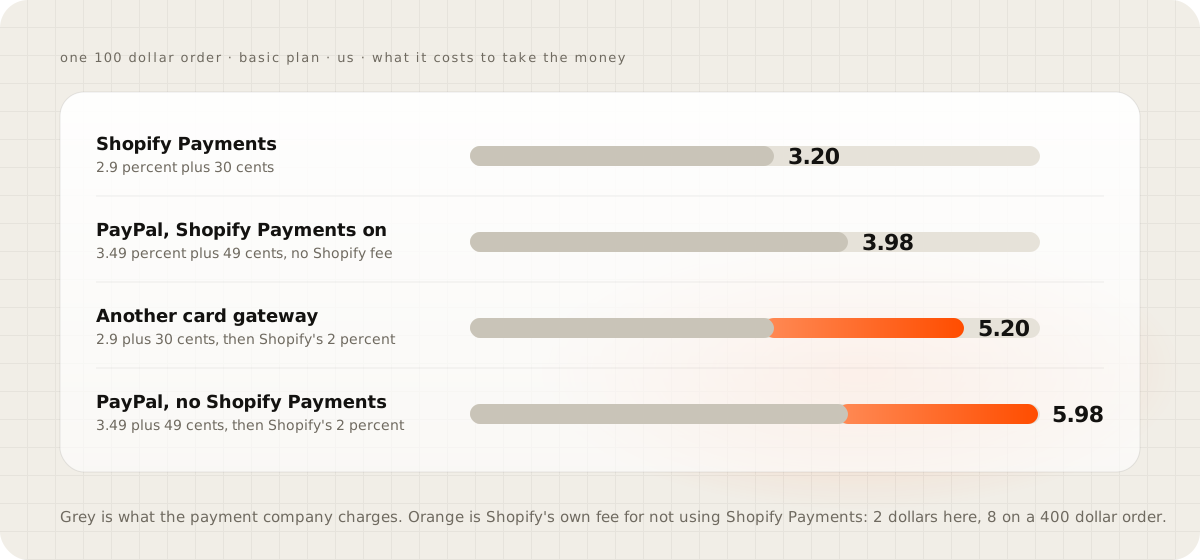
Two things stand out. Fixed fees hurt small orders: a 25 dollar order costs 4.1 percent on Shopify Payments, and PayPal's 49 cents alone is nearly 2 percent of it. And Shopify's own fee, 8 dollars on a 400 dollar order, is bigger than the whole difference between the card rates. International cards, American Express and currency conversion cost more on every option, so check your own mix of customers before you settle on one.
Outside the US the gap is starker. On Shopify's UK pricing page, Shopify Payments on Basic costs 2 percent plus 25 pence for a domestic card, so a 400 pound order costs 8.25 pounds. Shopify's fee for using another provider on the same order is 8 pounds before that provider charges anything. Australia's page shows the same pattern: 7.30 Australian dollars on a 400 dollar order with Shopify Payments, against 8 dollars of Shopify's fee alone.
The fees owners find later#
Three charges surprise people after the first month:
- Gift cards and store credit. For stores created on or after 12 May 2025, Shopify's billing page says orders paid partly with store credit or gift cards pay the third-party fee on that part, even on Shopify Payments. Plus stores using Shopify Payments as their only provider are exempt.
- Refunds. Stripe's and PayPal's pricing pages both say the original processing fee is not returned when you refund. Treat refunds as a cost, not a reversal.
- Chargebacks. Shopify's chargebacks page says the disputed amount and a chargeback fee are taken from you straight away. If you win, the amount comes back, and Shopify might refund the fee depending on your country or region.
Which countries have Shopify Payments?#
Shopify's supported countries page lists 40 countries and regions: Australia, Austria, Belgium, Bulgaria, Canada, Croatia, Cyprus, Czechia, Denmark, Estonia, Finland, France, Germany, Gibraltar, Greece, Hong Kong SAR, Hungary, Ireland, Italy, Japan, Latvia, Liechtenstein, Lithuania, Luxembourg, Malta, Mexico, the Netherlands, New Zealand, Norway, Poland, Portugal, Romania, Singapore, Slovenia, Spain, Sweden, Switzerland, the United Arab Emirates, the United Kingdom and the United States.
Pages that rank for this still say 20, 23 or 150, because the list grew in 2025. If your country is not on it, Shopify's page is direct: you need a third-party payment provider.
Shopify payments gateways if your country is not covered#
Shopify's payment gateways page lists more than 100 other providers, filtered by country, and the list only appears once you log in to Shopify. Shopify charges nothing to connect a gateway, each gateway sets its own prices, and Shopify's third-party fee applies on top of them. So a store outside the 40 countries pays two layers on every order, which is worth building into your prices from the start.
Inside the 40 countries the question is different. Shopify's gateway availability page says Stripe is not listed as a separate gateway there. It also says a store in those regions that cannot activate Shopify Payments cannot fall back to standalone Stripe. Owners who read an old guide and go looking for a Stripe button do not find one.
How to activate Shopify Payments#
On desktop, open Settings, then Payments, and choose Activate Shopify Payments. Shopify then asks for your personal details, your business details and the phone number to show on customers' bank statements, and you confirm. Have these ready before you start, by Shopify's setup page:
- Two-step authentication switched on for your Shopify account, or payouts can be put on hold until it is.
- One individual named as the account representative, even when the business is a registered company.
- A street address, because PO boxes and private mailboxes are not accepted.
- A bank account for payouts.
- Identity and address documents photographed in colour with all four edges visible, never scanned, copied or screenshotted, or the original PDF for digital documents.
Shopify says document review takes up to 24 hours. If a document is rejected, the upload page gives the reason, and you upload a new one.
This store can't accept payments right now#
When customers see this at checkout, no order can go through, so it is worth fixing in the next hour. Shopify's troubleshooting page documents one cause: the store has no active primary payment provider. The fix is to add one under Settings, then Payments. If Shopify Payments is not available in your country, set up a third-party gateway as the primary provider, because an extra method on its own does not count as one.
Owners in Shopify's community forum report two more situations behind the message. One is a store that offered only cash on delivery. The other is an account Shopify wanted to verify. Neither is tied to this message on Shopify's own page, so check the primary provider first, then the banner on your admin home page and your email for any request from Shopify.
A payout hold is a different problem, and it usually leaves checkout working. In one Shopify community thread, an Australian store that had traded for three years saw its payouts paused after the owner changed a home address, while customers kept buying.
"Shopify Payments can freeze my money"#
It can, and that thread is the reason to take it seriously. The thread ran from September 2025 to June 2026, and no resolution is recorded in it. The protection is dull and it works: keep your business, bank and address details current, answer document requests the day they arrive, and keep enough cash to cover a few weeks of payouts.
Running a second gateway as insurance has a price too. Every order through it pays Shopify's fee on top of that gateway's rate, which is the orange in the chart above. Weigh that fee against what a paused payout would cost your business, and decide with both numbers in front of you.
Check your payments setup this week#
Open Settings, then Payments, and note which provider is primary and whether Shopify Payments is on. Then open last month's bill and look for third-party transaction fees. If there are any, work out what they came to as a share of sales, and check them against the table above. If you find 2 percent going to Shopify for nothing, the fix is usually a setting you can change the same afternoon.
Questions people ask
Is Shopify Payments the same as Stripe?
No, though Stripe does much of the processing. Shopify Payments is Shopify's own service, and Shopify's processor list names the companies behind it in each country: Stripe and PayPal in the United States, and Stripe, PayPal and Adyen in the UK and the EU.
Does Shopify Payments have a monthly fee?
No. Shopify says there are no monthly, hidden or setup fees for Shopify Payments. You pay a rate on each transaction, which on the Basic plan in the US is 2.9 percent plus 30 cents for an online card payment.
Can I use Stripe instead of Shopify Payments?
Not in the 40 countries and regions where Shopify Payments is offered. Shopify says Stripe is not listed as a separate gateway there, and a store in those regions that cannot activate Shopify Payments cannot use standalone Stripe instead.
How long do Shopify Payments payouts take?
In the United States the minimum settlement time is 3 business days, and Shopify says payouts typically reach your bank 3 to 5 business days after a payment is captured. New stores start with longer settlement times that can come down as they fulfil orders on time.
Why does my store say it can't accept payments right now?
Shopify's troubleshooting page gives one documented cause: the store has no active primary payment provider. Add one under Settings, then Payments, and if Shopify Payments is not available in your country, set up a third-party gateway as the primary provider.
Sources
- Supported countries for Shopify Payments, Shopify Help Center
- Payment processors for Shopify Payments, Shopify
- Third-party transaction fees on your Shopify bills, Shopify Help Center
- Payouts with Shopify Payments in the United States, Shopify Help Center
- Setting up your Shopify Payments account, Shopify Help Center
- Troubleshooting payment gateways, Shopify Help Center
- Stripe pricing
- PayPal merchant fees, United States