Cloudflare geo blocking takes one rule on the free plan, and the rule is the easy part. What costs a store money is everything else the rule catches. Googlebot can be caught, and so can Google's ad checker, the webhooks that tell your store an order was paid, and real buyers on a VPN. The pages that rank for this show the rule and stop there, and several still use menu and field names Cloudflare has retired.
Since 15 September 2026 there is a second way to block Google by accident, and it has nothing to do with countries. In a July post, Cloudflare said customers who block AI training crawlers would also block multi-purpose crawlers such as Googlebot, Applebot and Bingbot from that date.
My own site's back office blocks countries and networks from its contact form, and it shows the Cloudflare expression that would make the same block at the edge. The rules below are the ones I would put on a WooCommerce store or any site you host yourself. A Shopify storefront cannot sit behind your own Cloudflare proxy, so none of this applies there.
The short version
- Use a WAF custom rule. On the free plan, IP Access rules cannot block a country.
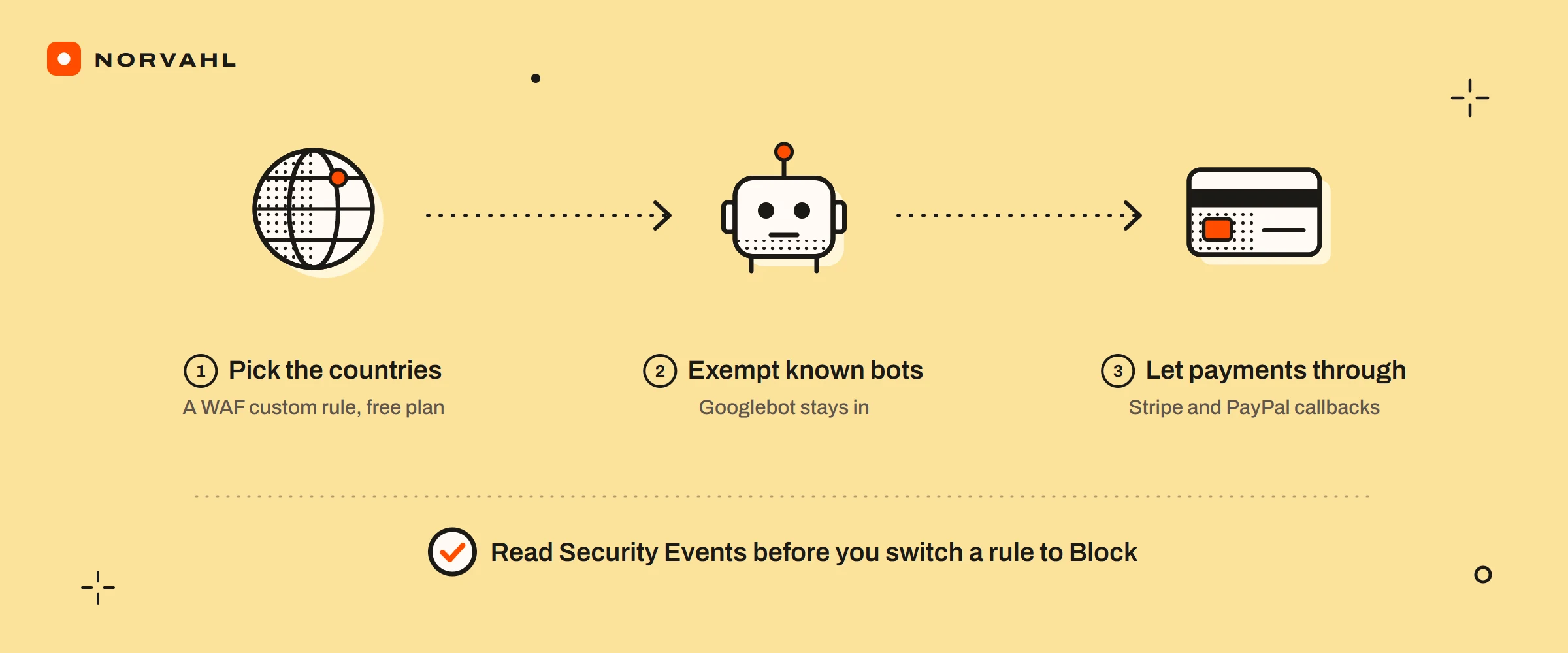
- Challenge before you block, and exempt known bots:
(ip.src.country in {"AA" "BB"} and not cf.client.bot).- Let payment callbacks through: Stripe's published webhook addresses as IP Access rules set to Allow, and PayPal's callback path kept out of the rule, with Bot Fight Mode off.
- Read Security Events within 24 hours before you switch any rule to Block.
- If you block AI training in Cloudflare's settings, check that it is not blocking Googlebot.
How to block a country in Cloudflare on the free plan#
Country rules live in WAF custom rules. In the new security dashboard, that is Security, then Security rules. On the older layout it is Security, then WAF, then Custom rules. Create a rule, write the expression, choose the action and deploy it.
The free plan gives you five custom rules, by Cloudflare's custom rules page. The Log action, which would let you watch a rule without it acting, is Enterprise only. So is blocking a country with IP Access rules: Cloudflare's IP Access rules page says to use custom rules for it on every other plan.
Use the field ip.src.country, which holds the two-letter country code. Older guides write ip.geoip.country, which Cloudflare's field reference marks as deprecated but still available. Both work today, and only one is guaranteed to keep working.
Block or challenge, for a store#
A Managed Challenge lets a person through after a check, often without a click, and stops the traffic that cannot pass it. Block stops everyone. For a store I would challenge the countries your own logs show abuse from, and block only where you cannot sell or deliver at all. Pick the countries from your own Security Events, never from a list in a blog post. The traffic that bothers your store is rarely the traffic that bothers someone else's.
A challenge is not free for buyers either. In-app browsers, old phones and privacy extensions fail challenges, which is the guide on why Cloudflare blocks visitors. That is a reason to keep the country list short.
The country rule that keeps Google and Bing working#
Cloudflare's own example for this, on its verified bots page, adds one condition to the country match. The field cf.client.bot is true for known good bots and crawlers, so excluding it keeps search engines out of the rule. Replace AA and BB with the country codes you chose:
(ip.src.country in {"AA" "BB"} and not cf.client.bot)
If you sell only to a few countries and want to challenge everyone else, the same exemption applies:
(not ip.src.country in {"AA" "BB"} and not cf.client.bot)
Google adds a caveat you should know. Its page on locale-adaptive pages says Googlebot's default addresses appear to be in the United States and that it also crawls from other countries. The same page says to treat Googlebot from a country like any other visitor from there. Read together, the practical rule is to never block the United States on a store that wants traffic from Google. Exempting known bots is Cloudflare's documented pattern, not a promise from Google.
Cloudflare blocking Stripe webhooks#
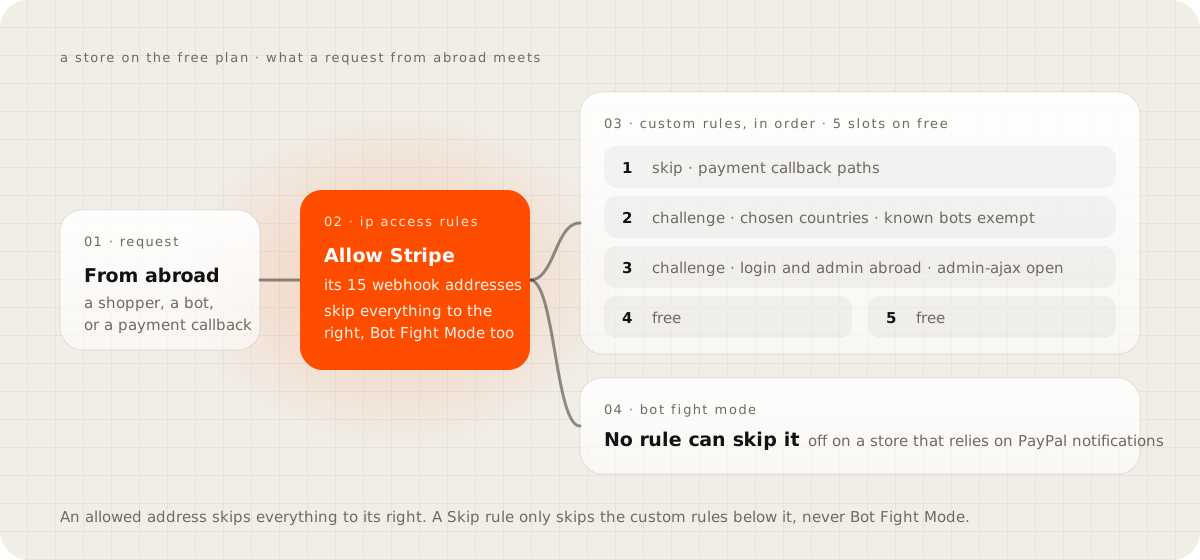
When Stripe cannot reach your store, the order is paid in Stripe and never confirmed in your shop. Country rules can cause it, and so can Bot Fight Mode. Cloudflare's Bot Fight Mode page says no custom rule or Page Rule can skip it on the free plan, which is why the Skip rules people add in forum threads do nothing.
The same page gives the way through: Bot Fight Mode does not trigger when an IP Access rule matches the request first. Stripe's addresses page lists the 15 addresses its webhooks come from, with a plain text copy, and Stripe gives seven days' notice before they change. Add each address as an IP Access rule with the Allow action. An allowed address skips your custom rules, rate limiting and managed rules as well, so keep the list to Stripe's own addresses and nothing wider.
On WooCommerce, the Stripe extension's settings page shows whether its webhook is configured. After adding the rules, resend a recent event from Stripe's dashboard and confirm it arrives as delivered.
Cloudflare blocking PayPal IPN on WooCommerce#
PayPal is harder, because it publishes hostnames instead of fixed addresses. Its help article on server endpoints names ipnpb.paypal.com and notify.paypal.com for live notifications and says it does not recommend allowing IP addresses. So the IP Access route that works for Stripe is not available.
What is left takes two changes. Keep PayPal's callback address out of your country rule, using the exact address your PayPal plugin shows in its settings, and turn Bot Fight Mode off. With the callback path added, the country rule looks like this, with the path swapped for your plugin's own:
(ip.src.country in {"AA" "BB"} and not cf.client.bot and not starts_with(http.request.uri.path, "/wp-json/paypal/"))
If your store takes PayPal and orders sit pending or cancel themselves, check Security Events for requests to that path before anything else.
Cloudflare blocking Google Ads#
Google disapproves ads whose landing page returns an error to its ad crawler. Its destination not working policy expects an HTTP 200 response for Google AdsBot on common devices globally and names firewalls as a common cause. A country rule or a challenge that catches AdsBot can knock your campaigns offline while the store looks fine to you.
To check, filter Security Events by the user agent AdsBot-Google and look at the action taken. Google suggests testing with Chrome's developer tools set to the AdsBot user agent, which shows what a browser claiming to be AdsBot receives. A changed user agent does not make a request a verified bot to Cloudflare, though. The Security Events filter is the check that tells you what Google's real crawler got.
Cloudflare blocking the WordPress REST API#
Your store talks to itself through /wp-json/. On WooCommerce, the Store API that serves the cart and checkout lives under /wp-json/wc/store/, and many plugins call their own routes there. Keep /wp-json/ out of country rules and login rules entirely.
The block you are more likely to meet comes from Bot Fight Mode, which challenges the calls your server makes to itself because they are automated. On WordPress.org, one WooCommerce owner traced past-due scheduled jobs to turning Bot Fight Mode on, and turning it off cleared them. If Security Events show Bot Fight Mode blocking your own server's requests, the free plan's only fix is to turn it off.
Cloudflare blocking wp-admin#
Locking the WordPress login to your own country is a sensible rule, and it breaks shops when it is written too wide. WordPress's front end uses /wp-admin/admin-ajax.php for requests from visitors who are not logged in, by its Plugin Handbook. A rule on all of /wp-admin/ therefore catches shoppers. This one leaves that file open:
((http.request.uri.path eq "/wp-login.php" or starts_with(http.request.uri.path, "/wp-admin/")) and http.request.uri.path ne "/wp-admin/admin-ajax.php" and not ip.src.country in {"AA"})
The inner brackets matter, because and binds tighter than or in Cloudflare's rules language. Use Managed Challenge rather than Block here. The first time you log in from abroad on a trip, a challenge lets you through and a block locks you out of your own store.
Cloudflare AI training block and Googlebot#
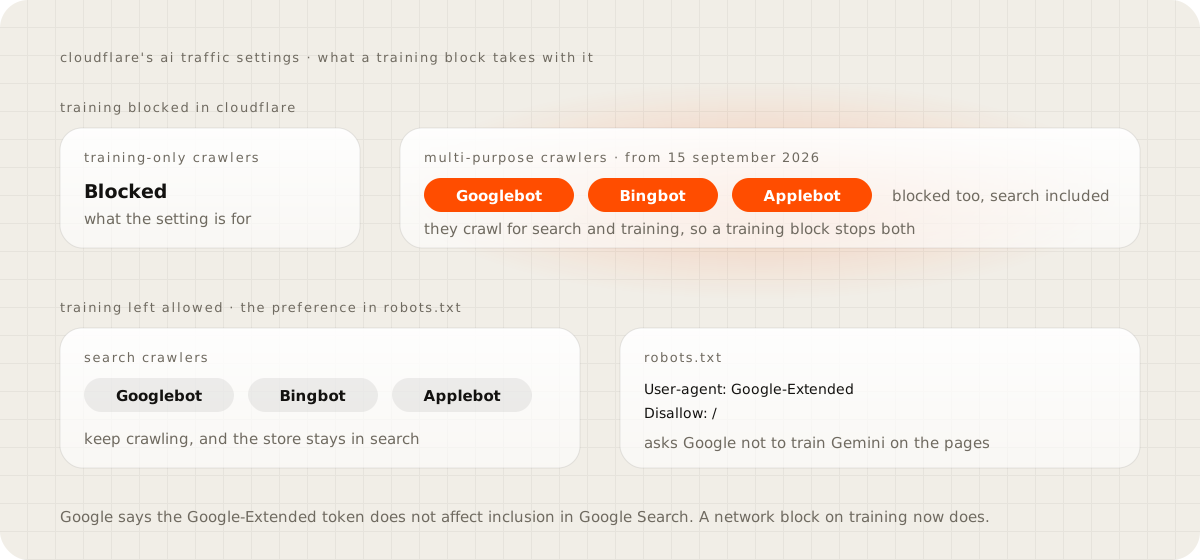
This is the newest trap, and countries have nothing to do with it. Cloudflare's July 2026 post on AI traffic split AI crawlers into Search, Agent and Training, each of which you can allow or block. It then said that multi-purpose crawlers such as Googlebot, Applebot and Bingbot will be blocked for customers who choose to block Training. That covers both the new options and the older Block AI bots setting, and Cloudflare scheduled the change for 15 September 2026.
For a store that lives on search traffic, the fix is to leave Training allowed at the network level and state your preference somewhere it cannot take search down. Google's crawler documentation says the Google-Extended token in robots.txt controls whether your content is used to train Gemini. It has no crawler of its own, and it does not affect inclusion in Google Search.
My own site takes the robots.txt route. Its file names the crawlers it turns away, among them GPTBot, CCBot and Bytespider, and lets everything else in. A robots.txt line is a request that well-behaved crawlers follow, not a wall, and for a business that needs Google that is the right trade. Open Cloudflare's security settings today and check what your zone's Training setting is.
Cloudflare country block not working#
When a country rule seems to do nothing, the cause is usually one of these:
- The DNS record is not proxied. Traffic that does not pass through Cloudflare, shown as a grey cloud in the DNS list, never meets the rule.
- An earlier rule lets the request through. Custom rules run in order, and a Skip rule above yours, or an IP Access rule set to Allow, ends the check before your rule runs.
- The visitor is on a VPN, which gives them an address in another country. Apple's iCloud Private Relay is different: Apple says its addresses keep the user's country and region.
- The rule matches the wrong thing. A common slip is
not ip.src.country inwritten whereip.src.country inwas meant, which blocks every country except the ones you listed.
Security Events shows every request a rule acted on, with the country Cloudflare saw. If your rule is missing from the events for a visitor you expected it to catch, one of the first two causes is the answer.
How to test a country rule before it costs you orders#
- Deploy the rule with Managed Challenge, never Block.
- The next day, open Security Events and filter by the rule's action and by country. On the free plan the events cover the last 24 hours and are sampled, by Cloudflare's Security Events page.
- Filter again by path for your checkout, /wp-json/ and your payment callback addresses, and by user agent for Googlebot and AdsBot-Google. Every event there is a problem to fix before you tighten anything.
- Resend a recent webhook from Stripe, and check your PayPal plugin's log for the latest notification.
- Switch to Block only for countries where nothing good was caught in a week of checks.
"Blocking whole countries stops fraud"#
It cuts noise from places you never sell to, and that has value. It does not stop a determined fraudster, because a country rule only sees the address a request arrives from, and a VPN chooses that address. Treat country rules as a filter on the rubbish that reaches your store. Your payment provider's fraud tools are still what decides whether an order is safe.
Check your store today#
Open Security Events and look at the last 24 hours. Filter for your checkout path, /wp-json/, your payment callback addresses, and the user agents Googlebot and AdsBot-Google. Then open your security settings and read what your zone does with AI Training. If any of those show a block you did not intend, you have found it before your ads or your orders did.
Questions people ask
Can I block a country on Cloudflare's free plan?
Yes, with a WAF custom rule that matches the visitor's country, and the free plan allows five custom rules. IP Access rules can block a country only on Enterprise, which is why guides that send you there do not work on a free account.
Will blocking a country hurt my Google rankings?
It can. Google says Googlebot's default addresses appear to be in the United States and that it also crawls from other countries, so a rule that blocks those countries, or allows only your own, can stop Google from reading your store. Cloudflare's documented pattern exempts known bots with not cf.client.bot.
Does Cloudflare's AI training block also block Googlebot?
Cloudflare says that from 15 September 2026, customers who block Training, through the new AI traffic options or the older Block AI bots setting, also block multi-purpose crawlers such as Googlebot, Applebot and Bingbot. A store that needs search should state its AI training preference in robots.txt instead.
Why is Cloudflare blocking my Stripe webhooks?
Usually Bot Fight Mode, which no custom rule can skip on the free plan. Stripe publishes the addresses its webhooks come from, and adding each one as an IP Access rule with the Allow action lets them past both the custom rules and Bot Fight Mode.
Why is my Cloudflare country block not working?
The most common causes are a DNS record that is not proxied through Cloudflare, an earlier rule or IP Access allow that lets the request through first, and visitors on a VPN who arrive from another country. Check Security Events to see what the rule actually matched.
Sources
- Custom rules, Cloudflare WAF docs
- Allow traffic from search engine bots and other verified bots, Cloudflare WAF docs
- IP Access rules, Cloudflare WAF docs
- Bot Fight Mode, Cloudflare docs
- Your site, your rules: new AI traffic options for all customers, Cloudflare blog
- How Google crawls locale-adaptive pages, Google Search Central
- Domains and IP addresses, Stripe docs
- Destination not working, Google Advertising Policies Help