A page that says 500 and mentions Cloudflare looks like Cloudflare's fault, and usually it is not. Cloudflare's own documentation for error 500 says it indicates a problem with your origin web server, the machine your site actually runs on. The exception is real. On 18 November and again on 5 December 2025, Cloudflare's own network served 500 errors to visitors of sites across the internet, online stores among them.
Cloudflare 500 errors look the same in both cases, and telling them apart takes about three minutes. The answer decides whether you call your host, wait, or change something.
I have been on the owner's side of this with my own domain. On 8 September 2026, www.norvahl.com answered with Cloudflare's 522 page. Nothing was wrong at Cloudflare. The name had a proxied DNS record with no server behind it and no redirect that worked, so Cloudflare had nothing to connect to.
A ten-line Worker that sends every request on to norvahl.com fixed it. When I checked on 15 September, the name answered with a permanent redirect.
The short version
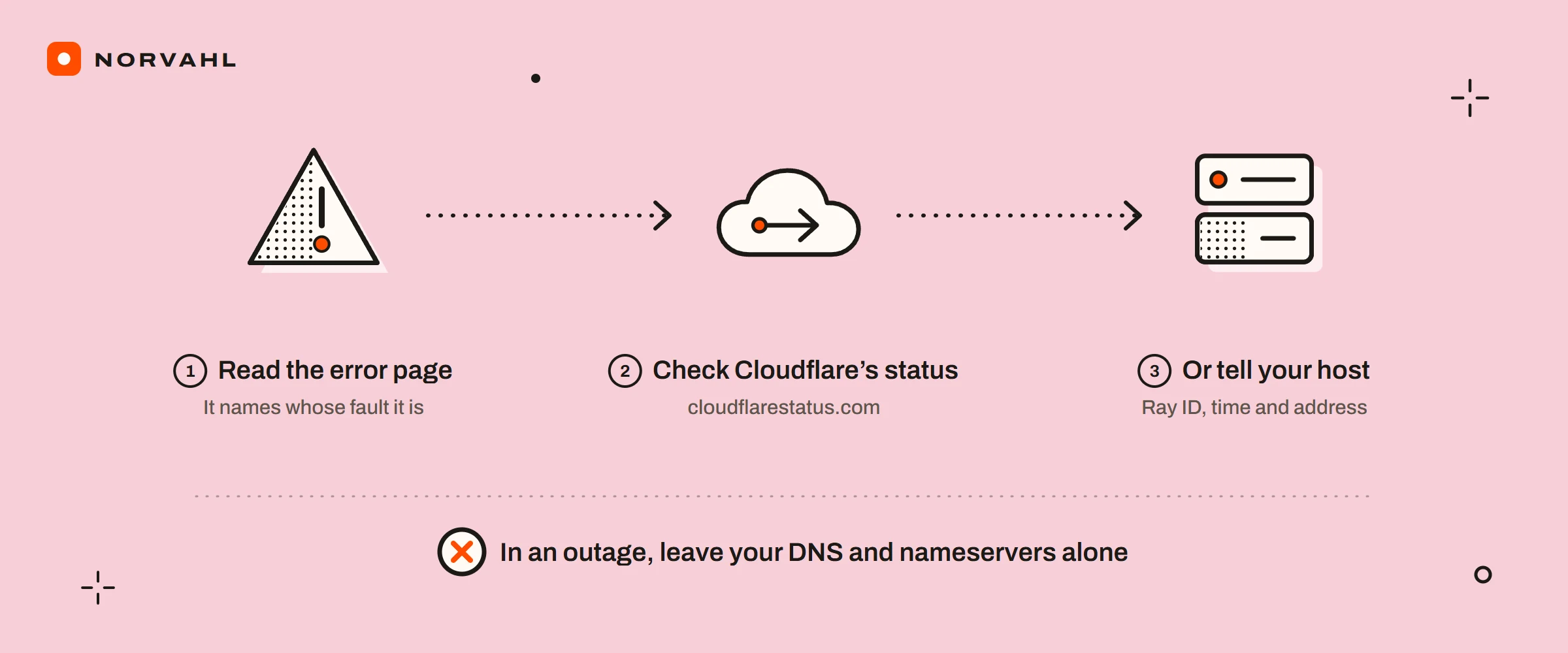
- Read the error page. A plain page that says cloudflare is Cloudflare's failure. A Cloudflare-branded 502 or 504, or any code from 520 to 526, is about your own server.
- Check cloudflarestatus.com, including the entries for single regions.
- Write down the Ray ID at the foot of the page, the time with your timezone, and the address.
- If Cloudflare is healthy, send those to your host. If Cloudflare is not, wait, and leave your DNS and nameservers alone.
Is it Cloudflare or your own server?#
The test runs in the order below, and most of the time the first step settles it.
Read the error page#
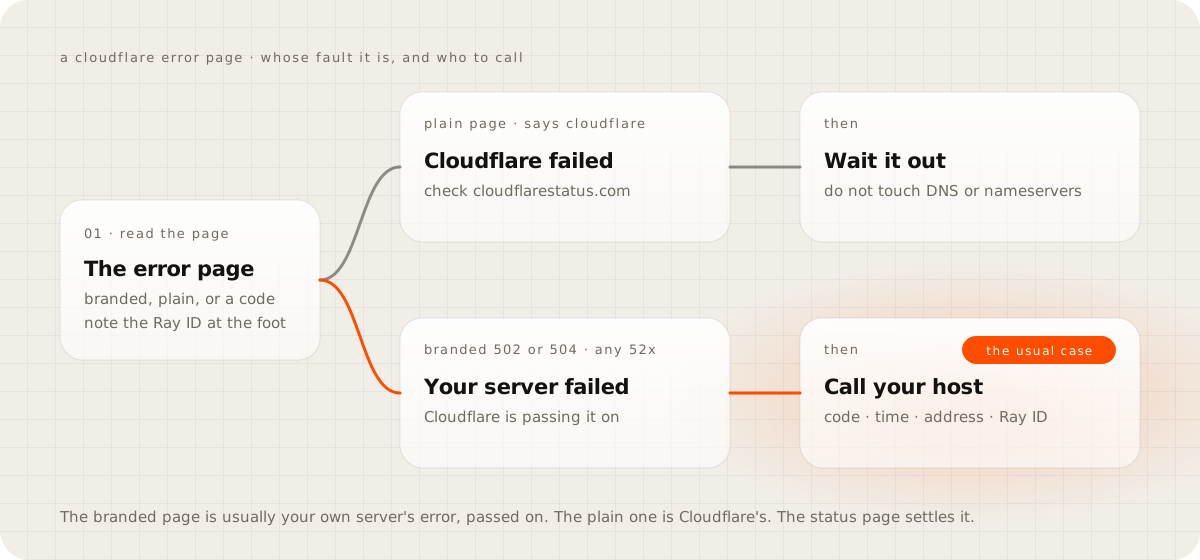
Cloudflare shows two kinds of error page, and they point in opposite directions. The branded ones carry Cloudflare's name. For the 52x codes they also draw three boxes, your browser, the Cloudflare location and the host, each marked working or not. Those pages report what happened between Cloudflare and your server, and Cloudflare's 502 and 504 page is explicit: a branded 502 or 504 means your server itself returned that error and Cloudflare passed it on.
The other kind is a plain page with little on it but an error code and the word cloudflare. That is the page Cloudflare produces when its own systems fail. For a 500, Cloudflare's test works the same way. If the page's HTML contains cloudflare or cloudflare-nginx, the error came from Cloudflare. If it does not, it came from your server.
Check Cloudflare's status page#
Open cloudflarestatus.com and look past the headline, because most incidents are regional. In the first days of September 2026 it listed entries such as increased 5xx errors in Hong Kong and increased 522 errors in Seattle. Each covered a single city, while the rest of the network ran normally. If your customers are in one region and the status page names it, you have your answer.
Write down the Ray ID, the time and the address#
Every Cloudflare error page ends with a Ray ID, the identifier of that one request. Write it down with the time, your timezone and the full address that failed. Cloudflare's 5xx overview lists the code, the time and timezone, and the address as what your host needs. Without them, nobody can find your request in a log.
Read the headers if the page is not enough#
Cloudflare now adds two headers, cf-error-type and cf-error-origin, to the error pages it builds itself, and leaves them off errors your server sent, by its diagnostic headers page. In a browser, open the developer tools, reload, and select the failed request in the Network tab. If those headers are there, Cloudflare built the page. Even then, a cf-error-type of 52x points at the connection to your server, and away from any fault inside Cloudflare.
Every site behind Cloudflare also answers at /cdn-cgi/trace. Mine, checked on 15 September 2026, reported the Cloudflare location that served me (colo=SIN, Singapore), the protocol and the TLS version. It is worth sending to support, and it proves nothing about your store. Cloudflare's post-mortem of the 5 December 2025 outage notes that test pages like that one kept answering while visitors got 500 errors.
What each Cloudflare 5xx error means, and who fixes it#
| Code | What it means | Who usually fixes it |
|---|---|---|
| 500 | Your server failed on the request; if the page's HTML mentions cloudflare, Cloudflare did | Your host or developer, or Cloudflare when the page names it |
| 502 or 504, branded | Your server returned a bad gateway or timeout error, and Cloudflare passed it on | Your host |
| 502 or 504, plain page | Cloudflare's own systems produced the error | Cloudflare, so wait |
| 520 | Your server sent back an empty or unexpected answer; headers over 128 KB, often from too many cookies, are one cause | Your developer or host |
| 521 | Your server refused Cloudflare's connection because it is down or its firewall blocks Cloudflare | Your host |
| 522 | No reply to Cloudflare's connection within 19 seconds, or no acknowledgement of its request within 90 | Your host |
| 523 | Cloudflare cannot reach your server at all, often because its address changed and DNS did not | You or your host |
| 524 | Your server connected but took more than 125 seconds to answer | Your developer |
| 525 or 526 | The secure connection to your server failed, or its certificate is not valid | Your host |
| 530 | Cloudflare could not resolve your server, and the page carries a 1xxx code with the detail | You or your developer |
Two rows need more than a line. A 520 that shows up only for someone logged in to a WordPress admin is worth checking against cookies first. Cloudflare's 520 page names headers over 128 KB as a cause, and a logged-in admin sends far more cookies than a visitor does.
The 524 is the one owners create themselves. A bulk delete, a large import or an export in a WordPress or WooCommerce admin can run past 125 seconds. On every plan below Enterprise that limit cannot be raised, by Cloudflare's 524 page, so split the job into smaller batches. Cloudflare also suggests running long jobs on a subdomain that bypasses its proxy. That publishes your server's real address to anyone who looks the name up, so it is a decision for your developer.
If the page shows no 5xx code at all and instead says you have been blocked, that is a firewall rule doing its job, which is the guide on why Cloudflare is blocking you.
What to do when Cloudflare itself is down#
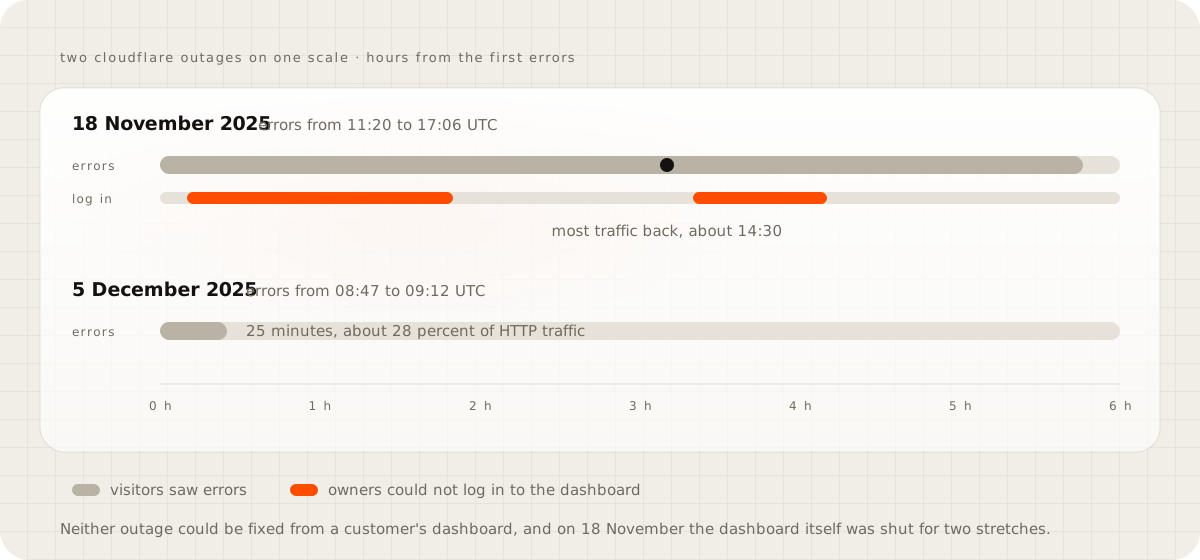
Very little, and the little matters. Cloudflare's two large incidents of late 2025 lasted 25 minutes on 5 December and most of a working day on 18 November, and both fixes were Cloudflare's to make. On 18 November the first errors came at 11:20 UTC and most traffic was flowing again around 14:30. Everything was back to normal at 17:06, by Cloudflare's post-mortem.
What I would not do during one:
- Change your nameservers. Cloudflare's pause page says nameserver changes can take several hours to spread, far longer than the December outage lasted, so you would end up halfway through a move after Cloudflare had recovered.
- Switch on Development Mode as a bypass. It turns off Cloudflare's cache, and your traffic still runs through Cloudflare.
- Count on the dashboard. On 18 November customers could not log in to it from 11:30 to 13:10 and again from 14:40 to 15:30 UTC.
- Change your SSL mode or security settings to make the error go away. Your settings did not cause an outage, and changes made under pressure leave you a second problem when it ends.
What I would do is short. Confirm the incident on cloudflarestatus.com, and on Shopify's status page if your store runs on Shopify. Tell customers in one line on your social profiles or your email auto-reply that the store is down and why. When it is over, check the orders and payments from the outage window.
Pausing Cloudflare is the one real lever, and I would keep it for long outages. Cloudflare says a pause sends visitors straight to your server within five minutes. It also takes Cloudflare's firewall, rules and certificates off the site. So it works only when your server has its own valid certificate and can take the traffic unprotected, which is a question to settle in a quiet week.
Cloudflare's side has changed since those two outages. It published a resilience plan afterwards, and on 1 May 2026 it said the work was complete, including configuration changes that now roll out gradually. That lowers the odds of another global event of that kind. It does not remove them.
What to send your host when it is your server#
When Cloudflare is healthy and your page is branded or shows a code from 520 to 526, the fix is at your host. Send one message with the error code and the exact words on the page, the time with your timezone, and the full address. Add the Ray ID and the text of your domain's /cdn-cgi/trace page. A host that gets all of that can go straight to its logs instead of asking you questions for a day.
Add one specific question. For a 521 or 522, ask whether their firewall or a security plugin blocks Cloudflare's addresses, which Cloudflare publishes at cloudflare.com/ips. For a 525 or 526, ask whether the server's certificate is valid for your domain. For a 524, ask which request ran past 125 seconds and why.
Did your store lose orders or payments?#
On a WooCommerce store, an outage breaks two things at once. Shoppers cannot reach the checkout, and payment providers cannot reach your store to report what happened to a payment. Stripe's webhook documentation treats a 5xx answer or a timeout as a failed delivery and retries for up to three days in live mode. It also lets you resend an event from its dashboard for up to 15 days.
So after an outage, open the event deliveries in Stripe and look for failed ones in the window. Then compare the payments Stripe took in that window with the orders in your store. A payment with no matching order in the right state is the one to fix by hand, and the customer behind it is the one to email first.
On Shopify, the platform runs the store and there is nothing on your own server to fix. During both late-2025 outages, Shopify owners in its community forum reported the storefront and the admin showing the same 500 page. The stores came back when Cloudflare did. Watch Shopify's status page and your email, and check the orders from the window once it clears.
"Cloudflare went down, so I should leave it"#
I understand the instinct, and I have not acted on it. My own site runs entirely on Cloudflare, including its hosting, its DNS and its mail routing. An outage there takes all of it down at once, and I accept that trade knowingly. What Cloudflare does for the rest of the year, filtering bots and carrying load, happens quietly, and the outage is the visible part.
The real risk is not knowing where to look, and you can fix that this week. Leaving over a rare outage swaps it for your host's own outages. You would then diagnose those with less information than a Cloudflare error page gives you.
Get ready before the next one#
The preparation takes an hour in a quiet week:
- Allow Cloudflare's published address ranges in your server's firewall and in any security plugin, so a busy day never looks like an attack to them.
- Keep a valid certificate on your server, so pausing Cloudflare stays possible.
- Keep your host's support email and phone number somewhere other than your own website or theirs.
- Bookmark cloudflarestatus.com, and Shopify's status page if you are on Shopify.
- Write the one-line message for customers now, while nothing is broken.
Then run the test once on a healthy day. Open your site, open your domain's /cdn-cgi/trace page, and find the Ray ID in the response headers, so the steps are familiar before you need them.
Questions people ask
Is a Cloudflare 500 error my fault or Cloudflare's?
Usually your server's. Cloudflare's documentation says a 500 indicates a problem with your origin web server, unless the page's HTML mentions cloudflare, in which case the error came from Cloudflare itself. Check cloudflarestatus.com before you change anything.
How long do Cloudflare outages last?
Cloudflare's two large incidents of late 2025 lasted 25 minutes on 5 December, and most of a working day on 18 November, when most traffic was flowing again about three hours after the first errors. Most entries on its status page are shorter and limited to one region.
What does Cloudflare error 522 mean?
Cloudflare could not connect to your server in time: no reply to its connection within 19 seconds, or no acknowledgement of its request within 90. The usual causes are a server that is down or overloaded, or a firewall blocking Cloudflare's addresses.
Should I pause Cloudflare when my site shows a 500 error?
Not as a first move. Pausing sends visitors straight to your server and takes up to five minutes, but it removes Cloudflare's firewall and certificates and needs the dashboard to be working. It is useful when you need to see whether your server works on its own.
Why does my WordPress admin show a 524 error?
A request ran longer than Cloudflare's 125-second limit, usually a bulk edit, an import or an export. On plans below Enterprise the limit cannot be raised, so split the job into smaller batches.
Sources
- Error 500, Cloudflare docs
- Error 502/504, Cloudflare docs
- Error 524, Cloudflare docs
- Cloudflare error diagnostic headers, Cloudflare docs
- Pause Cloudflare, Cloudflare docs
- Cloudflare outage on November 18, 2025, Cloudflare blog
- Cloudflare outage on December 5, 2025, Cloudflare blog
- Receive Stripe events in your webhook endpoint, Stripe docs