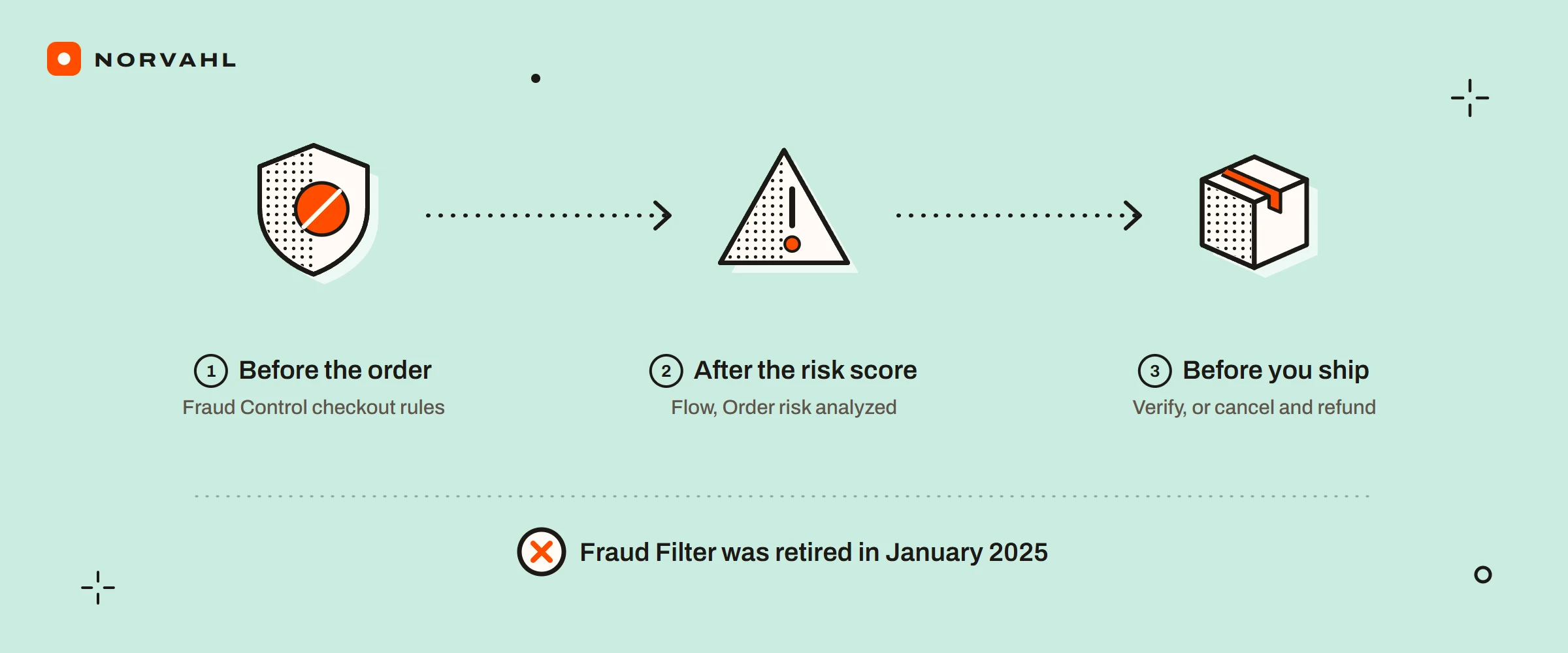
If you are looking for the Shopify Fraud Filter app, its App Store listing now says it is not currently available. Shopify retired it at the end of January 2025, and its job did not pass to a single replacement. Blocking a checkout before it becomes an order now lives in Shopify's free Fraud Control app, for stores on Shopify Payments. Acting on an order after Shopify has scored it lives in Shopify Flow. Most pages that rank for the old app's name are App Store listings and vendors selling a paid replacement, and none of them lays out that split.
The move cost some stores years of work. In a Shopify community thread from 4 January 2025, an owner wrote that Flow had not imported the fraud data built up over four years. In another, from 8 January, a store reported that only 2 of its 32 filters migrated, and merchants relayed that only rules used in the last 12 months carried over. If you ran Fraud Filter, assume part of your list did not survive the move, and check it.
The short version
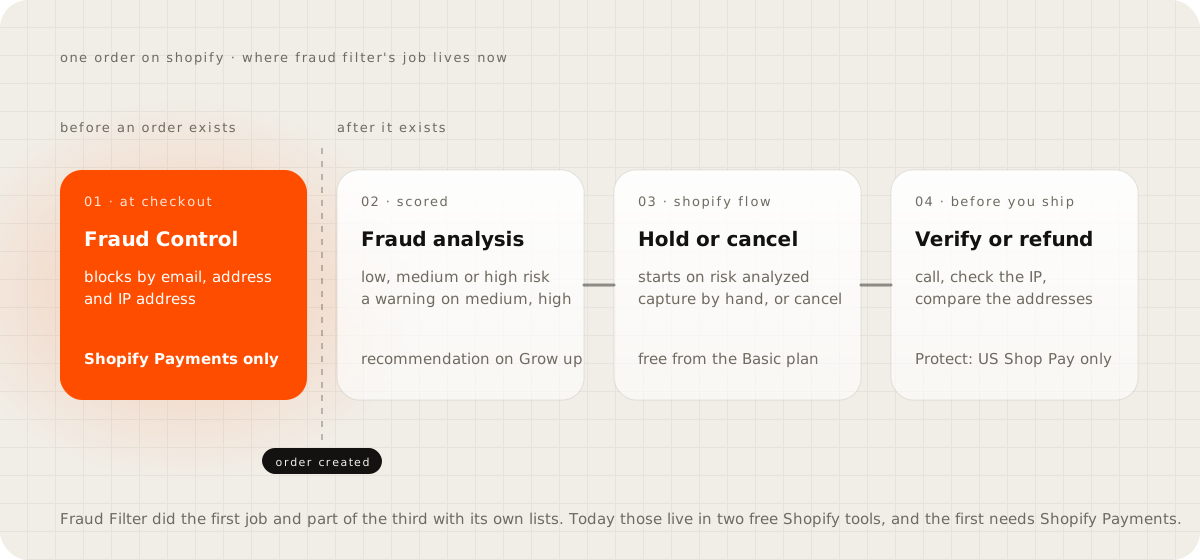
- To block a checkout before an order exists, use Fraud Control's checkout rules on emails, addresses and IP addresses. They need Shopify Payments.
- To act on an order after Shopify's fraud analysis scores it, use Flow, starting from the Order risk analyzed trigger.
- Before you ship any medium or high risk order, verify it, or cancel and refund it.
- In the US, Shopify Protect covers eligible Shop Pay orders against fraudulent chargebacks at no cost.
- Pay for an app when manual review takes too long, chargebacks keep coming, or you want a guarantee.
What happened to the Shopify Fraud Filter app?#
The listing still exists, with Shopify named as the developer and a note that the app is not currently available. The three apps it suggests beside it are all third-party: Blockify, Disputifier and Chargeflow. It points to neither of Shopify's own tools. Merchants in Shopify's community forum were writing about the shutdown in the first week of January 2025, and a February 2025 report from the fraud vendor Signifyd dates the end to 31 January.
Shopify's help page for the migration still sits at an address ending in fraud-filter-migration. It is now titled Managing high-risk orders with Shopify Flow, and it no longer mentions Fraud Filter. That is why owners searching for the old app's name find paid alternatives before they find Shopify's free ones.
The Shopify Fraud Control app, for blocking before the order#
Fraud Control is a free app that adds a fraud dashboard to your admin and, for stores on Shopify Payments, checkout rules. Shopify's Fraud Control page says the app is available on all plans in locations where Shopify Payments is offered. The checkout rules, though, are only for merchants using Shopify Payments.
A rule filters on email addresses, address attributes or IP addresses, and one rule can combine several conditions. You create one under Apps, then Fraud Control, then Rules, then Create rule, and saving turns it on. A blocked buyer sees a message that the checkout could not be completed and is told to contact the store. The attempt shows up in your abandoned checkouts, no order is created, and Fraud Control does not tell the customer why.
This is the part of Fraud Filter's job that matters most, because it stops a bad order before any card is charged. It also has limits worth knowing:
- Shopify's page says plainly that Fraud Control cannot guarantee you never receive a fraudulent order.
- Merchants in a June 2026 community thread say the email rules match on "contains" only, with no pattern matching and no condition on order value. Shopify's page does not list the match types either way.
- On the App Store the app shows 2.2 stars from 23 reviews on 15 September 2026, and a separate third-party app called Fraudify: Fraud Control ranks beside it. Check the developer before you install.
Fraud filter rules in Shopify Flow, for acting after the order#
Flow is Shopify's free automation app, available on the Basic, Grow, Advanced and Plus plans, by its help page. For fraud, Shopify's Flow page tells you to start workflows from the Order risk analyzed trigger, not Order created, because fraud analysis takes some time after an order is placed. Its templates include capturing payment only when an order is not high risk, cancelling and restocking high risk orders, and cancelling orders from known bad email addresses.
The catch is timing. A Flow workflow runs after the customer has checked out, so on its own it cannot stop the checkout. What it can do is hold the money back: Shopify's fraud prevention page recommends manual payment capture to review high risk orders before funds are collected. Combined with a Flow rule that captures only low risk orders, that gives you a review step without cancelling good customers.
What Shopify's high risk of fraud detected flag means#
Shopify scores online card orders it can verify as low, medium or high risk, using a model trained on past transactions across Shopify stores. Medium and high risk orders get a warning symbol next to the order number, and the order page shows the analysis. By Shopify's fraud analysis page, the indicators are available from the Basic plan, and the recommendation needs the Grow plan or higher, or Shopify Payments.
Some orders never get a recommendation: test orders, free orders, orders paid by gift card, point of sale, B2B and subscription renewals. For a medium or high risk order, Shopify's advice is to verify it, cancel it or refund it, and it warns that fulfilling high risk orders can lead to more chargebacks.
A flag is a reason to look, not a verdict. In a community thread from February 2024, an owner found a repeat customer's order flagged high risk, with the same address and email as a month before. The indicators read that the connection was a web proxy and that the order resembled past fraudulent ones. That is exactly the case for a phone call before a cancellation.
How to check a high risk order before you ship it#
Shopify's fraud prevention page lists the checks. Run them in this order and stop when you are sure either way:
- Read the indicators on the order: whether the card passed the address check and the security code check, what the IP address shows, and whether the customer tried more than one card.
- Look up where the IP address is and compare it with the shipping address.
- Call the phone number on the order and check that the area code fits the address.
- Search the email address for reports of fraud.
- Compare the billing and shipping addresses on a map.
- If you still cannot verify the order, cancel and refund it before you fulfil anything.
Card testing on Shopify#
Card testing is when a script tries stolen card numbers against a checkout to find the ones that work, and Shopify's fraud prevention page lists card testing protection among its checkout defences. Shopify Payments can also block risky checkout attempts before an order is created, and those appear in a Blocked view under abandoned checkouts, by the fraud analysis page.
Owners still describe floods that get through. In a June 2026 community thread, one store reported more than 225 fraudulent 2 dollar orders in a month from a card testing bot, placed with email addresses shaped like a name plus digits. In another thread, owners reported that switching to a three-page checkout, requiring customers to log in before checkout, or adding a hidden CAPTCHA reduced the attempts for a while. Those are merchant reports, not Shopify advice, and the same threads note that bots adapt. The CAPTCHA and bot settings Shopify offers are in the guide on Shopify bot protection.
Shopify's automated fraud settings#
On 22 August 2025, by its changelog, Shopify let Shopify Payments stores switch on automated fraud settings that follow Shopify's recommendations as they change. Turning them on switches off declining charges that fail the address postal code check, because Shopify's fraud model now covers it, and switches on declining charges that fail the security code check. Shopify says the model uses over 400 fraud signals.
You find the setting under Settings, then Payments, then Manage in the Shopify Payments section, then Reduce credit and debit card fraud. If an older guide told you to turn on address declines by hand, know that Shopify's own recommendation now leaves them off, and that address checks can raise your failed payments.
Shopify Protect, the free cover many US stores miss#
Shopify Protect reimburses the chargeback amount and its fee when an eligible order gets a fraudulent chargeback, and it costs nothing. The conditions are strict, by Shopify's Shopify Protect page:
- Your store is in the US with a US Shopify Payments account, and the order was paid with Shop Pay. Shop Pay Installments orders are not covered.
- The order contains only physical items that need shipping, so one digital or local pickup item removes the cover.
- It is fulfilled with valid tracking within 7 days and in transit within 10, with a supported carrier.
- Its shipping address is not changed after checkout, because a changed address voids the cover.
A store outside the US gets no Shopify Protect at all. Fraud Control, Flow and fraud analysis are what it has.
What a chargeback costs on Shopify Payments#
When a chargeback arrives, the bank takes the disputed amount from you straight away, and on Shopify Payments it comes out of your next payout. The cardholder's bank also charges a chargeback fee, which varies by country, and Shopify's chargebacks pages say the fee may be returned if you win. By Shopify's chargeback response page, you usually have 7 to 21 days to respond, and the card company's review can take up to 75 days after you submit. Lead your evidence with direct proof, such as delivery confirmation.
The arithmetic is why the free steps above matter. A fraudulent order costs you the goods, the shipping and the chargeback fee, on top of the sale itself.
When a Shopify fraud filter app is worth paying for#
"Fraud app" covers three different jobs, and the App Store lists them side by side. These are the apps as their own listings showed them on 15 September 2026:
| Job | Examples | How they charge, by their listings |
|---|---|---|
| Screening with a chargeback guarantee | Wyllo, formerly NoFraud; Signifyd | Wyllo: a free screening tier, then guarantee plans from 250 to 450 dollars a month. Signifyd: a 14-day trial, price not on the listing |
| Rules and block lists you run yourself | FraudLabs Pro; Blockify | FraudLabs Pro: free for 500 checks a month, then 29.95 dollars for 1,500. Blockify: free to install, 4.9 stars from 1,694 reviews |
| Fighting chargebacks after they arrive | Chargeflow; Disputifier | Free to install; check each listing for how disputes are billed |
Pay for one when manual review is taking more of your week than the app costs, or when chargebacks keep arriving after the free setup. The other good reason is wanting someone else to carry the loss, which is what a guarantee is for. For a store with a handful of flagged orders a month, I would start with the free tools and a phone call.
"Fraud Control has 2.2 stars, so it must be useless"#
Stars on a listing reflect whatever its reviewers wanted from it, so judge the app by what it does for your store instead. Its checkout rules block known bad emails, addresses and IP addresses before a card is charged, for free. Its dashboard shows your high risk share and fraudulent chargebacks every month. If those numbers stay low after you set it up, the stars do not matter. If they climb, that is your evidence for paying for an app.
Set up the free layer this week#
Open Settings, then Payments, and check that automated fraud settings are on. Install Fraud Control and add rules for the emails, addresses and IP addresses already tied to chargebacks on your store. In Flow, build one workflow on Order risk analyzed that notifies you about high risk orders, and add manual capture if you want to review before money moves. Then read the Fraud Control dashboard once a month.
Questions people ask
Is the Shopify Fraud Filter app still available?
No. Its App Store listing says the app is not currently available. Merchants were describing the shutdown in Shopify's community forum in early January 2025, and Signifyd's report dates the end to 31 January 2025.
What replaced Fraud Filter on Shopify?
Two free Shopify tools share its job. Fraud Control's checkout rules block by email, address and IP address before an order exists, for stores on Shopify Payments. Shopify Flow acts on an order after Shopify's fraud analysis has scored it.
What does high risk of fraud detected mean on Shopify?
Shopify's fraud analysis has scored the order as high risk, from signals such as a failed address or security code check, a proxy connection or several cards tried. Shopify advises you to verify the order, cancel it or refund it before you fulfil it.
Is the Shopify Fraud Control app free?
The App Store lists it as free. Its dashboard is available on every plan in countries where Shopify Payments is offered, and its checkout rules need Shopify Payments.
Does Shopify Protect cover my store?
Only if your store is in the US with a US Shopify Payments account. It covers Shop Pay orders of physical goods shipped with valid tracking within 7 days, and it reimburses the chargeback and its fee when an eligible order gets a fraudulent chargeback.
Sources
- Fraud Control app, Shopify Help Center
- Reviewing orders with fraud analysis, Shopify Help Center
- Managing high-risk orders with Shopify Flow, Shopify Help Center
- Preventing fraud, Shopify Help Center
- Protecting an order with Shopify Protect, Shopify Help Center
- Responding to chargebacks and inquiries, Shopify Help Center
- Automate your fraud settings, Shopify Changelog
- Fraud Filter, Shopify App Store