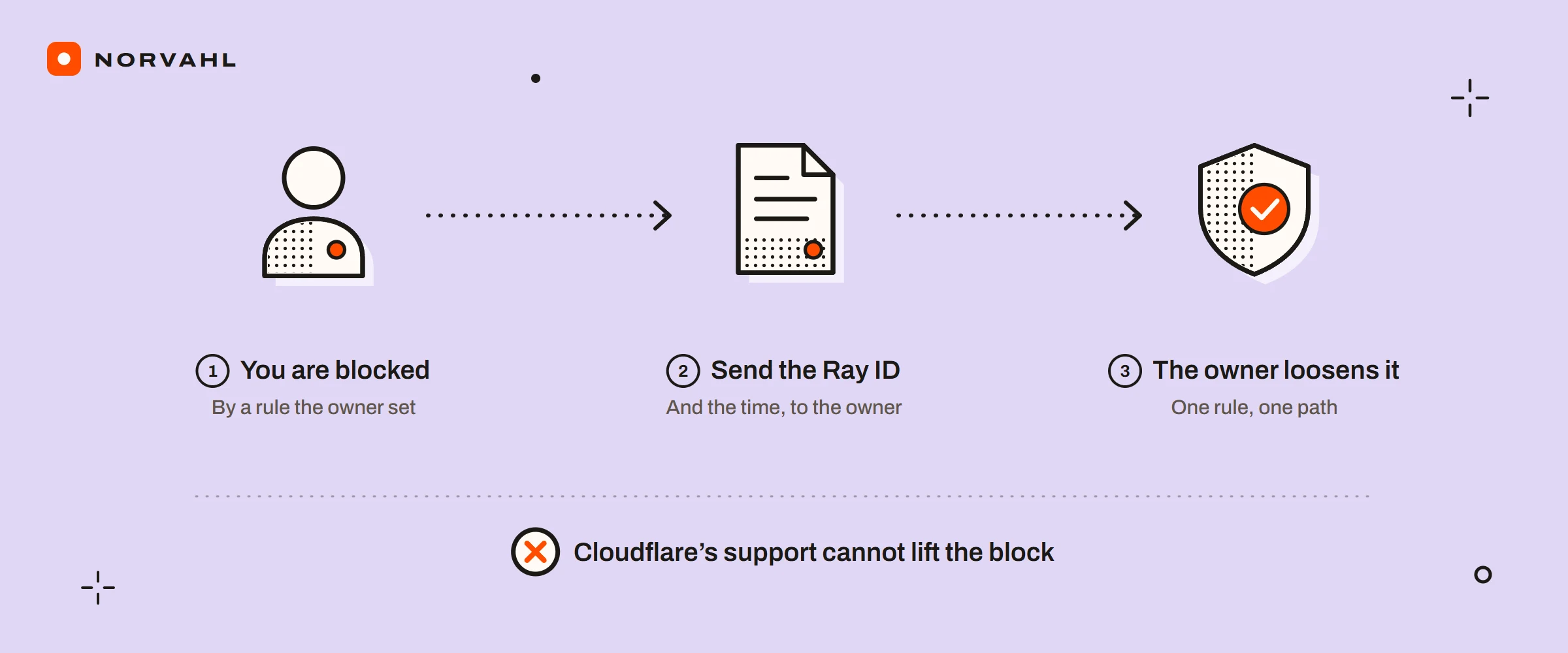
When a page shows Cloudflare's name and says you have been blocked, the website you are visiting made that decision. Cloudflare is a service many sites put in front of themselves to filter traffic before it reaches them, and each site's owner writes the rules it enforces. That is why Cloudflare blocking you on one site says nothing about other sites, and why Cloudflare cannot undo it for you. Its own 1xxx errors page says only the website's owner can contact Cloudflare's support.
Most people who search this are the visitor, so the first half of this guide is for you: what your code means, what you can change, and who to write to. The second half is for the owner of a site behind Cloudflare, which is the side I work on for clients and for my own site. It covers how to find the exact rule that stopped a real customer, and how to loosen it without switching your protection off.
The short version If you are the visitor, the site's owner set the rule, Cloudflare's support cannot lift it, and the error code says which kind of rule it was. Try the site with your VPN, extensions and work network out of the way, in an up-to-date browser. If that fails, send the owner the Ray ID and the time from the page. If you own the site, search that Ray ID in Security Events the same day, because the Free and Pro plans keep only 24 hours. Then loosen the one rule that fired, for the one path it fired on.
Why is Cloudflare blocking me?#
A request from you matched a rule. The owner's rules can look at your IP address, the network it belongs to, your country, your browser's signature, how many requests you sent in a short time, and whether your behaviour looks automated. Some rules block outright. Others show a challenge, the "verify you are human" check, and only block when it fails.
Nothing is wrong with your computer in most cases, and you are not on some list. None of Cloudflare's pages describe a list you can check or appeal. What exists are the rules of each site, which is why one site stops you while the next one does not.
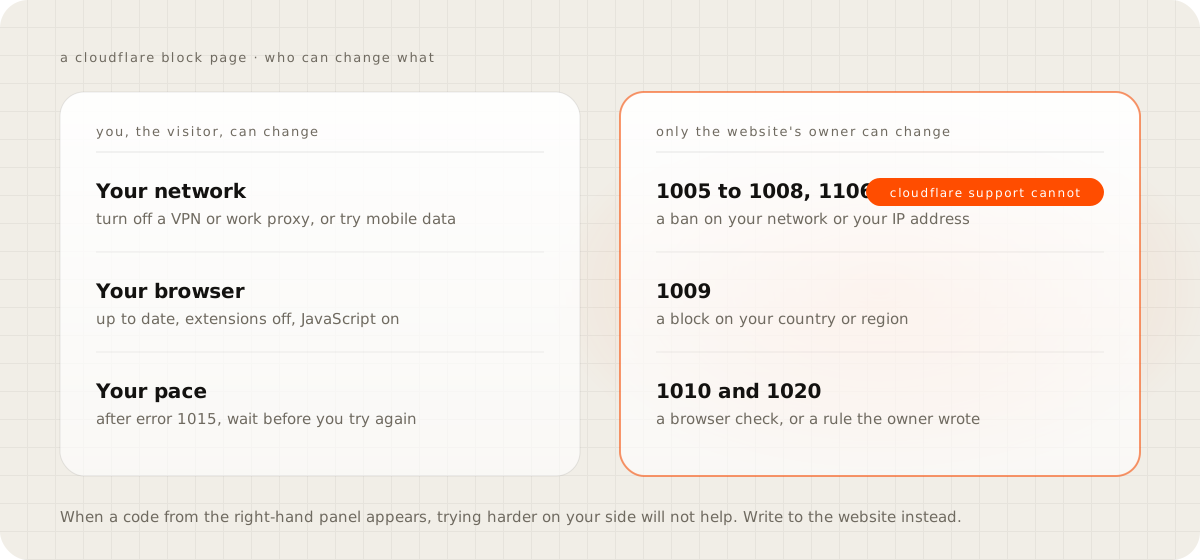
What your Cloudflare error code means#
The block page carries a number, and Cloudflare's 1xxx errors page says what each one blocked:
| Code | What the owner's rule blocked | What you can try |
|---|---|---|
| 1005 | The network your IP address belongs to | Another network, such as mobile data |
| 1006, 1007, 1008, 1106 | Your IP address | Another network, then write to the site |
| 1009 | Your country or region | Write to the site |
| 1010 | Your browser's signature, through a check called Browser Integrity Check | A current mainstream browser with extensions off |
| 1012 | Access denied | Write to the site |
| 1015 | Too many requests in a short time | Wait before you try again |
| 1020 | A rule the owner wrote | Send the site a screenshot of the page |
The page also shows a Ray ID near the bottom, the identifier of your one request. Keep it. It is the only thing that lets the owner find what happened to you.
Why does Cloudflare keep asking me to verify I am human?#
A loop means the check cannot finish, and Cloudflare's challenge troubleshooting page lists what stops it. The usual causes are an extension that blocks scripts, JavaScript or cookies switched off, a VPN or proxy, and an unstable connection. An unsupported browser, an in-app browser such as the one inside a social app, or a browser whose identity changes in the middle of a session will also fail.
Work through it in this order:
- Open the site in a private window, which starts without your extensions and cookies.
- Turn off your VPN, or step off a work network, and try again.
- Use an up-to-date Chrome, Firefox, Safari or Edge, outside any app.
- Switch to mobile data if you are on Wi-Fi, or the other way round.
The shortcut people reach for is a tool that disguises the browser or a paid proxy sold as a Cloudflare fix. Cloudflare lists a changing browser identity and shared proxies among the causes of failed checks, so both tend to make the loop worse.
Why is Cloudflare blocking my IP on so many websites?#
When many unrelated sites challenge you, the common factor is usually the address you arrive from. Cloudflare's troubleshooting page names IP addresses with a poor reputation, often shared VPNs or corporate proxies, as a trigger. On a VPN you share an address with strangers, some of whom may be abusive, and their reputation becomes yours.
Changing network is the fix that works. If it happens at home with no VPN, ask your internet provider whether your address is shared among many customers, and try your phone's data connection to confirm the address is the cause.
How do I get unblocked, and how long does a block last?#
Only the website's owner can unblock you. Look for a contact page, an email address or a support link somewhere the block does not cover, such as the site's social profiles. Cloudflare's 1010 page suggests a Whois lookup of the domain when there is no contact at all. Send a screenshot of the block page with the Ray ID and the time, and say what you were trying to do.
How long a block lasts depends on the rule. A rate limiting block on Cloudflare's free plan lasts ten seconds, by its rate limiting page. A ban on your IP address, your network or your country lasts until the owner changes it.
Is Cloudflare blocking your real customers?#
From here on, this guide is for the owner. The blocked customer rarely tells you, which is what makes it expensive. The people who do write send a screenshot and ask what they did wrong. The ones who do not simply buy somewhere else, and nothing on your side errors.
Some signs show up without a complaint. Orders from one country stop. A payment provider reports failed notifications to your store. On WooCommerce, the scheduled jobs go past due: one owner on WordPress.org traced overdue Action Scheduler jobs to turning on Bot Fight Mode, and switching it off cleared the warning. Background calls a store makes to itself look automated, because they are.
How to find the rule that blocked a customer#
Cloudflare keeps a record of every request its security stopped, and each record names the product that stopped it. The limit is time. By Cloudflare's Security Events page, the Free and Pro plans keep those events for 24 hours, Business for three days and Enterprise for 30.
- Ask the customer for a screenshot of the block page on the day they write. The time on it is in UTC, so convert it to yours.
- In the Cloudflare dashboard, open Security, then Analytics, then the Events tab. Cloudflare is moving accounts to a new security dashboard gradually, so on the older layout the same list sits under Security and Events.
- Add a filter for the Ray ID. If nothing comes back, filter by the customer's IP address and narrow the time range, because Cloudflare says the results can be sampled and a shorter range shows more.
- Open the event. It shows the action taken, the service that took it and the rule, which tells you exactly what to change.
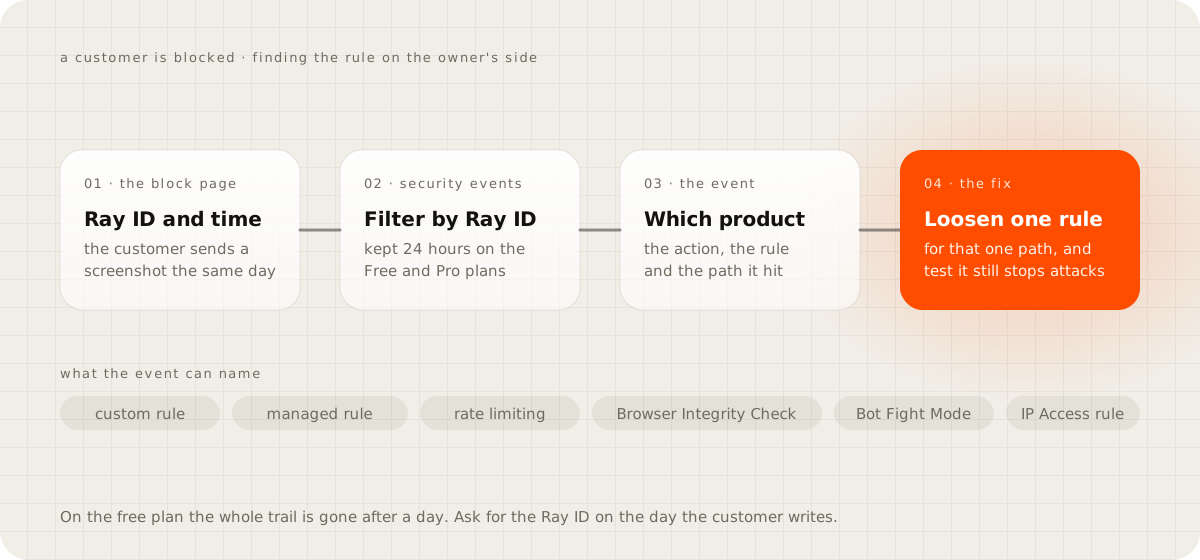
Which setting is doing the blocking, and the safe fix for each#
Owners who find a customer blocked tend to switch security off or lower everything at once. Change the one thing the event names, for the one path it hit:
| The event names | The safe change |
|---|---|
| A custom rule you wrote | Change its action from Block to Managed Challenge, or add a Skip rule above it for that path |
| A managed rule | Add an exception that skips that one rule for that path, and leave the rest of the ruleset on |
| A rate limiting rule (error 1015) | Raise the request count or lengthen the period; on Free you get one rule with a 10-second period, counted per IP |
| Browser Integrity Check (error 1010) | Skip it for that path with a custom rule, or turn it off |
| Under Attack mode | Turn it off once the attack is over, because it challenges every visitor |
| An IP Access rule | Narrow or remove it; an Allow rule also hides the requests it lets through from Security Events |
After the change, repeat what the customer was doing and confirm it passes. Then check that the rule still stops what you wrote it for. Skip rules are logged by default, by Cloudflare's skip options page, so the exception stays visible in the same events list.
What the free plan will not let you skip#
Bot Fight Mode is the exception to everything above. Cloudflare's Bot Fight Mode page says custom rules cannot bypass it, because it does not run on the same rules engine. A Skip rule has no effect on it. The only ways around it on the free plan are an IP Access rule that allows a fixed address, which matches before Bot Fight Mode runs, or switching it off. Cloudflare's paid bot product, Super Bot Fight Mode, does respect Skip rules.
That matters most for traffic that is automated and wanted: payment webhooks, calls between your own services, and a store's background jobs. If your payment provider publishes fixed addresses, allow those. If it does not, and your store depends on its notifications, Bot Fight Mode is the wrong tool for that site. The guide on Cloudflare country blocking walks through the rules that block good traffic by accident, webhooks included, and how to block a country on purpose.
Old advice to ignore#
A lot of what ranks for this was written for a dashboard that no longer exists:
- "Lower your Security Level." Cloudflare's Security Level page says the old sensitivity levels no longer tune anything, and the setting now only switches Under Attack mode on or off. The threat score behind it is deprecated and always 0.
- "Check the Firewall Rules tab." Firewall Rules became WAF custom rules. Cloudflare's own 1020 page still uses the old name, which is why the advice survives.
- "Contact Cloudflare support to unblock the visitor." Cloudflare says its support cannot override a customer's security settings.
"Can't I just switch Cloudflare's security off?"#
You can, and for an hour while you investigate, turning off one feature is a reasonable test. As a fix it trades one lost customer for every bot and attack the rules were stopping, and you will not see that cost until something breaks. The event list tells you which single rule fired, so there is rarely a reason to switch off more than that one rule.
Check your own site today#
If you own a site behind Cloudflare, open Security Events now and look at the last 24 hours. Sort by path and by country. Blocks on your checkout, your login, /wp-json/ or your payment callback addresses are the ones to read first, because those are customers and services, rarely attackers. Write one sentence on your contact page telling blocked visitors to send the Ray ID, so the next customer who hits a rule gives you what you need.
Questions people ask
Why is Cloudflare blocking me from a website?
The website's owner uses Cloudflare to filter traffic, and a request from you matched one of the owner's rules: your IP address or network, your country, your browser's signature, the pace of your requests, or behaviour that looked automated. The error code on the page tells you which kind of rule it was.
Can Cloudflare support unblock me?
No. Cloudflare's documentation says only the website's owner can contact its support, and that support cannot override a site's security settings. Send the owner the Ray ID and the time shown on the block page instead.
Why does Cloudflare keep asking me to verify I am human?
Something stops the check from completing: an extension that blocks scripts, JavaScript or cookies turned off, a VPN or corporate proxy with a poor reputation, an in-app browser, or an unstable connection. Try a private window with extensions off on another network before anything else.
How long does a Cloudflare block last?
It depends on the rule. A rate limiting block on the free plan lasts ten seconds, while a ban on an IP address, a network or a country lasts until the owner changes the rule.
How do I find out why Cloudflare blocked one of my customers?
Ask the customer for the Ray ID and the time on their block page, then search that Ray ID in Security Events. On the Free and Pro plans those events are kept for 24 hours, so do it the same day.