Most small businesses should not build software, and the ones that should need only one piece of it. The systems I build are for businesses running an operation by hand, and each one replaces a single job. Four of them sit on the homepage. A person deciding which installer gets which lead. A rep doing coverage maths on the phone. Staff working six inboxes. A teacher tracking practice from memory. None of them is an ERP. Custom software for a small business is the one narrow thing no vendor's form can hold, built once, owned outright, and running for about the price of a coffee a month.
Here is what custom means at your size, the one test for buying against building, and four of my systems with the mistakes I made on them. Then what it costs to run, what happens when it breaks, and the cases where I would tell you to stay on the subscription.
The short version Buy the job everybody has: accounting, payroll, email, calendar, payments. Build the one only you have, the rule or the price or the route that lives in one person's head today, and build only that. Write the job down as steps first; if you cannot, it is not ready to be built. Expect a fixed price for the build and a few dollars a month to run it, on accounts in your name.
What custom software means at your size#
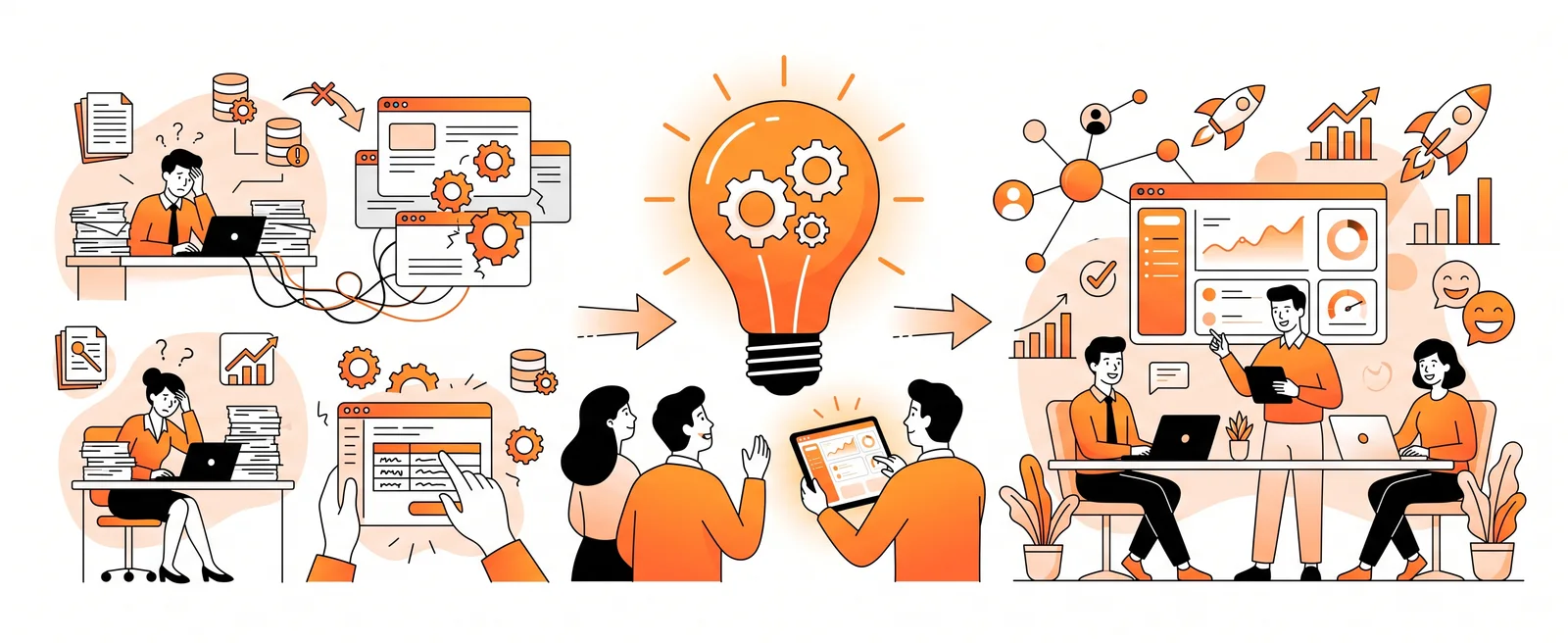
The phrase makes owners picture an enterprise system with a consultant attached. What I build is smaller than that and more useful. Each of the four systems on the homepage answers one question that a form, a spreadsheet or someone's memory had stopped being able to hold.
The routing hub has 21 tables and runs day and night, and all of it exists to answer who gets lead #4821. The quoting engine is eleven calculators over more than a hundred products, and it exists to answer what 680 square feet costs, in about 90 seconds, locked for 24 hours. The inbox joins eight channels and carries sixteen tools, so that someone answers at 11 pm. The student platform has grown to 50 tables and a job that runs every hour, so a teacher can see who practised without asking.
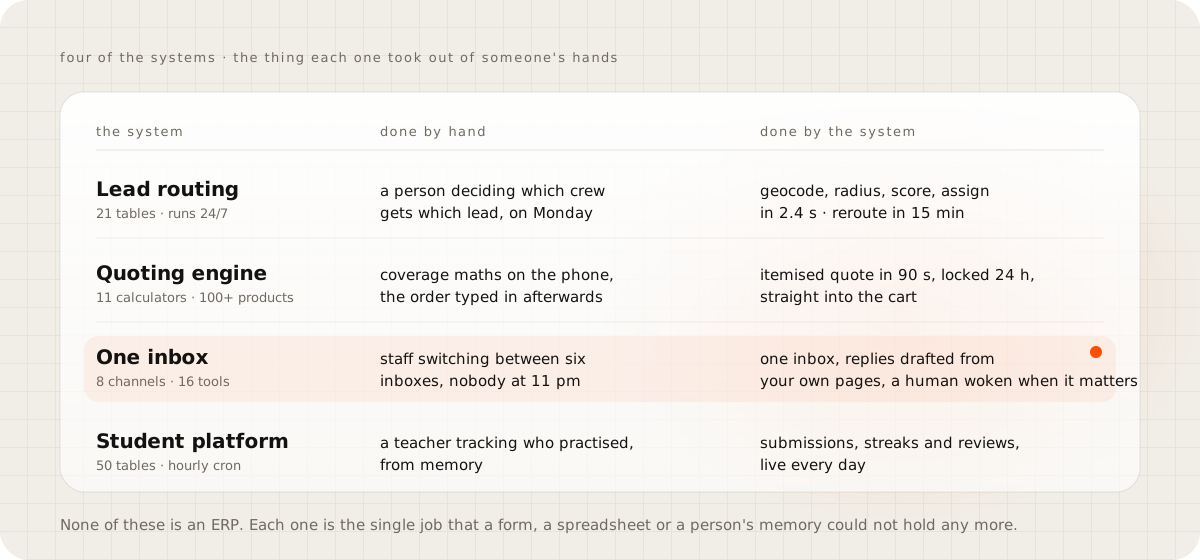
That narrowness is the point. At small-business scale the right project connects the tools you already have, or builds the one piece that is missing between them. It does not replace your books or your store. When a builder proposes replacing everything, they are pricing their year, not your problem.
Big software projects have a long record of failing, and it is worth knowing the shape of it. The Standish Group's 1995 CHAOS report surveyed 365 IT executives responsible for 8,380 applications. Only 16.2 percent of their projects finished on time and on budget, 31.1 percent were cancelled, and the ones that ran over cost 189 percent of the estimate on average. Those were companies with a hundred million dollars in revenue and up, buying software the way large companies do. The cure is not to avoid software. It is to keep the piece small enough that a single person can hold the whole of it in their head, and stop when it works.
Buy it when the job is the same as everyone else's#
Accounting, payroll, email, calendar, card payments, file storage, video calls, and the store itself. A million businesses do these the same way you do, so the vendor's form fits and the subscription is the right price for a shared job. I rent most of them for this studio myself.
The trap with buying is not the first subscription. It is the tenth. Zylo's 2026 SaaS Management Index puts the average company at 305 applications, with licence utilisation at 54 percent, which means nearly half of the seats paid for sat unused.
Those are large companies, and a twelve-person business is not one of them. But the mechanism is the same: nobody is counting. Keep a list of what you pay for and who logged in last month, and cancel from the bottom.
Field-service software is the honest example for a trade. Jobber's Core plan is 29 to 49 dollars a month for one user, and every extra user is 29 dollars. The Plus plan runs 399 to 499. If your work fits its form, that is a fair rent, and I would not build you a copy. The tell is the seat price: a fee for every hire, forever, for a form shaped for the average of every trade at once.
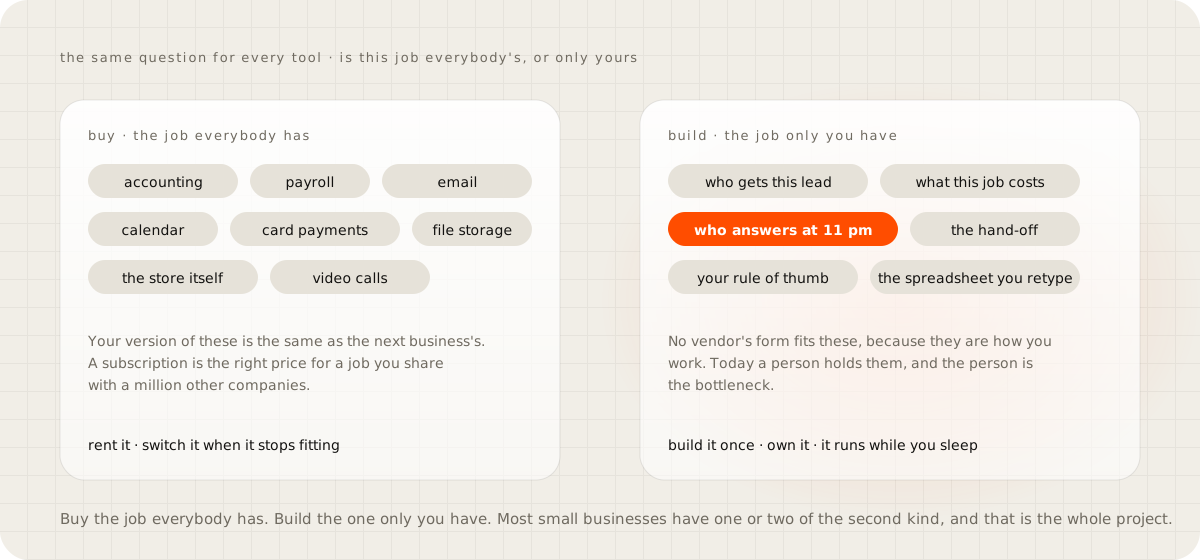
Build it when the work is yours#
The test is one question. Is there a job that only your business does this way, and is a person holding it together today? If yes, that person is the bottleneck and the job is the project. The signs are always the same, and they sound like this.
Your orders get typed from one screen into another, every day. Someone reads the web form on Monday and forwards it to whoever they think covers that town. The rule for who gets what lives in your head, and it has three parts nobody's software has fields for: how far away, what plan they are on, how booked they are this week. A rep does the coverage maths on the phone and then types the same list into an order. Or the enquiry lands at 9 pm and nobody is there, which is the first symptom on the homepage and the subject of the guide on how fast to reply to a lead.
Every one of those is a job only you have, done by hand, with a rule you could write down. That is the whole qualification. The routing hub is the clearest case. The kickoff said it would route "by plan and territory". What shipped was a radius filter, a distance score, a plan tier and a load cap, because that is what the owner actually did in their head, once it was written out. The weights are settings, so the owner moves them without me.
There is one hard limit. If you cannot write the rule down as steps, it is not a system yet, it is a person's judgement, and I cannot build judgement. "It depends" is fine when you can say on what. When you cannot, the honest first step is a spreadsheet, not a build, and the guide on what to automate first is about finding the piece that is ready.
What went wrong on mine#
I would not trust a builder who only shows the wins, so here are the misses, all of them my own defaults.
The routing hub shipped with real-time distribution switched off and a nine o'clock morning batch switched on. A lead sent at 11 pm sat until breakfast. The same version carried a 48-hour response deadline, also off by default, which is a reminder about a lead that has already hired someone else. Both were changed, and the working version assigns in 2.4 seconds median and reroutes an ignored lead in 15 minutes, but a client who trusted the defaults would have run the slow version for months.
The visualizer, a tool that renders a floor finish onto a customer's own photo, had a fallback I am not proud of. When the segmentation model returned nothing, it painted the bottom half of the photo anyway, flake over the car and the shelving, with no error. Confidently wrong is the worst way software can fail. The fix is to refuse and say why, never to guess.
The inbox platform has a feature called Flows, an automation builder, with a database table, an API that answers "coming soon", and no engine behind it. That is what scope creep looks like a year later. The lesson I took is the one this guide is built on: ship the one job, then stop.
And the student platform's documentation described version one long after version forty had shipped. Documentation rots the moment nobody owns it, which is why the handover docs are written last, dated, and yours.
"If you disappear, who fixes it?"#
It is one person, and that is a real risk. Here is what makes it survivable, and none of it is a promise about me.
The system ships on your accounts. The hosting, the domain, the database and every key are opened in your name, so the bill lands with you and nobody sits between you and your own system. The code is plain TypeScript, PHP or Python on frameworks any developer knows, none of my own invention, so any developer can open it. You get documentation and training at handover. The platform it runs on is a large vendor's, not my server in a cupboard.
If I am hit by a bus, you hire someone and hand them the keys you already hold. Nothing ends the day you stop paying someone, which is the fifth sign on the fit check and the one I care about most.
The subscription has the mirror risk, and it is less visible. The vendor changes its pricing, retires your plan, or you outgrow the tier and face a migration. Your data lives in their database on their terms, which is the whole subject of the guide on owning your customer data. A system you own is an asset on the sheet, and when you sell the business it goes with it.
What it costs to build, and to run#
The build is one fixed price, agreed at the map stage. The scope is the contract, so the number you approve is the number you pay, and I price the work rather than the hour. The number depends on the job, and I would rather tell you yours on a call than print a range you will hold me to for a different job. What moves the number, and why I price the work rather than the hour, is the guide on what custom software costs a small business.
The running cost is the line people get wrong, and it is small. The ledger on the homepage is for a lead desk like the routing hub. Hosting on Cloudflare's free plan, database and storage on free plans, email delivery free. The domain is 10 to 15 dollars once a year and AI replies run 2 to 5 dollars a month, pay per use. About 5 dollars a month, all in. The free plan allows 100,000 requests a day; a busy small business with 140 leads, 60 quotes, 900 messages and 3,100 visits in a month uses about 2,000. The next plan up is 5 dollars a month, and growing is a plan change on an account you already own, with nothing rebuilt.
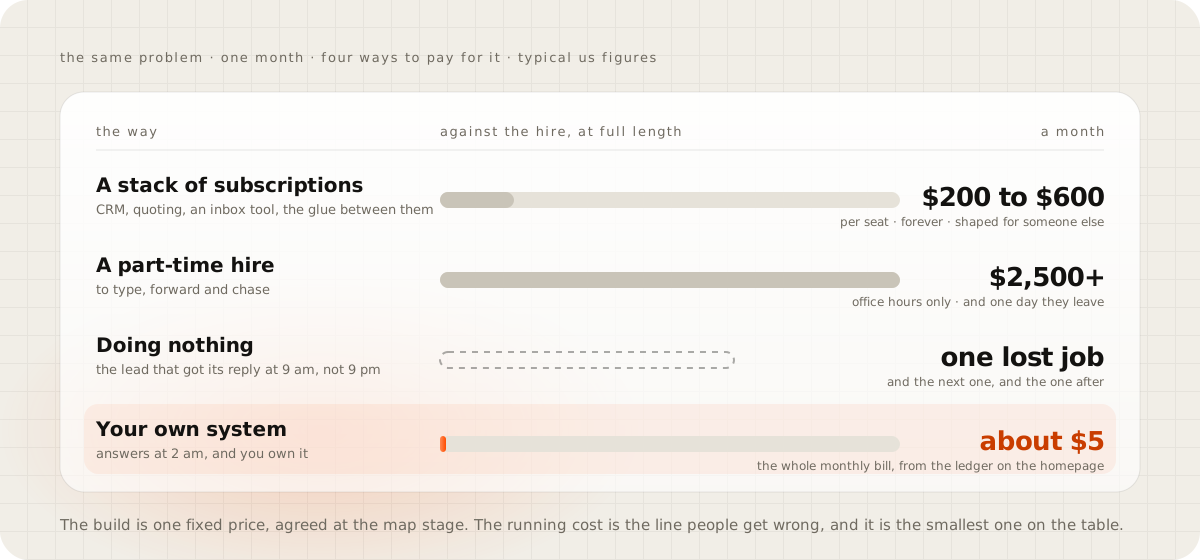
Set that against the alternatives most businesses already pay for. A stack of subscriptions for the same problem, a CRM, a quoting tool, an inbox tool and the glue between them, runs 200 to 600 dollars a month at typical US prices, per seat, forever. The glue alone, Zapier's Professional plan, starts at 19.99 dollars a month for 750 tasks and its Team plan at 69. A part-time hire to type, forward and chase is 2,500 dollars and up, office hours only, and one day they leave. Doing nothing costs the lead that got its reply at 9 am instead of 9 pm, and one missed job a month outspends the whole build inside a year.
When to stay on the subscription#
Stay when you are starting out and the process does not exist yet; a system is a process written in code, and you cannot write down what you have not done. Stay when the process changes every week, because you will pay to rebuild it every month. Stay when the tool you have is barely used; Zylo's half-empty seats say the problem is usage, not the tool. Stay when the job is everybody's job. And stay if you want the cheapest thing that works, because on price alone a template and a subscription win, and I will say so on the call.
The examples in this guide come from a network of installers, a distributor, a store and a school, because those are the builds I can show. I have not built for a restaurant or a clinic, so I would not tell either what to build first. The test above still holds, but take my examples as examples.
How the project runs#
Four stages, one fixed price, and a live system you can open any day while it is built. The full sheet is on the homepage.
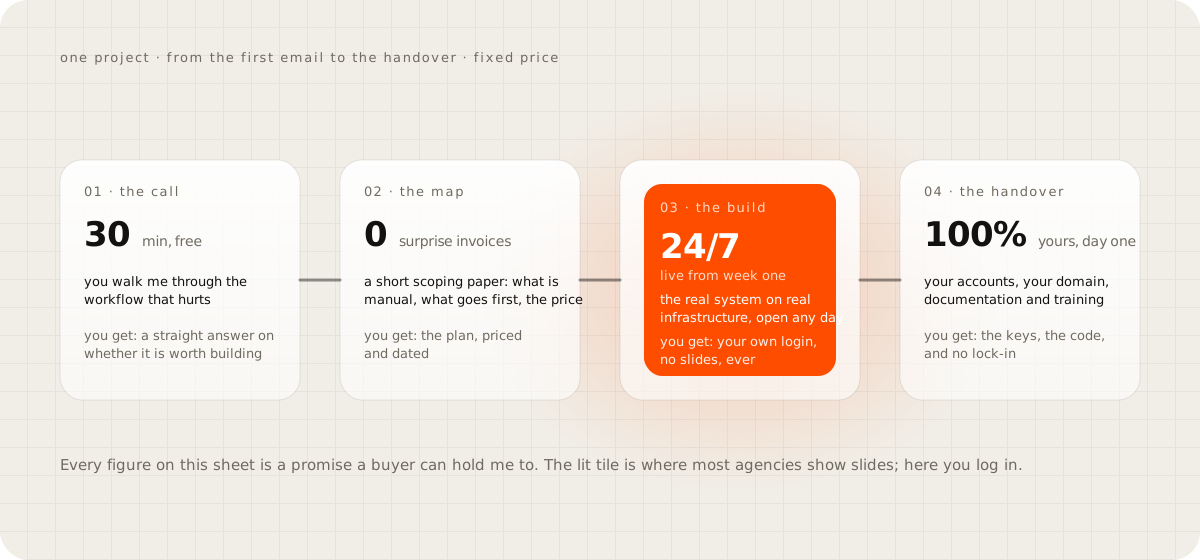
The call is thirty minutes and free, and if I am not the right builder for it I say so and point you at someone who is. The map is a short scoping paper: what is manual today, what gets automated first, what it costs and when it lands. The build goes up on real infrastructure in the first week and stays open, so you click what exists and change your mind while changing it is cheap. The handover ships everything on your accounts with documentation and training, then a quiet exit. It is one person, and you talk to the builder, not an account manager, and you wait in a short queue instead of buying a deep bench.
Write the job down this week#
Take the one thing in your business that is still done by hand and write it as numbered steps, with the decision at each step. Where you write "it depends", write what it depends on. If you reach the end, you are holding the specification and half of the map, and the build will be short. If you cannot reach the end, you have learned that the job is still judgement, and the right next step is a spreadsheet that makes you write the rule down for a month.
Then bring the page to a call. Book it here. It is thirty minutes, and I will tell you whether it is a build, a subscription, or a spreadsheet and a rule, and I have told people the last two more often than the first.
Questions people ask
What counts as custom software for a small business?
One narrow piece that does a job no vendor's form fits, the way you actually do it. Who gets this lead, what this job costs, who answers at 11 pm, how an order gets from the store to the books. It is not an ERP and it is not a rebuild of your accounting.
Is custom software cheaper than a subscription over time?
For the right job, yes, and by a wide margin. The build is a fixed price once. The running cost of a system sized to a small business is a few dollars a month on accounts in your name, against a seat fee for every hire, forever. For a job everybody has, the subscription wins, and I will say so.
How long does a custom build take?
Weeks, not days, and the real system is live on real infrastructure from the first week, so you log in and click what exists while it is built. Anyone who promises a working system in a few days is describing a template.
What happens if the developer disappears?
It ships on your accounts, under your domain, in plain code with documentation and training, so any developer can open it. That is the honest answer to a one-person studio's biggest risk, and it is why I refuse to host anything for you.
Can I start with a spreadsheet and build later?
Yes, and you should. The spreadsheet is the specification. When you can write the columns and the rules down, the system can be built from them. When you cannot, it is not ready to be software yet.