Notion is a place to write that can hold a database. Airtable is a database that can hold a screen. That difference settles Airtable vs Notion for most teams: write in Notion, and keep the records you work through every day in Airtable. The harder case is a business that wants one tool for its leads, orders and jobs. I modelled that board in both on 15 September 2026, from each company's help pages and prices, to see where each one bends.
Five of the seven pages ranking for this search sell something that replaces, syncs or automates the two tools. The page with the most numbers gets Notion's Business price wrong, says Notion databases have no hard row limit, and says Notion has no webhooks. Notion's own pages say $20 a member billed yearly, 250,000 rows a database, and a Send webhook action.
The short version
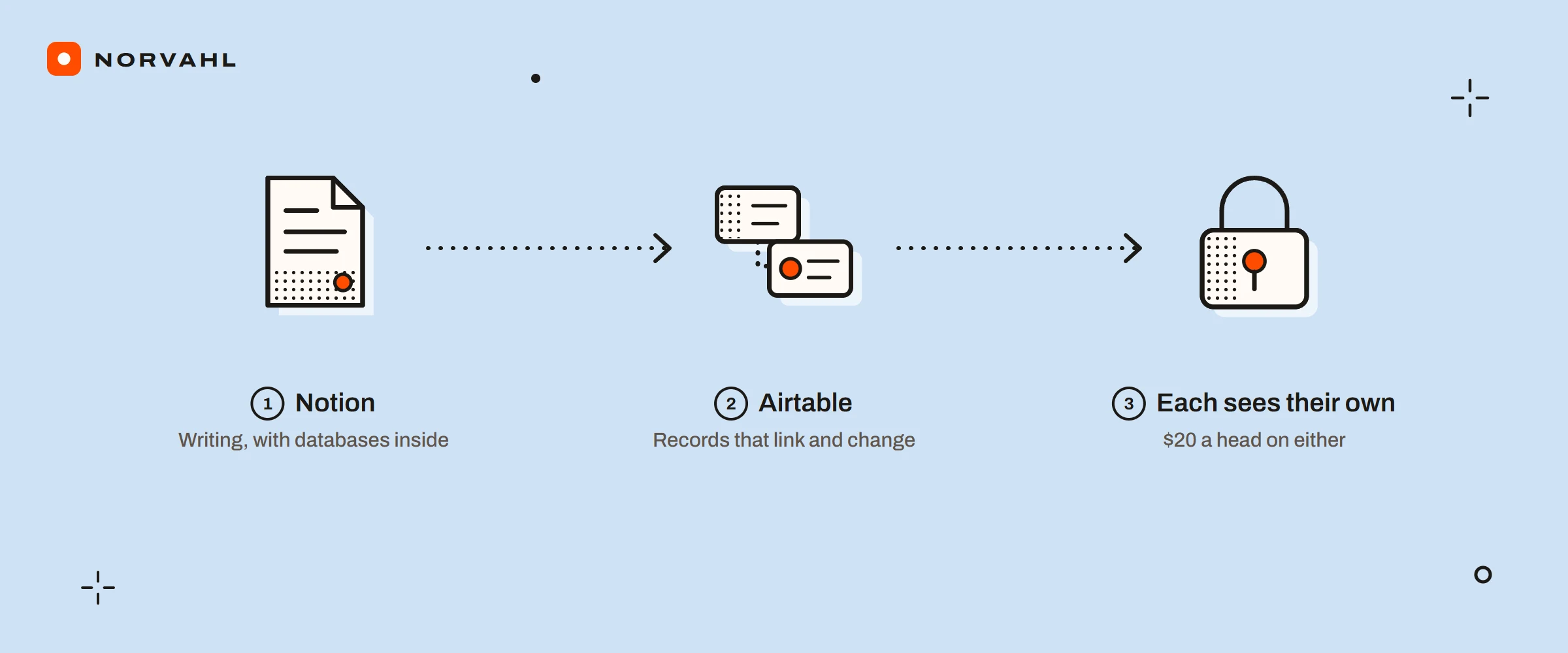
- Choose Notion when most of the work is writing, with a few databases inside the pages. A member costs $10 a month on Plus billed yearly, and guests are free.
- Choose Airtable when the work is records that link to other records and change every day. Its automations run up to 25 actions each, and a record can pull fields from the records it links to.
- Expect the same bill on either once each person should see only their own records: $20 a head on Notion Business or Airtable Team.
One job, as a record and as a page#
In Airtable, a job is a row in a jobs table, and every field has a type: a status, a date, a person, a link to the order it belongs to. A lookup pulls the order's address onto the job, and a rollup adds up the cost of every job on the order. Both work on every plan.
In Notion, the same job is a page. Its properties sit at the top and act like fields, and under them is a page body where a crew can write notes, add photos or tick a checklist. A relation links the job to its order, one way by default and both ways if you switch it on, and a rollup can show or total values through that relation.
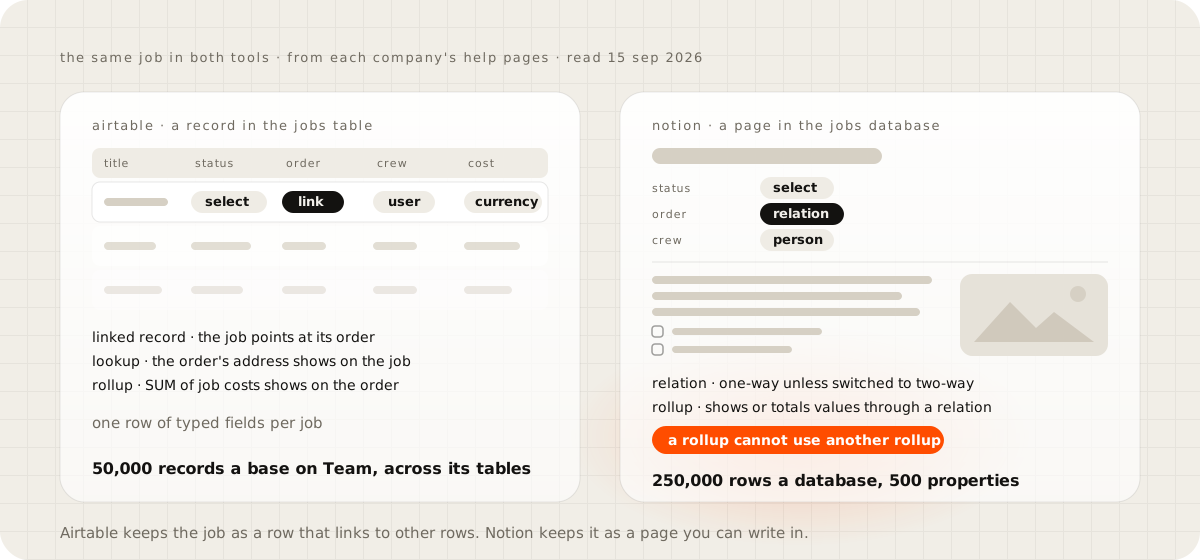
The difference that matters for an operations board is how far totals can travel. Notion's help page on relations says a rollup cannot roll up another rollup, because that could create a loop. So job costs can total onto an order, but order totals cannot roll on to a customer without a workaround. Notion gives each database room for 250,000 rows and 500 properties, and names formulas and rollups as what slows a big one down.
Where the board bends when work comes in#
A lead usually arrives through a form, and both tools build one as a view of a database. In Airtable a submission creates a record and can start an automation, and in Notion each response becomes a page. Notion keeps conditional questions for its Business plan.
When an order is won, the next job should appear and the crew should hear about it. Airtable's automations can do that in one run: when a record matches a condition, create the job, then send an email, a Slack message or a Teams message. Each base allows 50 automations of up to 25 actions, within the plan's monthly runs.
Notion's database automations cover the same ground on paid plans: when a property changes, add a page to the jobs database, then notify people, send a Gmail message, post to Slack or call a webhook. Two limits matter here. A Notion automation cannot trigger another automation, and it skips pages with restricted access.
Photos and notes favour Notion. A job page holds them in its body, and paid plans place no size limit on uploads. In Airtable they live in an attachment field, inside the base's storage allowance of 20 GB on Team.
Who sees what, and who pays#
A crew member should see their own jobs and nobody else's. Notion does this with page-level access rules on a Person property, and those rules are on Business and Enterprise only. Airtable does it with an interface filtered to the current user, which needs a user field, and sharing an interface without its base needs a paid plan.
The seat rules differ too. Every Notion member is a paid seat, and guests are free, unlimited on paid plans. Airtable bills every editor, bills commenters too on Team, and lets read-only users in free. Outsiders who edit in Airtable need the Portals add-on, from $120 a month for 15 portal seats on Team.
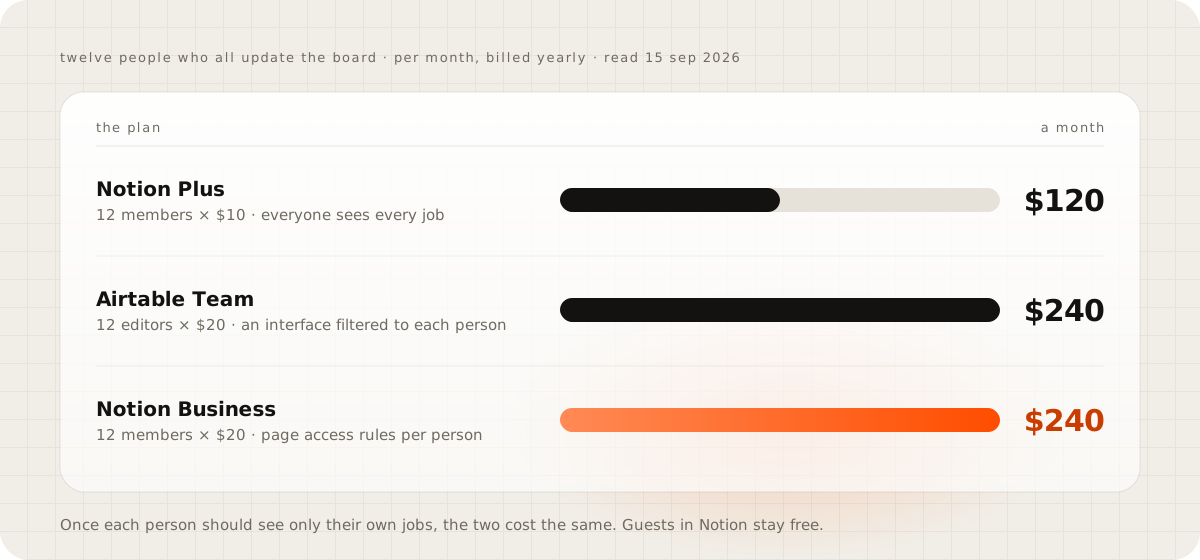
For twelve people who all update the board, Notion Plus costs $120 a month billed yearly and Airtable Team $240. The moment each person should see only their own jobs, Notion needs Business, and the bill is $240 on both. Guests are where Notion pulls ahead again: a customer invited to their own order page costs nothing.
Where each one stops as the board grows#
Notion's ceiling is 250,000 rows a database, 500 properties and 2.5 MB of property data on any one page. Its API allows 180 requests a minute per connection, or 600 on Business and Enterprise, under a separate workspace limit. In 2023, one Hacker News user found Notion slowing on databases of about 100 rows, far below that ceiling. Notion's help page puts slowness down to formulas and rollups, and to pages crowded with databases, rather than to a row count.
Airtable's ceiling arrives sooner, and it is shared. The Team plan holds 50,000 records across all the tables in a base, 25,000 automation runs a month and 100,000 API calls, after which the API slows to two calls a second. Those walls, with Google Sheets' and Excel's beside them, are laid out in Airtable vs Google Sheets.
When to use both, or neither#
Plenty of teams run both. Cotera, which sells AI agents, described its own split: a sales pipeline of 2,400 records with six views in Airtable, and its content, project pages and meeting notes in Notion. That works as long as nobody needs one record in both places. The moment they do, you are paying for sync between two subscriptions.
Neither fits once the board is the business itself: leads that become orders, orders that become jobs and invoices, and customers who need to see their part. That is the point to price an app of your own. Build ranges and running costs are in Airtable vs Google Sheets, and what owning the record looks like is in the private back office guide. If your board fits under both tools' ceilings and one of the bills above looks fine, stay where you are.
Sketch your board before you choose#
Write your board on one sheet of paper: the things you track, the arrows between them, who changes each thing and who only looks. Many arrows and daily changes point to Airtable. Long pages with few arrows point to Notion. People from outside the business on that sheet mean pricing Notion guests against Airtable portals before anything else.
Questions people ask
Can Notion and Airtable sync with each other?
Not in both directions out of the box. Companies such as Whalesync and Getint sell sync between the two, both tools connect through Zapier, and Notion's Business plan lists one-way database syncs.
Is Notion free for a team?
The free plan has no block limit for one person, but a workspace with two or more members can add only a limited number of blocks before it must upgrade. It also caps uploads at 5 MB, keeps 7 days of page history and allows 10 guests.
Sources
- Notion pricing
- Optimize database load times and performance, Notion Help Center
- Relations and rollups, Notion Help Center
- Database automations, Notion Help Center
- Build forms in Notion, Notion Help Center
- Sharing and permissions settings, Notion Help Center
- Request limits, Notion API reference
- Airtable pricing
- Airtable plans overview
- How Airtable collaborators impact billing
- Lookup field overview, Airtable Help Center
- Rollup field overview, Airtable Help Center
- Getting started with Airtable automations
- Interface Designer permissions, Airtable Help Center
- Using Airtable Portals for external collaborators
- Airtable vs Notion, we use both, Cotera
- Comment on "People who use Notion to plan their whole lives", Hacker News