A visitor who cannot find a price on your site assumes it is high, and leaves to find one somewhere else. Nielsen Norman Group has watched that happen in usability sessions since at least 2002, when the lack of prices was their web design mistake of the year. The quoting engine I built for a distributor of resin-bound surfacing takes the opposite bet. Eleven calculators across more than a hundred products. A full itemised price in about 90 seconds, locked for 24 hours, and a button that puts the whole list in the cart.
A quote calculator for a website is the right answer more often than contractors think and less often than the calculator vendors say. It depends on one thing: whether the price of the job follows from numbers the visitor already has. This is how the working one prices a job, what the 24 hour lock is for, when a range beats a number, and when a calculator is the wrong tool altogether.
The short version If you sell materials, or a job whose price follows from an area and a finish, give an instant quote and lock it for a day. If the site visit decides the price, give a range for your common jobs and say what moves it. Either way, never make "call for a quote" the only path. Match the number of questions to the buyer: one slider for a homeowner, the full form for the trade.

Why people leave a site that hides its price#
Price is the first thing a visitor looks for, whatever they are buying. Hoa Loranger at Nielsen Norman Group put it plainly in 2013. Business customers report pricing as the top piece of information they need online. In their studies, participants went to competitors' sites when a site did not show it.
She names the excuses, the price varies, competitors will see it, every job is custom, and calls them legitimate and still excuses. The site that hides the number makes the shortlist less often, and the visitor carries the impression, they are hiding what I want, over to everything else about the company.
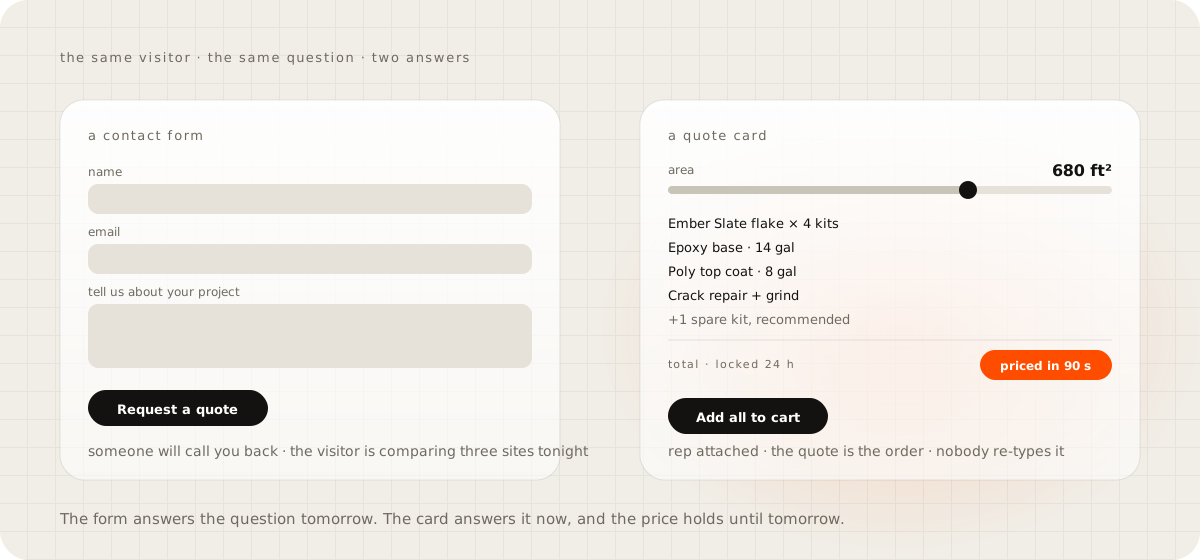
That was written about business buyers. I have watched the same thing on the homeowner side without a usability lab. The form that says "contact us for a free estimate" is a request to wait, and the visitor is comparing three sites in one sitting. The quote card on the homepage exists to make the opposite point in one motion. Slide the size and the bill re-prices itself. Nobody has to call anyone to learn what 680 square feet costs.
What the calculator does that a rep did by phone#
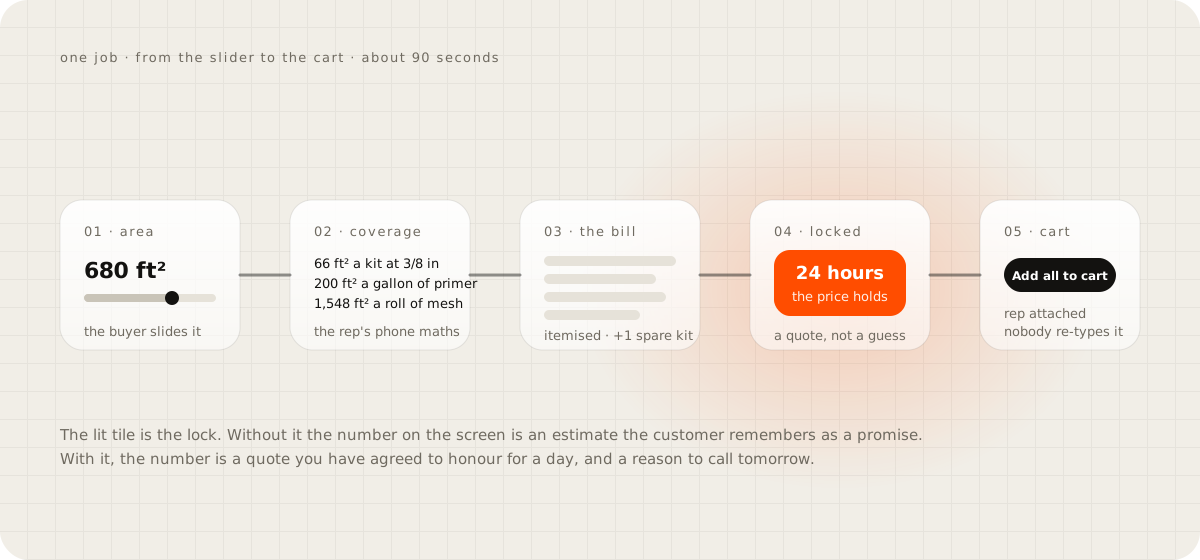
The manual version of this job was a rep on the phone doing coverage maths from a spec sheet. How many kits for 680 square feet at this depth, how much primer, whether the mesh roll covers it, and then typing the list into an order. The engine does the same arithmetic in the browser, from the numbers the buyer already has.
Area and depth come first. The resin-bound calculator carries depth presets by traffic, from three eighths of an inch for foot traffic up to a full inch for heavy vehicles. A kit covers 66 square feet at the thinnest setting and 26 at the thickest.
Primer covers about 200 square feet a gallon. A roll of mesh covers about 1,548. Anti-slip glass covers 5,000 a bag, which is why it appears as an optional line rather than a per-job cost. Wastage is a chip the buyer taps, from nothing up to 20 percent, and the totals move as they tap.
Then the list writes itself. Every product the job needs appears with a quantity, a unit price and a line total, plus the lines a rep would add from experience: primer as required, trowel cleaner as recommended, one spare kit.
The homepage demo shows the flake version of the same maths. Four kits of flake, 14 gallons of base, 8 of top coat, crack repair and grind, and the spare kit, priced in about 90 seconds. In the trade portal, under the total sit two selects, the distributor location and the account manager, and one button, add all to cart. The quote is the order. Nobody re-types it. The checkout it lands in has to be a lean one, which is the subject of the guide on why a WooCommerce checkout is slow.
Quote or estimate, and what the 24 hour lock is for#
A quote is a price you will honour for a stated time. An estimate is a range that a site visit turns into a quote. The calculator vendors blur the two, and the blur is where contractors get burned, because a homeowner who saw a number on your site remembers it as a promise.
Materials can be quoted. The area is the area, the kit covers what it covers, and the price of a kit is the price of a kit. So the engine calls its output a price and locks it for 24 hours, with a line under the total that says so.
The lock does two jobs. It makes the number a commitment the buyer can act on today, and it gives you a true reason to follow up tomorrow: the price holds until Thursday. That is the follow-up with a reason I argued for in the guide on how fast to reply to a lead.
Labour on a floor you have not seen is an estimate, and the card should say estimate. Cracks, moisture, a previous coating that has to come off, a garage full of shelving. A calculator cannot see any of it. What it can do is give a range from the area and the finish, name the three things that move the number, and book the visit.
I have not built the homeowner-labour version of this card for a live client yet. The material engine has run for a distributor's trade customers. What I would build for an installer is a range with a visit button, and I would say so on the card rather than dress the range as a quote.
"Customers will use it to price-shop me"#
They already do, on somebody else's site, without your reasons. Nielsen Norman's participants did not stop comparing when a site hid its price. They compared the sites that showed one and dropped the site that did not.
The shortcut people take is to hide the number and call it a strategy. It costs you the visitor who was never going to call and would have bought from the card.
The better move is to show the total with the lines behind it. Prep, the spare kit, the top coat, the warranty. A total on its own is what gets shopped. A total with its reasons is a proposal. The visitor who takes it to a competitor is asking them to match your spare kit and your prep, an argument you have already framed.
Do not show unit rates on their own. Nothing on the homepage card says what a gallon of base costs by itself, and the engine's trade portal shows unit prices only inside a priced job. The visitor sees what the job costs and why. They do not get a rate card to negotiate line by line.
When a calculator is the wrong tool#
Nielsen Norman's own finding cuts against a lot of what I just described, and it is worth taking seriously. In Jakob Nielsen's 2006 study a test participant compared two shipping companies. She gave up on the one whose calculator wanted both zip codes, the weight and the full dimensions, and used the competitor's plain table of prices for common shipments. Loranger's 2013 piece says the same: most pricing tools they tested were complex and error prone, and only a few highly engaged customers make the effort to type into them.
Both are right, and the reason the engine works is that its buyers are the engaged few. A distributor's trade customer placing a real order will type the depth and tap the wastage chip, because they are ordering, not browsing. A homeowner comparing three garage sites on a Sunday night will not.
So the depth of the form has to match the buyer. The homepage card takes one input. The trade portal takes eleven calculators, because its users need eleven.
If you sell to homeowners and your price depends on a site visit, Nielsen's answer is the right first step, and it costs nothing. A table of three or four typical jobs with a price and what is included. A two-car garage at 500 square feet in a solid colour. The same garage in flake with a spare kit. A shop floor at 1,200. Anyone can read a table in five seconds, and the table tells you which scenario to build a slider for next.
What the calculator knows that the customer does not#
The best argument for a calculator is not speed. It is that the maths can carry knowledge the buyer does not have, and refuse a job that will fail.
The catalyst calculator in the engine asks for the air temperature, the humidity and, if they have it, the surface temperature. From those it works out the dew point and the spread between the surface and the dew point, then flags the job. Under five degrees is high risk, under ten is caution, ten and over is clear to coat. It then picks the catalyst dose per kit from 18 temperature ranges and multiplies by the kit count.
The rule behind the flag is not mine. ASTM D3276 and ISO 8502-4 set the surface temperature at least five degrees Fahrenheit above the dew point through preparation, application and cure. Below that, the surface sweats under the coating. Sherwin-Williams' tech tip for resin floors gives the worked example: air at 70 degrees and 65 percent humidity means a dew point of 57 and no coating below a 62 degree surface.
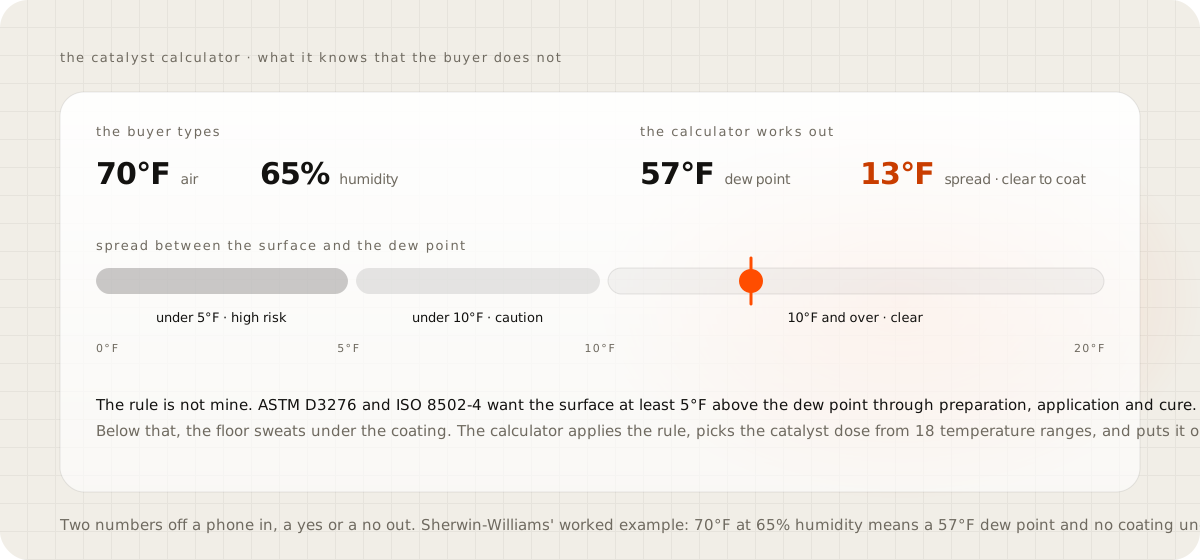
A buyer typing 70 and 65 into a box does not know that rule. The calculator does, and it puts the answer in plain words on the screen, with the catalyst quantity already on the order. That is the version of a quote calculator worth building: one that encodes what your best rep knows, so the customer gets the rep's answer at 11 pm.
Price your three common jobs this week#
Write down your three most common jobs, with an area, a finish and what is included, and put a price on each. Put the table on your site this week, with a line that says the site visit confirms the number and a button to book it. Then watch which row people ask about. That row is the one to turn into a slider, and that is the moment the calculator earns its build.
Slide the quote card on the homepage to see what the finished version feels like from the customer's side, and open the store it feeds to see the quote land in a cart. What that store costs to run each month is the guide on the real monthly cost of a small online store.
Questions people ask
Should a contractor put prices on their website?
Yes, at least for the common jobs. Nielsen Norman Group has watched people leave sites that hide prices for two decades, and a visitor who cannot find a number assumes it is high. Show the price of your three most common jobs with what each includes, and let the site visit set the final number.
What is the difference between an instant quote and an estimate?
A quote is a price you will honour for a stated time. An estimate is a range that a site visit turns into a quote. Materials can be quoted from the area alone. Labour on a job you have not seen is an estimate, and the card should say so.
Will an instant quote calculator lose me jobs to price shoppers?
The shoppers are already comparing you, on someone else's site. A calculator that shows the total with the lines behind it, the prep, the spare kit, the warranty, gives them a reason for the number. A total alone is what gets shopped.
What should a quote calculator ask for?
For a homeowner, one or two things: the area and the finish. For a trade buyer placing orders, everything the maths needs, because they will type it. Every extra field costs you the casual visitor, so match the depth of the form to the buyer.
Can a quote calculator put the order in the cart?
It can and it should when you sell the materials. The engine I built prices the job, lists the products, adds a spare kit, locks the price for 24 hours and puts the whole list in the cart with the rep attached. The quote is the order.
Sources
- State the Price to Give B2B Sites a Competitive Advantage, Hoa Loranger, Nielsen Norman Group, December 2013
- Show Prices for Common Scenarios, Jakob Nielsen, Nielsen Norman Group, April 2006
- Measuring environmental conditions for the application of paints and coatings, DeFelsko
- Using the dew point calculator, Sherwin-Williams resin flooring tech tips
- Price quote calculator, ConvertSite use case page