Acuity Scheduling lets a business stop clients from cancelling or rescheduling inside a set number of hours before an appointment. Calendly's help centre says its cancellation policy does not restrict cancellations or reschedules at all, because the policy is text in the emails and the only lever is removing the links. For a sales team booking calls, that rarely matters. For a clinic, a salon or a tutor who loses the hour, it can settle Calendly vs Acuity on its own.
I followed one booking through both on 15 September 2026, using each company's help pages and pricing: the reminder, a late change, a no-show, the follow-up and the record that reaches a CRM. Most pages ranking for this search stop at feature lists. Two of the four I read get Acuity's plans and prices wrong, and Calendly's own comparison prices Acuity by the seat, when Acuity charges one price per account.
The short version
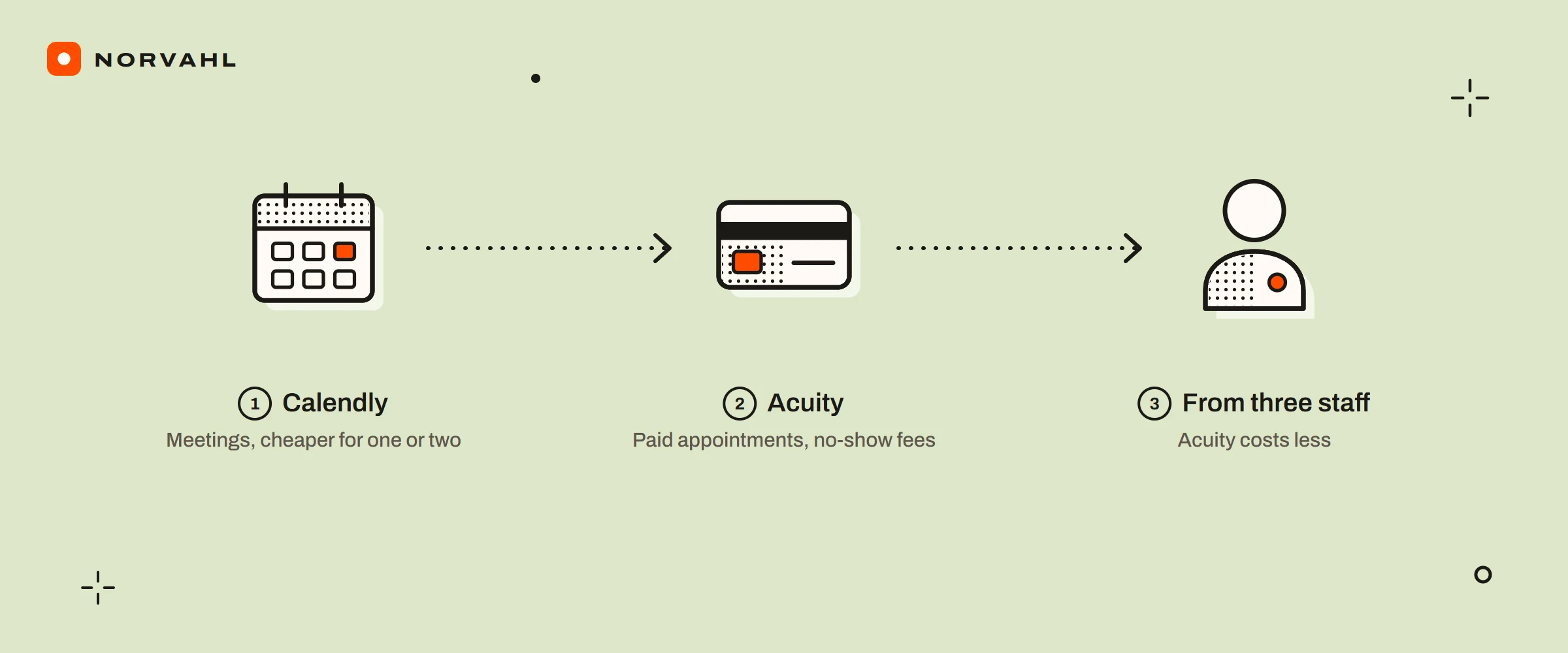
- Choose Calendly for meetings, where a no-show costs an empty slot rather than money. It is cheaper for one or two people and connects to HubSpot from its Standard plan.
- Choose Acuity for appointments people pay for. It can block late changes, keep a card to charge a no-show and sell packages, and from three staff it costs less because it charges per account.
One booking, followed through both#
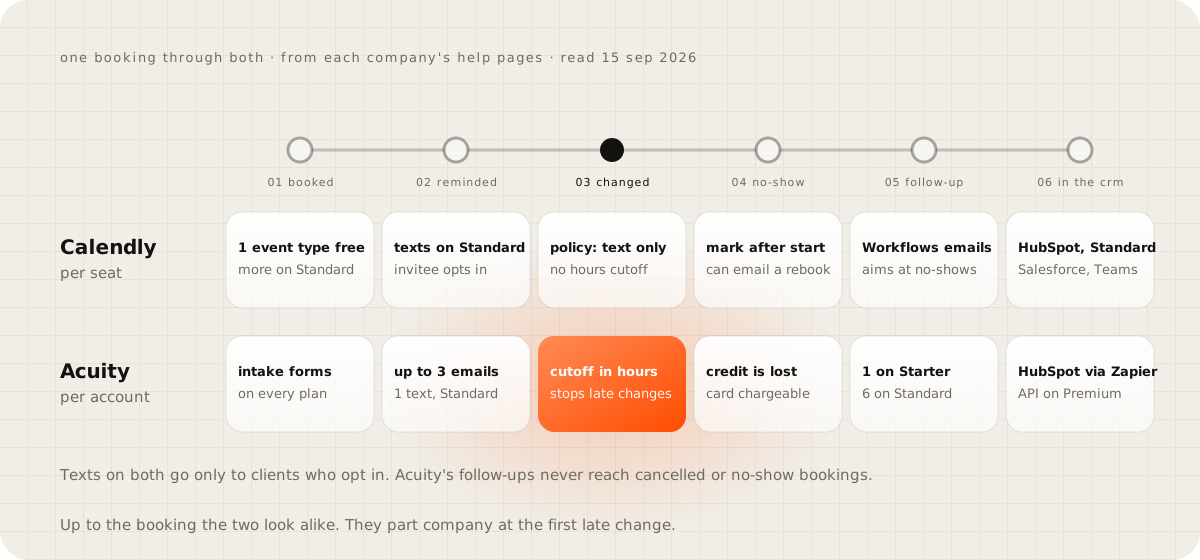
Up to the moment of booking, the two look alike. Both give the client a booking page, and Acuity adds an intake form on every plan. The differences start with the first reminder and widen at every step after it.
What each sends before the appointment#
Acuity sends up to three reminder emails, one by default, and the last can go as close as an hour before. Its text reminder is one per appointment, sent anywhere from 15 minutes to 14 days ahead, on Standard and Premium only. Calendly sends reminders through its Workflows, and texts from its Standard plan up.
Both text only clients who opt in, so some bookings will get email alone. Calendly's help adds that each text is capped at 180 characters and is not sent to Singapore, Russia or Iran.
Can a client cancel an hour before?#
On Acuity, you decide. Client rescheduling and cancelling can each be switched off, or blocked inside a number of hours before the start that you set. The same settings hold a minimum notice for new bookings and a limit on how far ahead anyone can book.
On Calendly, the policy is a paragraph. Its help article on cancellation policies says the text does not restrict cancellations or reschedules. When a business asked Calendly's community in December 2025 how to stop customers cancelling, the community manager said there is no time-based block. The suggestion was to remove the cancel and reschedule links from the emails, so clients have to get in touch.
That works, and it moves the work onto your phone. For a business built on meetings, the flexibility suits everyone. For one that sells the hour, it is where the money leaks.
What happens when a client does not turn up#
Calendly lets any plan mark a no-show once the start time has passed. From Standard, a workflow can email that person automatically, for example with a link to rebook, and the status appears in the meetings export. A reply in Calendly's community in January 2025 said the product has no no-show fee, and pointed to taking a deposit instead.
Acuity treats a no-show as a cancellation with a box ticked. A client who paid with a package, gift certificate or subscription code loses that credit, and pending follow-up emails stop. If card details were required at booking, the business can collect payment afterwards.
What reaches your CRM#
After the appointment, Acuity's follow-up emails can go out from about 14 minutes to a year later. Starter allows one per appointment and Standard or Premium up to six, and none go to cancelled or no-show bookings. Calendly's Workflows send follow-ups too, and they can target no-shows.
The record is where the two differ most. Calendly connects to HubSpot from Standard, sends meetings to Salesforce from Teams at $16 a seat, and offers custom webhooks from Standard. Acuity's help articles name no direct CRM connector. Its route to HubSpot is a Zapier trigger, capped at 25 zaps per contributor, and its API is on Premium only.
Neither tool is built to hold a client's history. A missed appointment and the rebooking that follows belong on one record, next to what the client paid and asked for. Getting them there takes Calendly's webhooks from Standard or Acuity's API on Premium, writing every booking, every change and every no-show into the CRM. A business with few bookings can skip the calendar altogether: the booking form on this site asks for a day and a part of the day, and the exact time is confirmed by email.
If your bookings are meetings and HubSpot is already your CRM, Calendly Standard's HubSpot connection does most of this without extra work. Where a client's full history should live is the subject of the private back office guide.
What each costs for 1, 3 and 10 staff#
Calendly charges per seat: Standard is $10 a month billed yearly, and Teams is $16. Acuity charges one price per account, capped by calendars: Starter is $16 for one calendar, Standard $27 for up to six and Premium $49 for up to 36, all billed yearly.
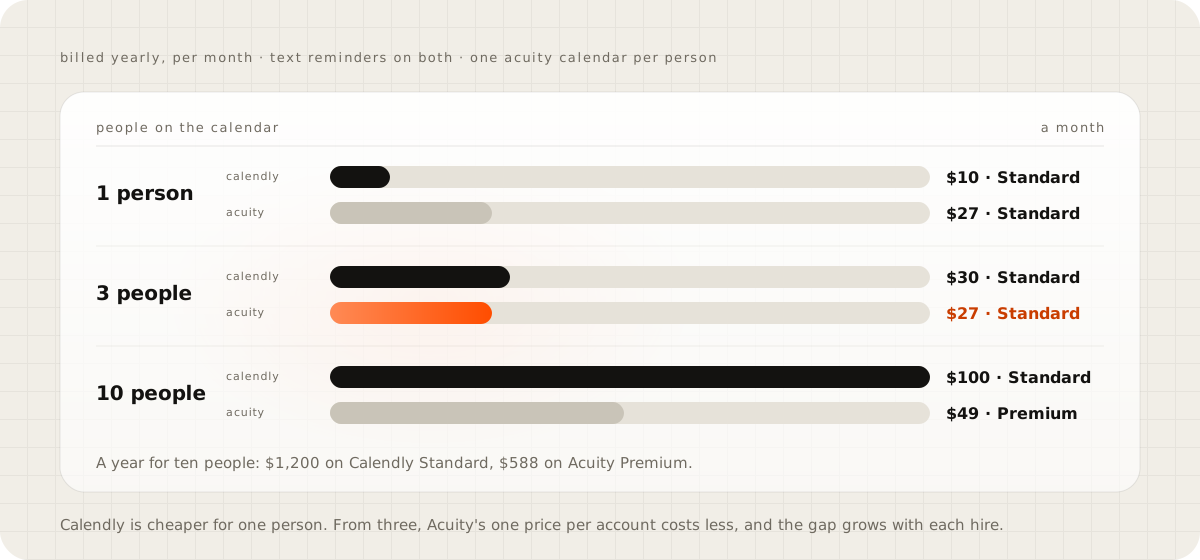
With text reminders on both, and one Acuity calendar for each person, Calendly is cheaper for one person: $10 against $27 a month. At three staff Acuity costs less, $27 against $30, and at ten it costs about half, $49 against $100. Over a year that is $588 against $1,200. Two needs change the answer: Salesforce means Calendly Teams at $16 a seat, and a signed HIPAA agreement means Acuity Premium.
Test your own booking page as a client#
Open your booking page on your phone and book a slot the way a client would. Cancel it an hour before the start and see whether anything stops you. Then mark yourself as a no-show and look for where that fact ends up: an email, an export file or your CRM. Those three answers tell you which of the two you need.
Questions people ask
Does Acuity Scheduling have a free plan?
Not on its pricing page. Every plan has a 7-day trial that needs no card, and the cheapest plan, Starter, costs $16 a month billed yearly or $20 billed monthly.
Why do some guides call Acuity's plans Emerging, Growing and Powerhouse?
Those are the old names. Acuity's help articles still pair them with the current ones: Emerging is Starter, Growing is Standard and Powerhouse is Premium, so a guide using the old names may also carry old prices.
Is Acuity Scheduling part of Squarespace?
Acuity's pricing page brands it as a Squarespace company. It is still sold as Acuity Scheduling, with its own plans and its own help centre.
Sources
- Pricing, Calendly
- How to send text messages with Workflows, Calendly Help
- How to mark no-shows for meetings, Calendly Help
- How to add a cancellation policy, Calendly Help
- Prevent customers cancelling or rescheduling, Calendly Community
- Charging a no-show fee, Calendly Community
- Pricing, Acuity Scheduling
- Text reminders, Acuity Scheduling Help
- Reminder emails, Acuity Scheduling Help
- Limit when clients can book, edit or cancel, Acuity Scheduling Help
- Marking appointments as no-shows, Acuity Scheduling Help
- Integrating Acuity Scheduling with Zapier, Acuity Scheduling Help
- Using custom CSS, webhooks and APIs, Acuity Scheduling Help