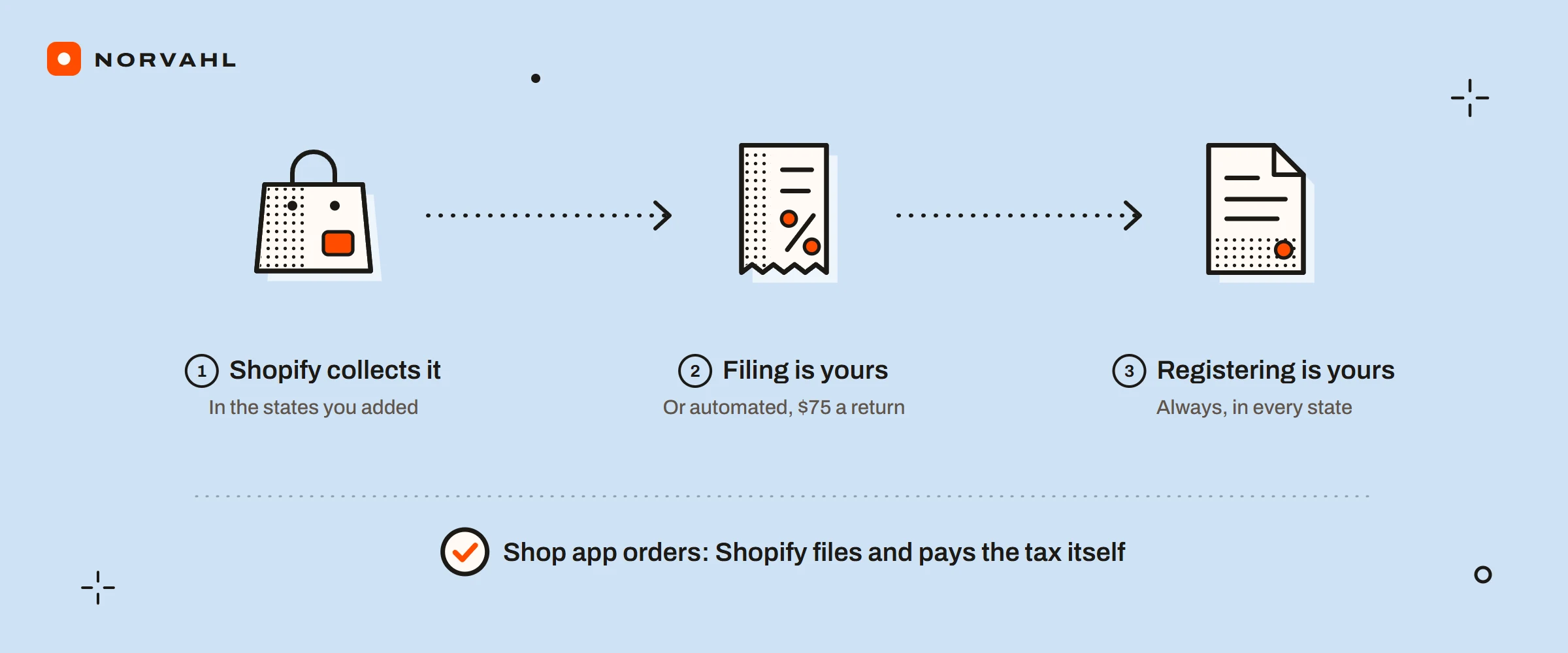
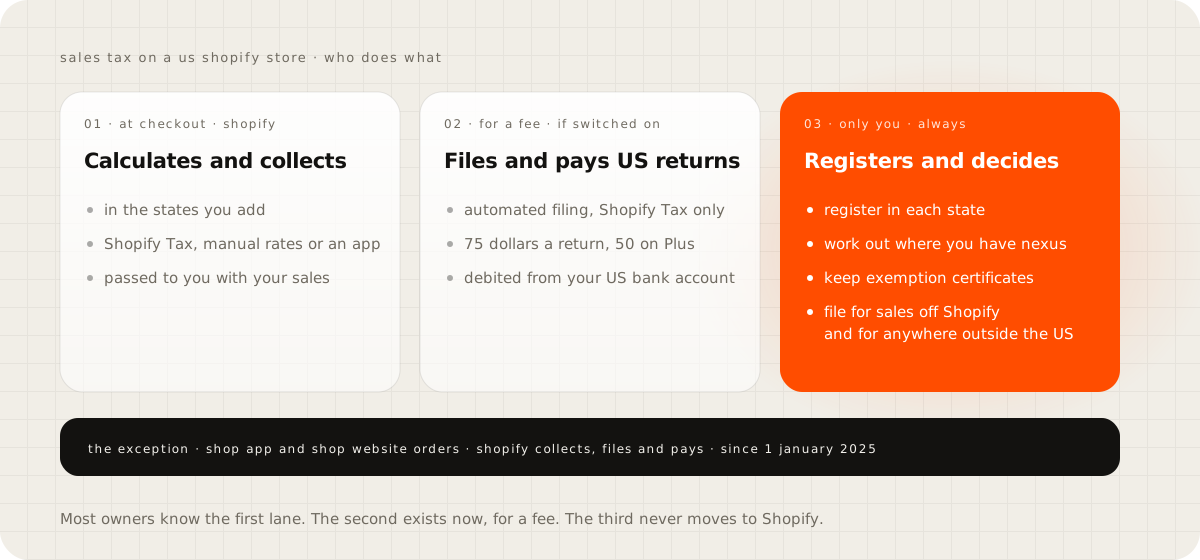
The honest answer to "does Shopify collect sales tax" comes in three parts, and most pages that rank for it get one of them wrong. Shopify calculates and collects the tax at checkout, but only in the states you add. It files your returns and pays the states only if you use Shopify Tax and switch on automated filing, at 75 dollars a return. Registering with each state, the step everything else depends on, stays yours whatever you switch on.
I build and look after Shopify stores, and I am not a tax adviser. This guide covers what Shopify does, what it costs and where each setting lives, checked against Shopify's own help pages in September 2026. Where you owe tax is a question for an accountant who knows your states, and nothing below replaces that conversation.
The short version
- At checkout, Shopify calculates and collects sales tax in the states you have added with a sales tax ID, and nowhere else.
- Filing and paying are yours, unless you use Shopify Tax and switch on automated filing: 75 dollars a return, or 50 on Plus, paid by debit from your US bank account.
- Registering with each state, and deciding where you have nexus, are always yours.
- One exception: orders placed in the Shop app or on the Shop website. Since 1 January 2025, Shopify collects, files and pays the tax on those itself.
Does Shopify collect sales tax at checkout?#
Yes, in the states you tell it to. In Settings, then Taxes and duties, you choose a tax service and add each state where you collect, with its sales tax ID. Shopify's US setup page walks through it. A customer shipping to a state you have not added pays no tax, which is the behaviour behind the most common forum question on this subject.
Since 14 July 2025, a US store has three ways to calculate tax: Shopify Tax, manual tax settings, or a third-party tax app. Basic Tax is no longer offered in the US, by Shopify's page on choosing a tax service. Of the three, only Shopify Tax brings automated filing, liability insights, rates by product category and customer exemptions. When your store's contact address and its fulfilment location differ, Shopify uses the location to work out nexus.
Does Shopify remit and pay sales tax for you?#
Only if you ask it to and pay for it. Shopify's Taxes page says it does not remit or file your taxes for you unless you use Shopify Tax and set up automated filing. With automated filing on, Shopify prepares your returns for every US state that collects sales tax, whether you file monthly, quarterly or once a year. Its filing partner, Sovos, submits them, and the tax is paid by direct debit from a US bank account you give Shopify.
The price is 75 dollars for each return on the plans below Plus, and 50 dollars on Plus, by Shopify's pricing page for automated filing. A return that is generated and then held up by an error is still charged, and that charge is not refunded. To avoid paying for a return you do not want filed, skip it before the 9th of the month.
Filing frequency adds up faster than people expect. A store that files monthly in one state and quarterly in two others files 20 returns a year. That is 1,500 dollars a year, or 1,000 on Plus.
It also has limits, and Shopify's eligibility page lists them:
- The store must be located in the US, priced in US dollars, with tax-inclusive pricing turned off.
- It covers only sales made on Shopify where you are the merchant of record, so marketplace orders from Amazon, Meta or TikTok are left out, as are imported orders.
- It files current and upcoming returns only, never past or amended ones.
- It does not handle Streamlined Sales Tax, prepayments, or several stores filed together.
- Each state's setup has to be finished before that state's deadline.
Shopify's filing terms add that you remain responsible for your tax compliance and should not rely on the service alone. In practice you are buying a filing clerk, and a clerk depends on your registrations and your settings being right.
The Shop channel exception#
There is one place where Shopify collects, files and pays without being asked. Since 1 January 2025, by Shopify's page on sales tax in Shop, the Shop channel handles US sales tax on orders placed in the Shop app or on the Shop website. That covers every US state with a statewide sales tax. It applies even where you have no nexus and no registration.
Orders paid with Shop Pay on your own store's checkout are not part of it. Only orders placed directly in the Shop app and on the Shop website count.
You will see these orders in three places. The tax is deducted from your Shopify Payments payouts, labelled Marketplace sales tax. The orders are marked Filed in your tax reports. And when a customer in a state where you never registered pays tax, check the order's sales channel first, because this is the usual reason.
You may still need to include these sales on your own state returns. If a state asks for proof, Shopify Support provides the Shop channel's collection certificate.
Where do you have to collect sales tax?#
Where you have nexus, and Shopify will not decide that for you. A physical presence such as a warehouse or an office creates nexus in a state. So does selling past a state's economic threshold, which states have been allowed to set since the Supreme Court's 2018 ruling. Thresholds differ by state and several have dropped their transaction counts recently, so check each state's own revenue page rather than a list in a blog post.
If you use Shopify Tax, Settings, then Taxes and duties, then United States, then Tax liability insights shows where you may owe. Shopify's liability insights page marks states as Action required when it finds potential liability, from a location or from sales. It marks them as Monitoring when your sales reach at least 80 percent of a threshold. It alerts you. It does not register you.
Two figures of 100,000 dollars get confused here. Shopify Tax's free allowance counts your global sales, shipping and tax included. A state's nexus threshold is set by that state's law, and Shopify measures it on net sales without shipping and tax. Crossing one tells you nothing about the other.
Shopify tax transaction fees#
Shopify Tax is free until your store's global sales reach 100,000 dollars, and what happens after that depends on when the store was created. Shopify's Shopify Tax pricing page splits the rule at 13 May 2026:
- A store created before 13 May 2026 gets the 100,000 dollar allowance every year. Past it, US orders cost 0.35 percent on Basic, Grow and Advanced and 0.25 percent on Plus, capped at 0.99 dollars an order and 5,000 dollars a year per region.
- A store created on or after 13 May 2026 gets the allowance once, for its lifetime. The rates and the per-order cap are the same, and the pricing page lists no yearly cap for these stores.
The fee applies to orders from the states, provinces or countries where you collect, including orders where an exempt product meant no tax was charged. It is billed with your subscription and never reaches your customers. The allowance also fills faster than product sales suggest, because shipping, tax, point of sale, the Shop channel and gift cards all count toward it. It is one more line on the monthly bill that the guide on what an online store really costs takes apart.
Here is what the fee comes to at a few sizes. The table assumes a US store on Grow or Plus, with every order shipping to a state where you collect. It also assumes an average order of 80 dollars, so no order reaches the cap, and a fee charged as a percentage of the order. For a newer store, the figures are for a year after lifetime sales have passed 100,000.
| Yearly sales | Created before 13 May 2026, Grow | Created before 13 May 2026, Plus | Created after, Grow | Created after, Plus |
|---|---|---|---|---|
| 80,000 dollars | 0 | 0 | 280 | 200 |
| 300,000 dollars | 700 | 500 | 1,050 | 750 |
| 750,000 dollars | 2,275 | 1,625 | 2,625 | 1,875 |
| 2,000,000 dollars | 5,000, capped | 4,750 | 7,000 | 5,000 |
Two things bring these numbers down. At 0.35 percent, any order above about 283 dollars hits the 0.99 dollar cap, so a store with large orders pays less than the table shows. And the fee applies only to orders from states where you collect. A store collecting in one state that ships 30 percent of its orders there pays about 30 percent of these figures. Automated filing, if you use it, comes on top.
One conflict to know about. Shopify's billing page still states the 5,000 dollar yearly cap per region with no date condition, while the pricing page lists it only for older stores. If your store is new and busy, read your own bill before you plan around either.
The Shopify sales tax collection screens to check#
This is the order I would go through them on a store I had just taken over:
- Settings, then Taxes and duties: which tax service is on. A store runs Shopify Tax or a tax app, never both at once.
- United States, then Regional settings: each state you collect in, with its sales tax ID. For California, Colorado, Florida, Illinois, Louisiana, Maine and Maryland, the state's advanced options also decide whether shipping is taxed.
- Each product's tax setting and its product category. Shopify Tax uses the category to decide which rate applies.
- Product overrides and Shipping overrides under the country, for any collection with a special rate.
- Customers set to pay no tax, under Customers, then the customer, then Manage tax settings.
- Tax-inclusive pricing, which has to be off for automated filing.
- Tax liability insights, for states where you are close to a threshold.
- Automated filing, if you use it, and the returns waiting for review before the 9th.
- The United States sales tax report under Analytics, then Reports, which is what a return is built from.
Shopify not charging sales tax#
When tax goes missing, the cause is almost always a setting, and each one has a place to look:
| What you see | The usual cause | Where to look |
|---|---|---|
| Only customers in your own state pay tax | Tax is collected only in states you have added | Settings, Taxes and duties, United States |
| One customer never pays tax | Their tax setting says not to collect, or an exemption applies | Customers, the customer, Manage tax settings |
| One product is never taxed | Its tax setting is off, or its category is exempt in that state | The product's tax setting and category |
| A group of products has a wrong rate | A product or shipping override | Product overrides and Shipping overrides |
| No tax line at checkout | Tax-inclusive pricing puts the tax inside the price | Your tax-inclusive pricing setting |
| Rates differ from your settings | A tax app is replacing Shopify's calculation | Your installed apps |
| Tax charged in a state you never set up | A Shop app or Shop website order | The order's sales channel |
On Shopify's community forum in January 2024, an owner reported Michigan orders suddenly carrying no tax with every setting unchanged, and the thread never got an answer. If you are there, go down this table in order before you open a ticket. It is quicker than waiting.
Shopify tax exemption for products and business buyers#
Exemptions come in two kinds. A product can be exempt, either because its tax setting is off or because its product category is exempt in a state under Shopify Tax. A buyer can be exempt too, such as a reseller or a nonprofit. Shopify's overrides and exemptions page covers exemptions for US states and Canadian provinces, plus EU and UK VAT, and choosing specific exemptions for a customer needs Shopify Tax.
Customer exemptions always take precedence over tax overrides, by the same page. They apply to online sales and to Shopify POS. If you sell to businesses through Shopify's B2B features, exemptions are set per company location, each with its own tax ID.
Watch the trap in tax-inclusive pricing. When prices include tax, an exempt customer still pays the full listed price, so the exemption does not lower what they pay.
What Shopify's help pages do not say is which exemption certificates to collect or how long to keep them. That depends on the state, so ask your accountant or the state's revenue department, and keep a copy of every certificate before you mark a customer exempt.
How to make a customer tax exempt in Shopify#
- Open Customers and select the customer.
- In the customer's section, open the menu and choose Manage tax settings.
- Choose Collect tax, Don't collect tax, or Collect tax unless exemptions apply, and pick the exemptions if you chose the last one.
- Select Save.
The setting follows the customer to online orders and point of sale. Check one test order afterwards, because an exemption set on the wrong customer record is invisible until someone reads a return.
When a Shopify tax app beats Shopify Tax#
A store uses Shopify Tax or a tax app, never both, by Shopify's tax apps page. These are the options as their own Shopify App Store listings described them on 15 September 2026:
| Option | What it does, by its listing | Price as listed |
|---|---|---|
| Shopify automated filing | Files and pays US returns | 75 dollars a return, 50 on Plus |
| Numeral Sales Tax | Registers, files and pays US sales tax, and VAT and GST in 70 or more countries | 75 dollars a filing, 150 a registration |
| TaxJar | US filing, including local returns and Streamlined Sales Tax | 39 or 99 dollars a month, with 2 or 4 AutoFiles a year |
| Kintsugi | Free nexus monitoring, with filing in the US, EU and Canada | Filing prices not listed |
| Quaderno | EU VAT, US sales tax and Canada, with e-invoicing | 29 to 149 dollars a month |
An app earns its price when you need registrations done for you, filing outside the US or Streamlined Sales Tax returns. It also wins when you want one tool across Shopify and your other sales channels. For a US store that sells only on Shopify and is registered where it needs to be, Shopify's own filing is the simpler bill.
Shopify tax reporting and the reports to file from#
Shopify's tax reports page lists the reports under Analytics, then Reports. The United States sales tax report breaks your tax down by state, county and jurisdiction, and exports the detailed transactions. The Taxes report gives a summary, Total sales by order shows gross and net sales with tax and shipping, and a Canada sales tax report exists for Canadian sales.
Shop channel orders appear in them marked Filed, so you can tell them apart from the tax you owe. Keep one habit in your books too: payouts arrive as lump sums with the tax you collected inside them, and that money belongs to the states until the return is paid.
Where your Shopify tax documents and 1099-K are#
The Form 1099-K is under Finance, then Documents, for the store owner or staff allowed to view tax documents, by Shopify's 1099-K page. Shopify delivers it in January for the year before. It covers only payments processed through Shopify Payments, which the guide on what Shopify Payments is explains, so Shop Pay Installments and other payment methods are not on it.
For tax year 2025, Shopify issues it above 20,000 dollars and 200 transactions. The IRS confirmed in IR-2025-107, on 23 October 2025, that the One, Big, Beautiful Bill restored that threshold. Several states set lower ones, including Arkansas at 2,500 dollars, Illinois at 1,000 with at least four transactions, and 600 dollars in states such as Maryland and Virginia. The 1099-K reports the payments you received, not your profit, and it has nothing to do with the sales tax you owe.
Selling from outside the US#
Shopify Tax calculates for the US, the EU, the UK and Canada, and elsewhere a store uses Basic Tax or manual rates. Automated filing is for US stores only, so no Shopify service files VAT or GST returns for you. If you sell into the US from abroad, Shopify has supported Shopify Tax for those orders since November 2023, by its changelog. The same questions of nexus and registration apply to you.
"I turned on Shopify Tax, so I'm covered"#
You are covered for the maths at checkout, and for filing if you pay for it. You are not covered for the decisions that come before either. Shopify Tax will not register you in a state, decide where you have nexus, collect your exemption certificates, or file for sales you make outside Shopify. Shopify's own terms say so.
Check your tax settings this week#
Open Settings, then Taxes and duties, and write down the states you collect in. Put that list next to your liability insights, or next to where your orders ship if you do not use Shopify Tax. Take both to your accountant with one question: are these the right states? Then decide whether automated filing, an app or your accountant files the returns, and put the next due date in your calendar.
Questions people ask
Does Shopify pay sales tax to the state for me?
Only if you use Shopify Tax and switch on automated filing, which files and pays your US returns for 75 dollars a return, or 50 on Plus, by debiting your US bank account. Without it, Shopify collects the tax at checkout and passes it to you with your sales, and filing and paying the state is yours.
Why is Shopify only charging sales tax in my own state?
Shopify charges tax only in the states you have added under Settings, then Taxes and duties, each with a sales tax ID. That is deliberate, because you should collect where you have nexus, and Shopify Tax's liability insights show the states where your sales are getting close to a threshold.
Why was tax charged in a state where I am not registered?
Usually because the order came through the Shop app or the Shop website. Since 1 January 2025 the Shop channel collects, files and pays US sales tax on those orders itself, so the tax appears even where you never registered.
How much does Shopify Tax cost?
It is free until a store's global sales reach 100,000 dollars, then 0.35 percent on qualifying US orders, or 0.25 percent on Plus, capped at 0.99 dollars an order. Stores created before 13 May 2026 get that allowance every year, with a yearly cap of 5,000 dollars per region; stores created from that date get it once.
Where is my 1099-K in Shopify?
Under Finance, then Documents, for the store owner or staff allowed to view tax documents. Shopify delivers it in January for the year before, and it covers only payments processed through Shopify Payments.
Sources
- Taxes, Shopify Help Center
- Sales tax in Shop, Shopify Help Center
- Shopify Tax pricing, Shopify Help Center
- Pricing for automated filing with Shopify Tax, Shopify Help Center
- Eligibility and considerations for automated filing, Shopify Help Center
- Tax overrides and exemptions, Shopify Help Center
- Form 1099-K tax reporting with Shopify Payments, Shopify Help Center
- IRS FAQs on the Form 1099-K threshold, IR-2025-107