Free shipping with Shopify comes in two forms, and neither needs an app. One is a free shipping rate in your shipping settings: a standing policy, such as free shipping over a set order value, that every customer the rate covers sees. The other is a free shipping discount, as a code or an automatic discount, which suits a campaign, a list of customers or a set of dates.
Setting either up is quick. The part worth more thought is the minimum order, because a threshold that is too low hands your margin to the carrier. Even Shopify's own worked example leaves out the card fee. Both setups are below, then the threshold worked from your own numbers, the settings that take free shipping away at checkout, other currencies and the free shipping bar.
How to add free shipping to Shopify with a shipping rate#
This is the route for free shipping over a set amount for everyone. On the current setup, Shopify's zones and rates page gives these steps:
- Go to Settings, then Shipping and delivery, and open the shipping profile.
- Under the zone, click the menu icon next to the shipping option and choose Edit shipping option.
- Tick Offer free shipping and enter the minimum order amount that qualifies.
- Click Done, then Save.
Three details on that page decide who actually gets it:
- On a rate with no conditions, free shipping applies to every order the rate covers. On order amount or weight tiers, it applies only when an order falls inside a tier.
- If your highest tier has a Maximum, an order above it gets no rate and a shipping error at checkout. Leave the top tier's maximum empty.
- To give free shipping on certain products only, put them in a custom shipping profile with a free flat rate. On the current setup, a cart that also holds other products still pays their rate, because rates from different profiles are added together.
For free shipping to one country only, tick it on that zone's option and leave the others alone. For free standard shipping with paid express, tick it on the standard option only.
If Shopify has moved your store to shipping options by market, the option lives in Markets instead. Shopify's page on the new setup says a flat rate can be set to 0 for free shipping. Once a cart meets an option's free shipping threshold, the whole option becomes free, including the matching rate within it. The guide on changing shipping prices on Shopify explains how to tell which setup you have.
How to offer free shipping on Shopify with a discount#
A free shipping discount is the promotion route. Shopify's free shipping discount page gives the path: Discounts, then Create discount, then Free shipping, then either Discount code or Automatic discount. The settings that matter:
- Countries, to limit where it applies.
- Exclude shipping rates over a certain amount, which keeps expensive options such as express paid while cheaper ones go free.
- Minimum requirements, either a minimum purchase amount or a minimum number of items.
- Eligibility, for all customers, chosen customers or customer segments.
- Usage limits, unlimited unless you set a total or one use per customer, and Active dates, with no end date unless you add one.
- Combinations, which decide whether it can stack with product and order discounts.
An automatic free shipping discount can also run at POS Pro locations. Use the rate for a permanent policy and the discount for anything with a start, an end or an audience. That covers a sale weekend, a code for your email list, or free shipping for one customer segment.
Where to set your free shipping threshold#
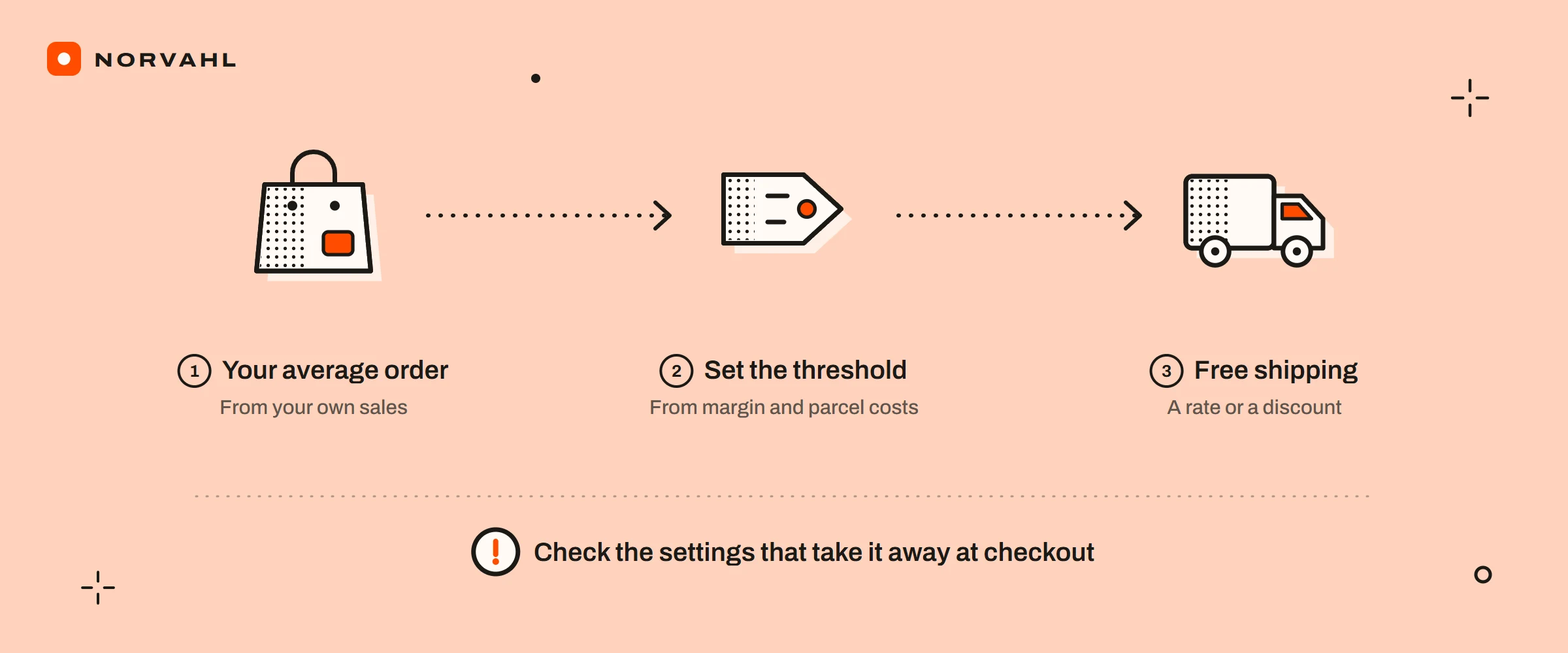
A threshold pays for itself when the extra amount it asks customers to spend earns enough margin, after the card fee, to pay for the parcel they no longer pay for. As a sum, it is your average order value plus your average parcel cost divided by your margin after the card fee.
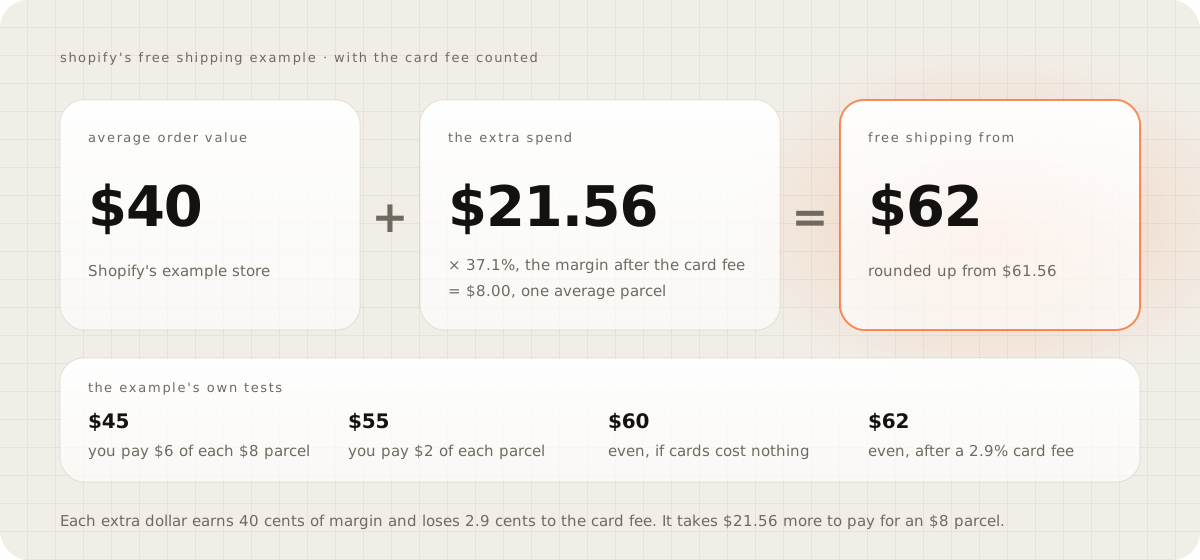
Shopify's blog post on free shipping, published in September 2025, tests a threshold for a store with a 40 dollar average order, an 8 dollar average shipping cost and a 40 percent gross margin. At a 45 dollar minimum, the extra 5 dollars earns 2 dollars of margin, so the store pays 6 dollars of each 8 dollar parcel. At 55 dollars it pays 2. The post stops there, and it leaves out payment processing fees.
Run the same numbers through the sum and the break-even is 60 dollars, where 20 dollars of extra spend at 40 percent earns the 8 dollars. With a 2.9 percent card fee, each extra dollar keeps 37.1 cents of margin, so the store needs 21.56 dollars more, and the threshold rounds up to 62 dollars.
Your own numbers are all in Shopify:
- Average order value is the Average order value over time report, under Analytics, then Reports. Shopify's sales reports page defines it as gross sales minus discounts, divided by orders, without shipping, taxes or duties. Checkout measures a cart against a free rate's minimum the same way, after discounts and before taxes, so the two figures compare directly. If your prices include tax, test a cart at the threshold before you rely on that match.
- Margin comes from your costs. If you fill in Cost per item on your products, Shopify's profit reports show gross margin, though only for products that had a cost recorded when they sold.
- Parcel cost is the label plus the box. Label charges sit in the Shipping section of your bill, under Settings, then Billing, and the guide on changing shipping prices has a monthly check that uses them.
- The card fee is your payment provider's percentage. On Shopify Payments in the US it is 2.5 to 2.9 percent plus 30 cents on the Basic, Grow and Advanced plans. Leave out the 30 cents, because every order pays it whether shipping is free or not.
My shipping calculator does this sum from three parcel sizes, takes the card fee off the margin, and prints the threshold with its reasoning. Rules of thumb such as 15 or 30 percent above your average order value turn up on several calculators and blogs. None gives a source, and they leave out what your parcels cost.
The sum has limits. Orders that already clear the threshold now ship free without anyone spending more, and each of them costs you a full parcel. Carts that grow to reach it may also weigh more.
It cannot count the shoppers who buy because shipping is free, either. Baymard Institute's cart abandonment research, updated in September 2025, reports that 40 percent of US shoppers who abandoned a checkout blamed extra costs such as shipping, tax and fees. Its figure leaves out shoppers who were only browsing. I found no study that says how much a threshold lifts a given store's order value, so treat your number as a starting point. After a month, check your average order value, the share of orders over the threshold and what you paid out in labels.
Once the threshold is set, say it in your shipping policy too, and the shipping policy template drafts one you can edit.
Why free shipping disappears at checkout#
Shopify's community has thread after thread about free shipping not showing at checkout. The causes are usually one of these:
- A discount code took the cart under the minimum. Shopify's troubleshooting page says checkout works out shipping rates from the cart value after discounts and before taxes. By that rule, a 105 dollar cart with a 10 percent code becomes a 94.50 dollar cart, and a free rate over 100 dollars no longer applies.
- Two shipping discounts. Shopify's page on combining discounts allows one shipping discount code per order, alongside up to five product or order codes. A free shipping discount stacks with product or order discounts only when each discount allows it, and when they cannot combine, Shopify applies the best one for the customer.
- The cart falls outside the rate. The troubleshooting checklist covers the rest: the product sits in a profile with no zone for that address, the country is not in a market, the rate's conditions do not match the cart, or a physical product has no weight.
- A top tier with a maximum, as described above.
Discount combinations also work only on the Online Store, the Storefront API and Shopify POS, not on external checkouts such as Facebook, Instagram or Google. Before a campaign goes out, put a cart through checkout just over the threshold, then again with your most-used discount code in it.
Free shipping in other currencies#
A free shipping discount's minimum is set in your store's currency. Shopify's Markets discounts page says it is converted to the customer's currency at checkout at the current exchange rate. So a 75 dollar minimum means whatever 75 dollars is in pounds on the day, and the local figure drifts as rates move. Fixed amount discounts cannot be set in a market's own currency.
Shipping rates show in the customer's currency once local currencies are on for a market, and flat rates in local currencies need Shopify Payments. To charge exact amounts in a region, Shopify's rates page suggests a separate zone for each currency or market. Any banner that promises a round local figure has to match what checkout does, so check it in each market. If you ever change your store's currency, the troubleshooting page says to delete and recreate your shipping rates, because they do not update on their own.
Free shipping bar on Shopify#
A free shipping bar tells shoppers how far they are from the threshold, and there are three ways to show one.
An announcement bar in your theme is the simplest. It shows one fixed message to everyone, so it cannot count up with the cart, and in other currencies its figure may not match checkout.
Your theme's own progress bar, if it has one. Some paid themes include a free shipping progress bar in their cart settings, so look in the theme editor before installing anything. I could not confirm that Shopify's free themes have one.
An app. These two ranked for the search, and their listings read like this on 15 September 2026:
- Hoppy Free Shipping Bar Upsell is free, rated 4.7 from 233 reviews, and adds itself through theme app extensions and app embeds. Its listing says it works with Shopify Markets and several currencies.
- Progressify is 5 dollars a month, rated 4.0 from 42 reviews, with up to three goals and display by market or country.
Any bar adds code to your pages, and neither listing says how much, so run PageSpeed Insights before and after you install one. The bar's goal also has to agree with Shopify. A bar that says 75 while the rate says 80, or one that ignores a code already in the cart, promises free shipping that checkout will not give.
Questions people ask
How do I add free shipping on Shopify?
Either tick Offer free shipping on a shipping rate under Settings, then Shipping and delivery, with a minimum order amount, or create a free shipping discount under Discounts, as a code or an automatic discount. The rate is a standing policy for everyone the rate covers, and the discount suits campaigns, chosen customers and set dates.
How do I work out a free shipping threshold?
Take your average order value and add your average parcel cost divided by your margin after the card fee. With Shopify's own example numbers, a 40 dollar average order, an 8 dollar parcel, a 40 percent margin and a 2.9 percent card fee, free shipping pays for itself from 62 dollars.
Why did free shipping disappear when a customer used a discount code?
Shopify works out shipping rates from the cart value after discounts and before taxes, so a code can take a cart below a free rate's minimum. An order can also use only one shipping discount code.
Can I offer free shipping on some products only?
Yes. Put those products in a custom shipping profile and give it a free flat rate. On the current shipping setup, a cart that also holds other products still pays their shipping rate.
Does a free shipping minimum change for customers paying in another currency?
For a free shipping discount, yes. The minimum is set in your store's currency and converted at checkout at the current exchange rate, so the local amount moves over time.
Sources
- Setting up shipping zones and rates, Shopify Help Center
- Free shipping discounts, Shopify Help Center
- Combining discounts, Shopify Help Center
- Troubleshooting and testing shipping rates, Shopify Help Center
- Discounts and gift cards in Markets, Shopify Help Center
- Understanding shipping options by market, Shopify Help Center
- Sales reports, Shopify Help Center
- Profit reports, Shopify Help Center
- Free shipping strategies to boost sales, Shopify blog
- Cart abandonment rate statistics, Baymard Institute