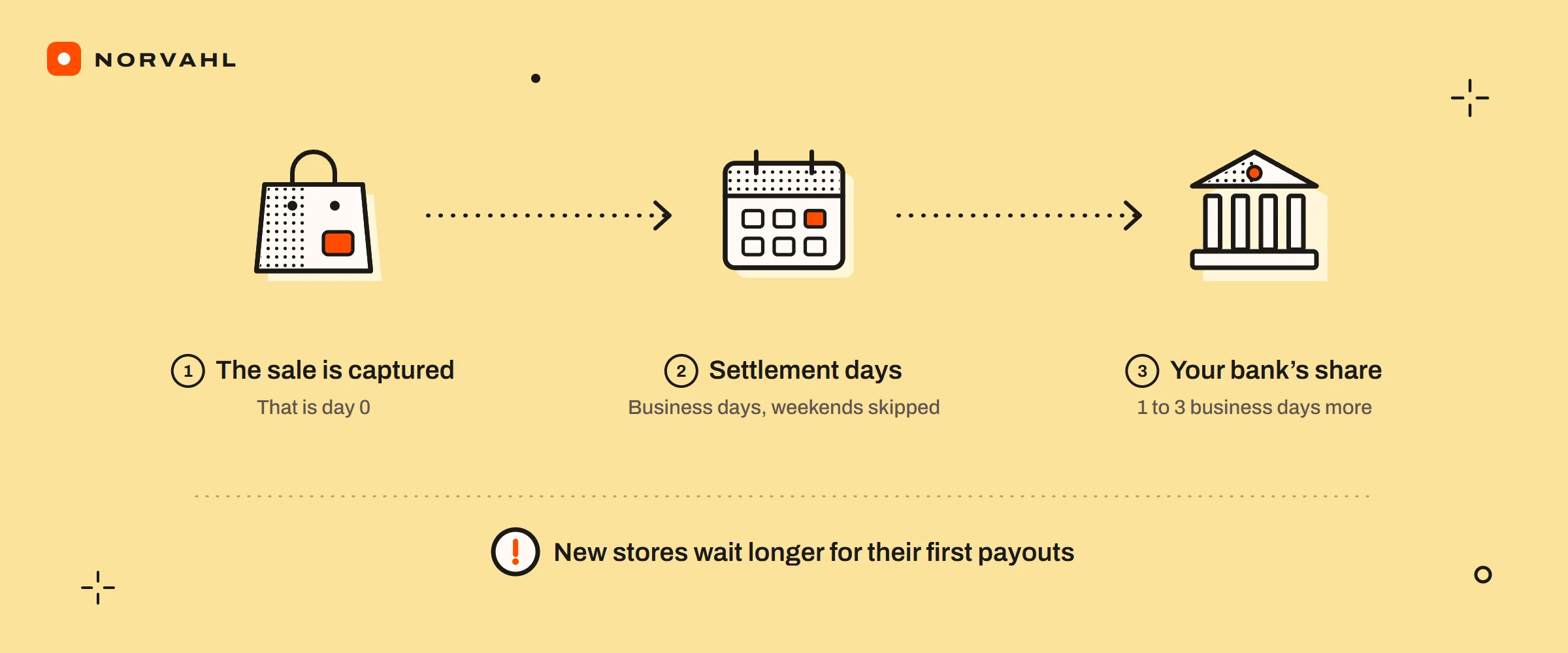
For an established store, Shopify sends a payout 3 business days after the customer's payment is captured in the US, Canada, the UK, New Zealand and most of Europe. Australia is quicker at 2 business days. Hong Kong SAR and Singapore take 4, Japan and the United Arab Emirates take 5, and Mexico takes 7. Your bank then usually needs 1 to 3 business days before the money shows.
Those are the minimums on Shopify's payout timing page, and the real day moves with a few rules. The clock starts when the payment is captured, and it runs in UTC. Weekends and holidays are not counted, and sales captured on Friday, Saturday and Sunday are sent together. A new store also starts slower than its country's minimum. The grid below turns those rules into the day your payout leaves Shopify.
Find the day your Shopify payout is sent#
Find the weekday the payment was captured, in UTC, and read across to your country's settlement time in business days. Each cell is the day Shopify sends the payout, worked out from its rules for an established store on a daily schedule, in a week without holidays.
| Captured on (UTC) | 2 days · Australia | 3 days · US, UK, Canada, New Zealand, most of Europe | 4 days · Hong Kong SAR, Singapore | 5 days · Japan, UAE | 7 days · Mexico |
|---|---|---|---|---|---|
| Monday | Wednesday | Thursday | Friday | Next Monday | Next Wednesday |
| Tuesday | Thursday | Friday | Next Monday | Next Tuesday | Next Thursday |
| Wednesday | Friday | Next Monday | Next Tuesday | Next Wednesday | Next Friday |
| Thursday | Next Monday | Next Tuesday | Next Wednesday | Next Thursday | Monday, 11 days later |
| Friday, Saturday or Sunday | Next Tuesday | Next Wednesday | Next Thursday | Next Friday | Tuesday, 11 days after the Friday |
Then add the bank. Shopify's pages give 1 to 3 business days from the payout being sent to the money appearing, and banks do not process transfers on weekends or holidays. So a payout sent on a Wednesday usually lands between Thursday and the following Monday.
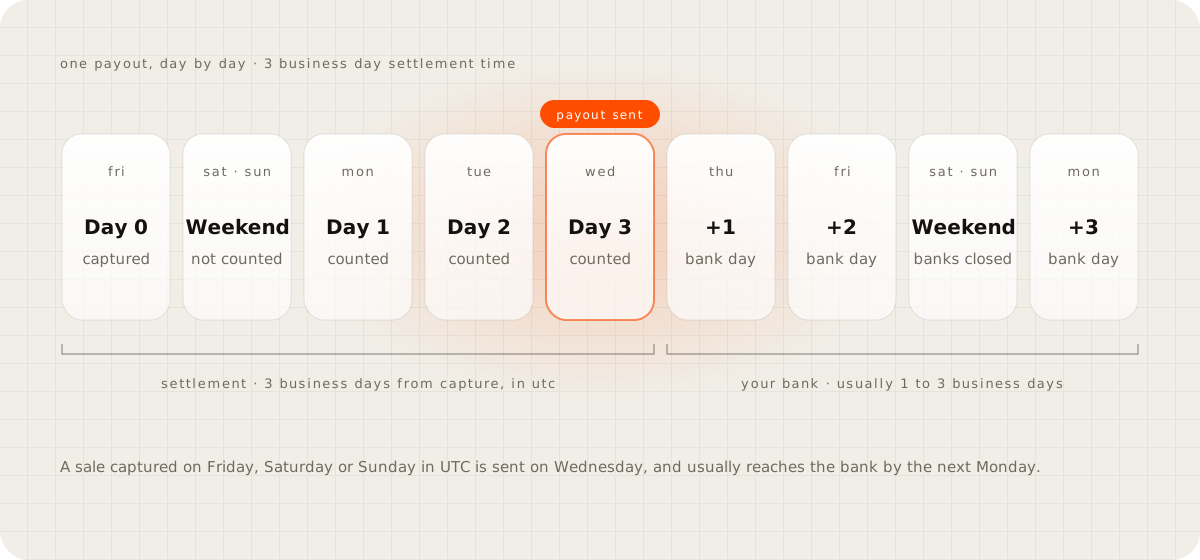
The clock starts at capture, not at the order. If you capture payments by hand, for example after checking an order, the count begins on the day you capture.
Evening sales can count as the next day. Shopify records the capture time in UTC. A card payment captured at 9 pm on Thursday 17 September 2026 in New York is 1 am on Friday in UTC. It joins the Friday group and goes out on Wednesday 23 September, not Tuesday 22. In the US the line falls at 8 pm Eastern or 5 pm Pacific while daylight saving time lasts, and an hour earlier after it ends on 1 November.
Morning sales in Australia can count as the day before. A sale at 9 am on Monday 21 September 2026 in Sydney is still Sunday in UTC, so it joins the weekend group and is sent on Tuesday 22 September. A sale at 11 am that Monday is sent a day later, on Wednesday 23.
Holidays push the day back, though Shopify does not say whose holidays count. Counting the bank holidays in the store's country, a US sale captured on Tuesday 24 November 2026 skips Thanksgiving and is sent on Monday 30 November. A UK sale captured on Wednesday 23 December skips Christmas Day and the Boxing Day substitute on Monday 28 December, so it is sent on Wednesday 30 December. A US payout sent on Wednesday 23 December should reach the bank between Thursday 24 and Tuesday 29 December, because Christmas falls on the Friday.
Japan has no daily payout schedule, so a store there waits for its weekly or monthly payout day after the date in the grid.
Shopify payout times by country#
Shopify's timing table, as it stood on 15 September 2026, gives each country's minimum settlement time and the smallest balance it will pay out.
| Settlement time | Countries | Smallest payout |
|---|---|---|
| 2 business days | Australia | No minimum |
| 3 business days | United States, Canada, New Zealand | No minimum |
| 3 business days | United Kingdom | £1 |
| 3 business days | Austria, Belgium, Croatia, Cyprus, Finland, Germany, Ireland, Italy, Lithuania, Malta, Netherlands, Poland, Portugal, Slovenia, Spain | €1 |
| 3 business days | Czechia (or 30 Kč), Denmark (or 20 kr), Norway (or 20 NOK), Romania (or 5 RON), Sweden (or 20 SEK), Switzerland (or 5 CHF) | €1 |
| 3 business days | Latvia | €3 |
| 3 calendar days | France | €10 |
| 4 business days | Hong Kong SAR (10 HKD), Singapore (1 SGD) | As shown |
| 5 business days | Japan (5 JPY), United Arab Emirates (20 AED) | As shown |
| 7 business days | Mexico | 10 MXN |
A few rows need a note:
- France counts calendar days rather than business days, and Shopify's page does not explain how that works with the weekend rule. That is why France is not in the grid above.
- Shopify Payments is also offered in Bulgaria, Estonia, Gibraltar, Greece, Hungary, Liechtenstein and Luxembourg, but the timing table does not list them. Check Shopify's page for your own country before counting on a date.
- A balance below the minimum stays pending until more sales take it over the line.
How does Shopify payout work#
A Shopify Payments sale goes through four stages before it reaches you. The payment is captured, it settles for your country's settlement time, Shopify sends it as part of a payout, and your bank deposits it. The guide to Shopify Payments covers what each sale costs on the way.
Not everything a customer pays you travels this way:
- Shop Pay Installments orders are paid to you in full, less the installments fee, within 1 to 3 business days of capture, inside your normal payouts. Affirm collects the installments from the customer, and the guide on Shopify split payments compares that with taking a deposit.
- PayPal Wallet payments on US stores that use Shopify Payments are bundled into the same payouts, on the same schedule.
- ACH direct debit payments can take up to 4 business days to settle.
- Your own PayPal account, or any other payment provider, never enters a Shopify payout. That money follows the provider's own timing.
Payouts run on a daily, weekly or monthly schedule, set under Settings, then Payments, then Manage in the Shopify Payments section, according to Shopify's scheduling page. Weekly lets you choose the day. A monthly date that a month does not have, such as the 30th in February, pays on that month's last day. Changing the schedule pushes pending payouts to the next date on the new one. In the US and France, Shopify works with more than one payment processing partner, so payouts can arrive sooner or more often than the schedule suggests.
Why does Shopify take so long to payout#
For a new store, the delay is built in. Shopify's US payouts page says a store starts with a longer settlement time, which can drop to the country's minimum as you reliably fulfil orders on time. Shopify publishes no starting figure and no timeline, so the grid gives a new store its earliest possible day, not its real one. Figures such as a week for a first payout, repeated on some blogs, are not on Shopify's pages.
In one Shopify Community thread, an owner who was told to expect 3 days was waiting 6, and support said it would get better over time. The thread never confirmed the cause, but that is what the new store rule looks like from the outside.
The other reasons are ones you can see or change:
- You changed the bank account. A new external account pauses payouts for 3 to 5 business days while Shopify checks it. Switching to Shopify Balance does not.
- Your schedule is weekly or monthly. Settled money waits for the payout day you chose.
- There is a hold. Shopify's account holds page says payouts stop until a hold is resolved, for reasons that include requests for information, incorrect bank details and routine reviews. The notice arrives in the admin or by email to the store owner, and no review time is given.
- There is a reserve. Shopify can hold part or all of your transactions for a set period, such as 10 percent of each sale for 120 days, when it sees chargeback or refund risk, long delivery times or a sudden jump in volume. The reserves page explains how to appeal one.
- Your account is on a custom schedule. Shopify's timing page says accounts it judges higher risk can have payout periods of 5 to 20 business days.
- Your balance is negative. Payouts wait until new sales cover the gap.
If you want the money sooner, the levers are few. Fulfil orders on time, which is what shortens a new store's settlement time. Keep the same bank account unless you have to change it. Choose a daily schedule. Where Shopify Balance is offered, Shopify says a payout into it arrives within 1 business day, or up to 5 for new merchants, and up to 7 days sooner than a bank.
Shopify payout status pending#
Search for this status and you mostly find pages about an order's payment being pending, which is a different thing. On Shopify's payout details page, under Finance, then Payouts, the statuses mean this:
- Pending belongs to transactions, not payouts. It marks sales that have not been added to a payout yet, and the payout date shown next to them is an estimate.
- Scheduled means the payout is on its way to your bank.
- Deposited means Shopify has sent it, and your bank typically takes 1 to 3 business days.
- Failed means your bank could not process it and the money was not deposited.
- Withdrawn means Shopify sent a withdrawal request to your bank, which only happens in regions where it debits negative balances.
Older threads, and some of Shopify's own country pages, still say in transit and paid. Shopify merged In transit into Scheduled in its developer API in 2025, and the main payouts page now uses Scheduled and Deposited.
Money stays pending longer than the grid says when the balance is below your country's minimum payout, or when you changed the schedule and it moved to the next date. It also stays put when Shopify has asked for information or placed a hold, so look for a banner in the admin and an email to the store owner. In a May 2026 thread, an owner's identity verification had sat in review for about 30 days, with a banner saying payouts were paused until it cleared. Other merchants advised checking that the address on the ID matched the store details exactly and asking support to escalate. Shopify publishes no review time, so reply with exactly what the email asks for and keep your ticket numbers.
When a Shopify payout fails or comes in short#
A failed payout means your bank turned it away. Shopify's failed payouts page lists the causes. They include a wrong account number, an account in a different currency, the wrong beneficiary name, and an account that is closed or cannot receive payouts. Replacing the bank account reactivates payouts, and it is worth doing quickly, because Shopify can hold payouts after one failure or after several in a row.
When a payout is smaller than your sales, the difference is itemised on the payout's own page. Shopify's page on lower or missing payouts lists refunds, chargebacks and their fees, processing fees, reserves, adjustments, a negative balance carried forward, holds on single transactions and currency conversion. If a Deposited payout has not reached your bank after 3 business days, call the bank with the payout's bank reference or trace ID.
Shopify payout report#
Each payout has its own page under Finance, then Payouts. It shows the total, the status, the bank account, a transfer reference, and a breakdown of charges, refunds, adjustments and reserves, with the transactions underneath. To get the transactions into a spreadsheet, use Export in the transactions view, pick the dates and choose Export balance transactions. Shopify emails the CSV file to you and the store owner.
In August 2026 Shopify added a summary on top of that. The Shopify Payments activity report, under Finance, then Documents, runs from your starting balance through gross activity, fees and payouts to your ending balance. It exports as a PDF, covers the last month, 3, 6 or 12 months or a custom range back to 1 January 2025, and shows one payout currency at a time. Its data runs 3 days behind, and it reports balance activity rather than revenue, so its timing will differ from your finance reports and bank deposits. It also leaves out Shopify's own billing fees and payments through other providers.
Two smaller changes help when you match payouts to deposits. Since 23 May 2026, the Payouts page calls the money waiting to be paid the Payout balance, where it used to say To be paid, and shows reserved funds on their own line. Each payout also carries a bank reference, which is what your bank will ask for if a deposit goes missing.
Questions people ask
How long does Shopify take to pay out?
For an established store, Shopify sends the payout 3 business days after the payment is captured in the US, Canada, the UK, New Zealand and most of Europe. Australia takes 2 business days, Hong Kong SAR and Singapore 4, Japan and the United Arab Emirates 5, and Mexico 7, while France counts 3 calendar days. Banks then usually take 1 to 3 business days.
Why is my first Shopify payout taking so long?
A new store starts with a longer settlement time than its country's minimum, and Shopify says it can drop to the minimum as you reliably fulfil orders on time. Shopify does not publish the starting figure.
Does Shopify pay out on weekends?
Weekends and holidays do not count toward settlement time. Payments captured on Friday, Saturday and Sunday are grouped and sent together, so with a 3 business day settlement time they go out on Wednesday.
What does pending mean on a Shopify payout?
Pending is a transaction status for sales that have not yet been added to a payout. A payout itself shows Scheduled while it is being sent, then Deposited, Failed or, in some regions, Withdrawn.
Where is the Shopify payout report?
Each payout has its own page under Finance, then Payouts, with a breakdown of charges, refunds, adjustments and reserves, and transactions can be exported as a CSV file. Since August 2026, the Shopify Payments activity report under Finance, then Documents, summarises balance activity as a PDF.
Sources
- Understanding Shopify Payments payout timing, Shopify Help Center
- Payouts with Shopify Payments in the United States, Shopify Help Center
- Scheduling your Shopify Payments payouts, Shopify Help Center
- Viewing and exporting your Shopify Payments payout details, Shopify Help Center
- Shopify Payments account holds, Shopify Help Center
- Overview of reserves in Shopify Payments, Shopify Help Center
- Failed Shopify Payments payouts, Shopify Help Center
- Resolving lower or missing payouts, Shopify Help Center
- Shopify Payments activity report, Shopify Help Center
- Review Shopify Payments balance activity with the new activity report, Shopify Changelog
- Shop Pay Installments FAQ, Shopify Help Center
- 2026 FedACH holiday schedule, Federal Reserve Financial Services
- Bank holidays, GOV.UK