In most Shopify stores, shipping prices live under Settings, then Shipping and delivery, inside a shipping profile, where you open the zone and edit the rate. Two things make it less simple than that. Shopify is moving stores to a new setup, shipping options by market, where prices live in Markets and a mixed cart is charged differently. And on the current setup, products in different profiles have their rates added together, which is what the Community threads about customers charged twice describe. Both are below, with zones, rules, split shipping and a check that your rates still cover the labels.
How to change shipping prices on Shopify#
Start by checking which setup your store has. In Settings, then Shipping and delivery, a list of shipping profiles means the current setup, which most stores still have. A Shipping options section means Shopify has upgraded your store to shipping options by market, and your shipping now lives under Markets.
On the current setup, Shopify's zones and rates page gives these steps:
- Go to Settings, then Shipping and delivery, and open the shipping profile. The general profile covers every product that is not in a custom one.
- Under the zone you want, click the menu icon next to a rate and choose Edit shipping option, or click Add shipping option for a new one. Add zone starts a new group of countries.
- Choose the Rate type: Flat, Order amount, Weight, or Carrier or app calculated.
- Enter the Price for a flat rate, or a Minimum and Maximum for each tier. For calculated rates, choose the carrier and set a Handling fee as a percentage or a flat amount.
- Click Done, then Save.
Several of the guides that rank for this still say Manage rates, Add rate or Edit rate. Shopify's help pages now use the names above, so if a guide's buttons do not match your screen, trust the screen. At checkout, customers see only the rates that apply to their order, with the cheapest selected by default.
On the new setup, the same prices sit in shipping options inside each market. Shopify's upgrade page says zones move into markets, product-based profiles become product conditions on rates, and location groups become location conditions. Stores that rely on a shipping app that is not yet compatible are upgraded later.
Changing the price on an order that already exists works differently. Open the order, click Edit, and in the Payment section choose Edit shipping fees. If the fee goes up, Shopify's order editing page says the customer owes the difference and you can send an invoice; if it goes down, refund the difference. Shopify does not recalculate rates when you edit an order, so check the total yourself.
Which rate type fits your products#
The rate type is a pricing decision, and it follows from how much your parcels vary.
A flat rate suits a store whose parcels fall in a narrow weight range. It is simple for the customer, and the light orders help pay for the heavy ones.
Weight tiers suit a wide range of parcels with label prices you know. Each tier has a minimum and maximum weight and its own price, so they are only as good as your product weights.
Order amount tiers charge by the value of the cart instead. They suit stores where price and size rise together, and they let shipping get cheaper as the order grows.
Calculated rates ask the carrier for a live price at checkout, which suits parcels that vary a lot. Shopify's own carrier integrations work on every plan in the countries it supports. Rates from your own carrier account or from an app need the right plan. Shopify's carrier accounts page lists them as included on Advanced and Plus, and available on Grow for an extra monthly fee or with yearly billing. Every other plan goes without, and the guide to Shopify shipping apps covers which app suits which setup.
A custom profile is for the few products that need their own prices, such as a heavy or fragile item. In Shipping and delivery, click Add custom profile, name it, add the products, then give it zones and rates. A product can sit in only one profile at a time, so adding it to a new profile removes it from the old one. Shopify allows up to 99 custom profiles, and the next section explains why fewer is better.
Whatever the type, work out the numbers before you type them in. My shipping calculator takes your parcel weights, label costs, order value and margin. It gives a flat rate for the Price field, weight tiers for Minimum and Maximum, and the percentage and flat amount for a Handling fee. Free shipping has its own settings, covered in the guide to free shipping on Shopify.
Why customers get charged shipping twice#
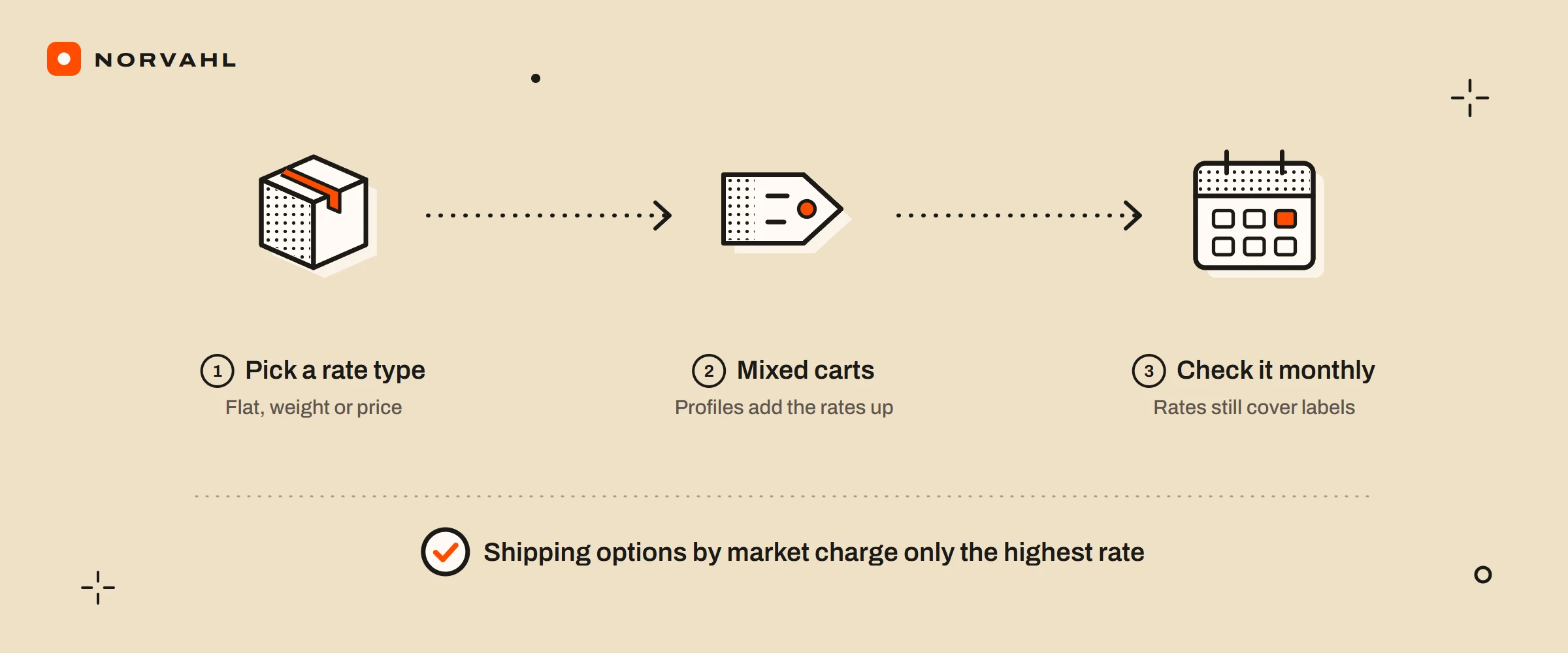
Shopify's page on combined rates explains it with its own numbers. When a cart holds products from different shipping profiles, each profile's rate is worked out and the rates are added together. A shirt with a 3 dollar rate and trousers with a 5 dollar rate give the customer an 8 dollar shipping charge, even if you pack them in one box.
Two more rules on that page catch stores out:
- Weight tiers add the package weight to every product. Shopify takes each product's weight plus your store's default package weight. By that rule, a cart of three small items counts the box three times and can land in a higher tier than the real parcel.
- Rate names decide what the customer sees. Rates with the same name in each profile are combined under that name, so Standard at 3 dollars and Standard at 2 show as Standard at 5. Rates with different names collapse into the cheapest options, shown only as Shipping.
The fixes are in how products are grouped. Keep products that ship in the same kind of parcel in one profile, and use a custom profile only when the parcel really is different. Name your rates the same in every profile, such as Standard and Express, so customers still get a choice. If you ship from several locations, Shopify's advice is to set your fulfilment priority so one location fills the order where it can.
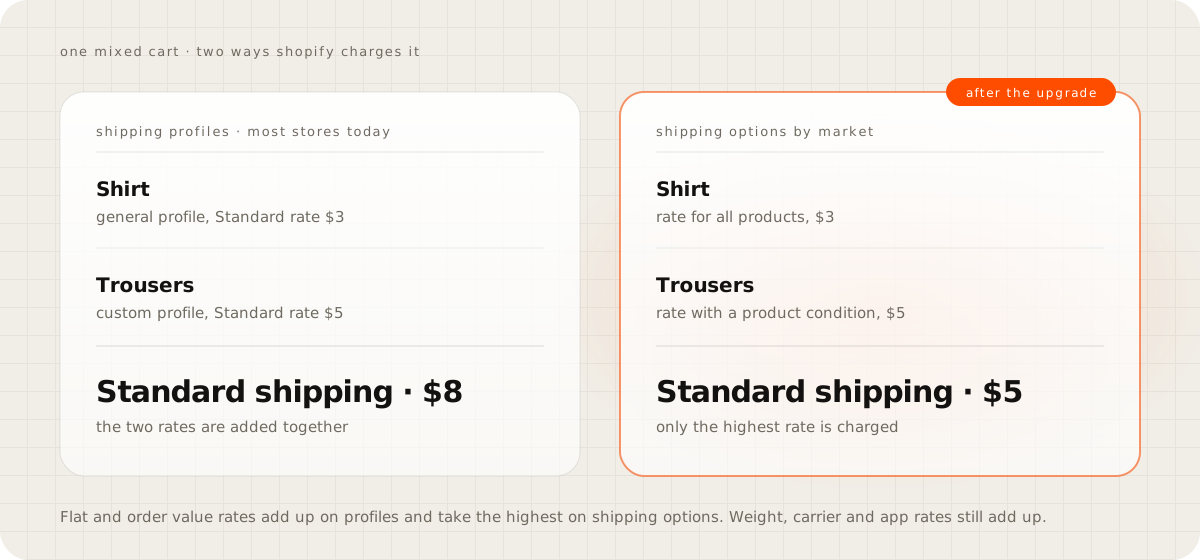
The new setup changes the rule. On shipping options by market, the upgrade page says a cart that matches more than one rate within a shipping option pays the highest rate, not the sum. That covers flat and order amount rates, while weight-based, carrier-calculated and app-calculated rates are still added up for each shipment. Worked through with the same cart, the shirt and trousers would pay 5 dollars instead of 8, if both rates end up in the same option.
So shipping income on mixed carts can change on the day of the upgrade without anyone editing a price. After an upgrade, put a mixed cart through checkout and compare the charge with what you expect. Split shipping is also switched on for every upgraded store, including stores that had turned it off.
Shopify shipping zone#
A shipping zone is a group of countries or regions, such as Europe or North America, with its own rates. To make one, open the profile, click Add zone, give it a name, choose the countries or regions, and click Done, then Save. Edit or delete a zone from the menu next to it.
Three rules on Shopify's zones and rates page matter:
- A country can sit in only one zone within a group of locations in a profile.
- A country has to be in an active market before customers there can order, whatever your zones say.
- A customer whose address is in no zone sees a notice that no shipping rate is available for their region.
So when customers in one country cannot place an order, check the market first and the zone second. For a cart with products from several profiles, also check whether each of those profiles covers that country.
Shopify's zone pages describe zones by country and region only. UK owners have asked in Shopify's community how to charge more for the Scottish Highlands and Islands, and that kind of postcode pricing comes from apps. ShipX offers postcode and distance rates from 9.99 dollars a month, and Advanced Shipping Rules adds postal code subzones on its 59 dollar plan.
Local delivery does price by postcode. Shopify's local delivery page lets a location deliver to a list of postcodes, with wildcards such as M5V*, or to a radius of up to 160 kilometres or 100 miles. Each location can have up to 10 delivery zones, each with its own price, an optional minimum order and up to three more prices by order value.
Advanced shipping rules on Shopify#
Before paying for a rules app, use what is built in: tiers by weight or order value, custom profiles by product, zones by country or region, and a handling fee on calculated rates.
The next step is a delivery customization, which hides, renames or reorders the options customers see at checkout. Shopify's checkout customization page says these come from App Store apps on the Basic plan and up, while custom apps built with Shopify Functions are for Plus. Shopify's own Checkout Blocks app can do it too, but its delivery customization page says that feature is for Plus only. A store can have up to 25 delivery customizations active across all apps. A renamed carrier rate keeps the carrier's name in front, so UPS Standard renamed Express Shipping shows as UPS Express Shipping.
A rules app is for prices the settings cannot express, such as by postcode, SKU or product tag, or blended rates across products. Two rank for this search, and their listings read like this on 15 September 2026:
- Advanced Shipping Rules is rated 4.8 from 321 reviews, at 9, 29, 59 or 99 dollars a month. It works with postcodes, SKUs, tags and weight, and can hide rates, add to them or take from them.
- ShipX, Shipping Rates & Rules is rated 5.0 from 1,231 reviews, with a free testing plan and paid plans at 9.99, 24.99 and 34.99 dollars a month. Its listing says some conditions need Shopify's carrier calculated shipping, so check your plan against the tier you need.
Shopify split shipping#
Split shipping is what Shopify calls a checkout that shows more than one shipment. Shopify's split shipping page lists when a cart splits: preorders, subscriptions, products from different locations or different shipping profiles, and Buy with Prime products. By default, checkout picks the lowest total shipping cost across the shipments and offers Lowest price and Fastest. More shipping options lets the customer choose for each shipment.
It changes the charge too. Orders that ship from locations in different location groups get a combined shipping charge, and products in different profiles add up as described above. Stores still on shipping profiles can switch split shipping in checkout on or off under Settings, then Shipping and delivery, while upgraded stores have it on.
One order sent to several addresses is a different request. I could not find a Shopify page that offers it, so that is app territory.
Does your shipping rate cover the label?#
Changing a price is the easy part. Knowing whether the new price covers your labels takes a check Shopify does not do for you. Its label billing page names no report that sets what the customer paid for shipping beside what the label cost.
Four things open that gap:
- Product weights. Shopify's packaging page says accurate weights are what make the shipping charge correct, and your default package's size is sent to the carrier with the order's weight.
- Dimensional weight. For some services, once a parcel's length, width and height multiply past 1 cubic foot, or 1,728 cubic inches, the carrier can charge for a weight worked out from its size.
- Adjustments. Carriers can charge more after scanning a parcel whose weight, size, service or address did not match the label. Shopify's billing page says adjustments show in the order's timeline and on your bill, and they can arrive well after the label was bought.
- Voided labels. An unused label voided within 30 days comes back as label credit for future labels, not as money.
The check I would run once a month works like this. Take the last 30 shipped orders. For each one, note the shipping the customer paid, from the order page, and the label cost plus any adjustment, from the order timeline or the Shipping section of your bill under Settings, then Billing. Add the cost of the box, and take the card fee off what the customer paid. If several orders lose money, raise that tier, fix the product weights or the default package, or move the heavy products into their own profile, then run the numbers through the calculator again.
When you change a price, update your shipping policy page to match, and the shipping policy template drafts one you can edit.
Questions people ask
How do I change shipping prices on Shopify?
Go to Settings, then Shipping and delivery, open the shipping profile, and use the menu next to a rate to choose Edit shipping option. Change the rate type or price, click Done, then Save. If your store has been moved to shipping options by market, the same prices live in Markets instead.
Why is my Shopify store charging shipping twice?
When a cart holds products from different shipping profiles, Shopify adds their rates together, so a 3 dollar rate and a 5 dollar rate make 8. Keep products that ship together in one profile, and give rates the same names in every profile.
Can I change the shipping price on an order that has already been placed?
Yes. Open the order, click Edit, and in the Payment section choose Edit shipping fees. If the fee goes up, send the customer an invoice for the difference, and if it goes down, refund the difference. Shopify does not recalculate shipping rates when you edit an order.
Can Shopify charge shipping by postcode?
Shopify's shipping zones are set by country or region. Local delivery can be priced by postcode or radius, and apps such as ShipX and Advanced Shipping Rules add postcode-based shipping rates.
What is split shipping on Shopify?
When a cart contains items that cannot ship together, such as a preorder and an item in stock, checkout shows separate shipments. The customer can pick the lowest price or the fastest option, and orders from locations in different location groups can carry a combined shipping charge.
Sources
- Setting up shipping zones and rates, Shopify Help Center
- Setting up and managing shipping profiles, Shopify Help Center
- Calculating shipping rates from different shipping profiles, Shopify Help Center
- Upgrading from shipping profiles to shipping options by market, Shopify Help Center
- Editing shipping fees in an order, Shopify Help Center
- Third-party shipping carrier accounts and availability, Shopify Help Center
- Customizing payment methods and delivery options at checkout, Shopify Help Center
- Customizing delivery options in Checkout Blocks, Shopify Help Center
- Split shipping in Shopify Checkout, Shopify Help Center
- Understanding shipment packaging and weights, Shopify Help Center
- Billing for shipping labels, Shopify Help Center
- Setting up local delivery for online orders, Shopify Help Center