Seal 'n Lock's WooCommerce store scores 94 on mobile PageSpeed and 100 on desktop, and it got there in four working days while it kept selling. It started at 68. That number is the end of a story that nearly did not have one. Halfway through the redesign that produced this store, a restore corrupted the old site's database and the site went dark, with no access to the hosting account to fix it there. I had been hired to redesign that site, not to rescue it.
Seal 'n Lock makes sealers for pavers and hardscape, trains the contractors who apply them, and sells to those contractors through a WooCommerce store at sealnlock.com. It is a real, named client. This is the whole engagement in three acts, the redesign, the rescue and the speed sprint, and every number in it comes from the project's own records. Where I do not have a number I say so instead of guessing.
The short version Act one, the redesign: a design system signed off and then enforced on 26 pages, 10 products, every form and every policy, with the plugin count cut from 63 to 32. Act two, the rescue: when the old site died mid-project it was migrated to hosting that fit the client, with orders preserved, five product-killing redirects caught before launch, and Stripe standing in for two dead payment accounts. Act three, the speed sprint: 68 to 94 on mobile and 100 on desktop in four working days, verified in a real browser, on a live store.

What Seal 'n Lock asked for#
A complete redesign of a working WordPress and WooCommerce site, and by complete they meant it. The old site had grown the way most working stores grow. Pages added for one campaign and never removed, two versions of some products, forms on a plugin nobody maintained, and a plugin list that had reached 63.
The first deliverable was not a page. It was a design system: colour tokens, a type scale on self-hosted Barlow Condensed and Inter, a spacing rhythm and a set of reusable components, signed off by the client before anything was built. Then the system was enforced on every page, which is the part a re-skin skips.
The scope that actually shipped, all of it verified against the live site:
- The home page designed and built to the new system with its own header, and the site-wide footer rebuilt.
- The client's 26-item page list audited against what actually existed, with the conflicts and gaps written down, then built out.
- The product catalogue consolidated. Duplicate and legacy product pages merged, all 10 products given per-product page templates, and the full PRO Series rename carried out, every product renamed and its page rebuilt from the client's content pack.
- Product category archives built to one reusable pattern. Cart, checkout and My Account built or audited.
- Every form rebuilt on a maintained tool with a proper thank-you flow and a verified submission path, and the dead legacy form plugin retired.
- Legal pages, the accessibility statement, privacy and terms, with client-approved copy.
- Accessibility as a build standard, not a plugin: WCAG 2.1 AA enforced on every published page. The final PageSpeed report shows Accessibility 92, Best Practices 100 and SEO 100.
- Content: 12 client articles published as proper posts, testimonials rebuilt, and 17 blog posts with missing featured images repaired.
- The plugin diet: 63 plugins to 32. Dead builders, dead backup tools and duplicated functions removed.
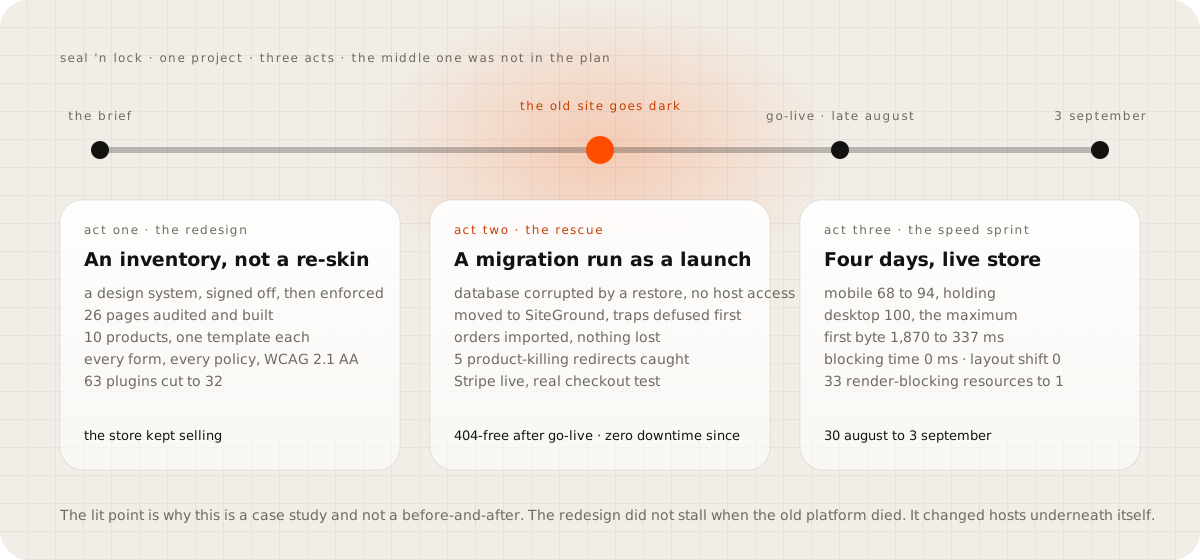
The client's correction rounds after launch were made directly on the live store, with zero downtime. That detail matters more than it sounds, and the reason is the second act.
The day the old site went dark#
In the middle of the rebuild, the old site went offline. A restore had corrupted its database, and the client did not have access to the WP Engine account to recover it there. I am not going to speculate here about why the database corrupted or whose restore it was, because I do not know, and the story does not need it. The site was down, the store could not sell, and the redesign in progress was suddenly the only working version of the business's website.
The decision was to move the client to hosting that fit their needs, which was SiteGround, and to treat the move as a launch rather than a file copy. A file copy is how migrations lose orders. A launch has a checklist, and this one had the traps that break WordPress migrations silently defused before the import ran.
The database table prefix on the new host did not match the old one, which on its own is fine. The trouble is the user-roles rows, which carry the prefix in their names and lock every administrator out of the new site when it differs. Those were rewritten before the import. So were the zero-date rows that abort a MySQL import halfway through and leave a half-loaded database that looks fine until someone opens an order.
Then commerce continuity. The live WooCommerce orders were imported, so no purchase history was lost. A content-drift report reconciled everything that had changed on the old site while the rebuild ran, so nothing published in the gap went missing.
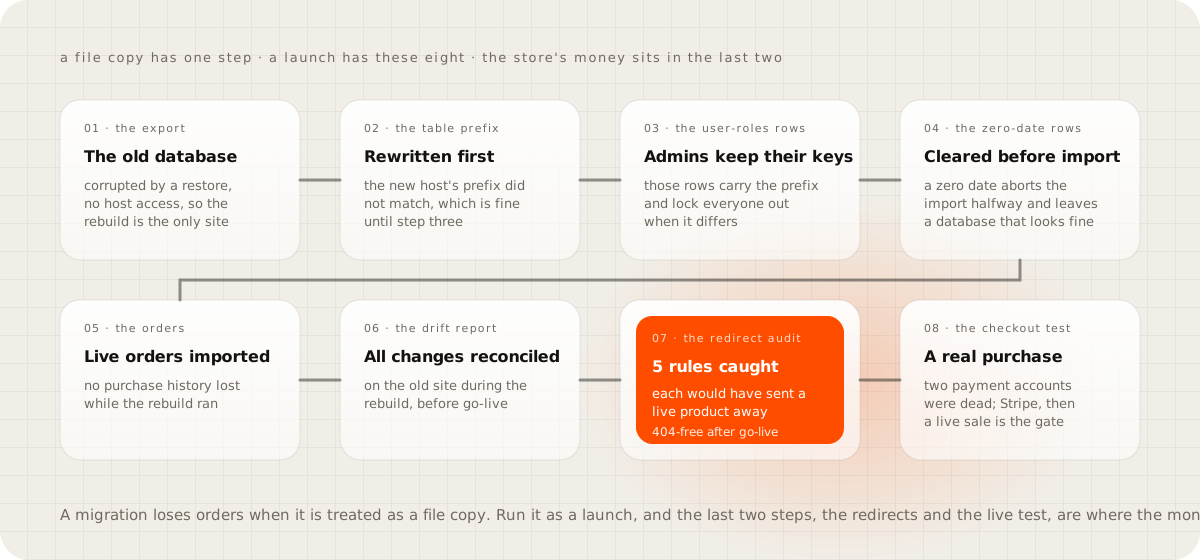
The redirect audit is the part I would tell any owner about. The go-live redirect map, the list of old addresses pointing to new ones, contained five rules that would have sent live, purchasable product URLs to the wrong place. On a store, a redirect like that is a product that stops selling with no error anywhere. All five were caught before launch, and the site verified 404-free after go-live.
Then payments, which is where a rescued store most often fails quietly. The client's WooPayments account was not accessible and the legacy Authorize.Net account was dead, so the rebuilt checkout could not take money. I set up Stripe for them. That experience became a standing rule on every project since: after any migration, a real transaction goes through the live checkout before anyone is told the site is back. A checkout that renders is not a checkout that works.
The site went live on SiteGround in the last days of August, with its orders, its products and a working card form. The redesign never stalled. It changed hosts underneath itself.
Four days to a fast store#
With the store live and selling, the last act was speed. The starting point was a mobile PageSpeed score of 68, a time to first byte of 1,870 milliseconds, 33 render-blocking resources, a shop page weighing 2.71 MB, and seven font requests totalling 260 KB.
The method I used has a name because it is the transferable part of this story: Tailored Speed Optimization. Measure first. Diagnose the root cause on this site, rather than installing a preset that was tuned for a different one.
Give each part of the pipeline one owner, so two tools are never fighting over the same job. Verify every change in a real browser and never in a score alone. And keep the live site safe with an instant rollback, because this store was taking orders while the work ran.
Five fixes did most of the work.
The Cloudflare HTML cache rule. Cloudflare does not cache HTML by default, only files by their extension. So a WordPress page behind Cloudflare still hits the origin on every visit unless a cache rule says otherwise. An explicit rule for HTML, with the cart, checkout and account pages excluded as WooCommerce's own documentation requires, took the time to first byte from 1,870 milliseconds to 337. That is a fall of 82 percent from one rule.
Zero render-blocking JavaScript. The 33 resources that held the first paint hostage became one, by loading scripts after the page had painted and removing the ones nothing used.
The font that downloaded four times. One 48 KB font file was being fetched four times on every page, from four slightly different declarations. One line of CSS fixed it and saved 145 KB. Fonts went from seven requests and 260 KB to four requests and 116 KB.
Right-sized images. Every image was sized to what the browser actually picks on a phone rather than what the designer uploaded, and the shop page fell from 2.71 MB to 1.32 MB.
Lazy loading driven by script. The browser's own lazy attribute was measured on mobile networks first, found to barely help on this site, and replaced with lazy loading that waits for the image to be needed.
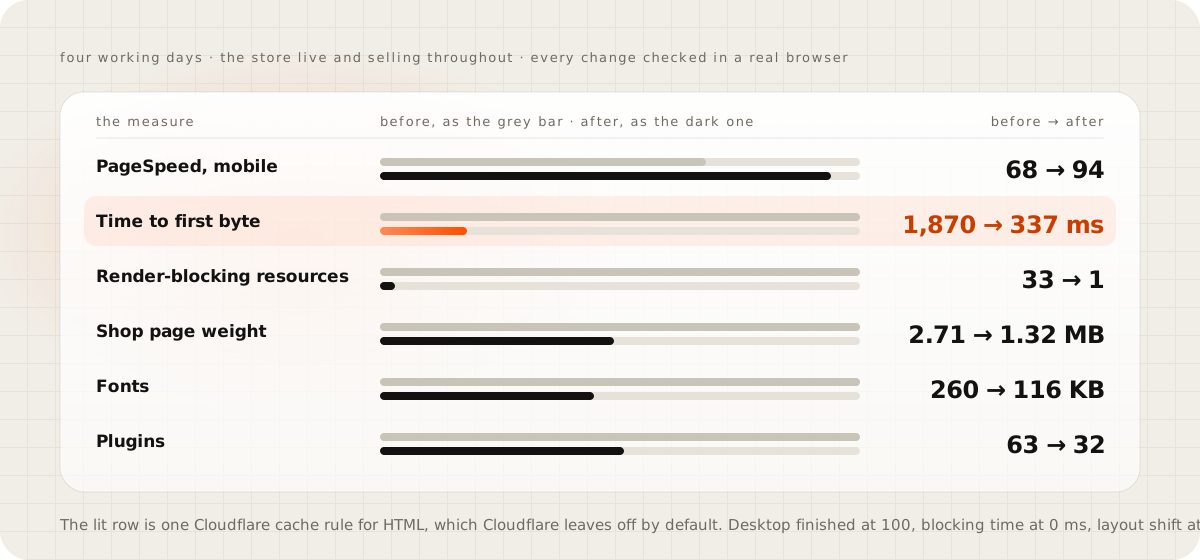
The result held. Mobile PageSpeed at 94 across repeated tests the client ran themselves, and desktop at 100, which is the maximum the scale allows. Total Blocking Time of 0 milliseconds against Google's threshold of 200, and a Cumulative Layout Shift of 0 against a threshold of 0.1. I report the number that held on purpose, not one lucky run. Google's own documentation says the score varies from run to run with network and hardware conditions. So the number that matters is the one that holds when the client runs the test on a different afternoon.
The scoreboard#
| Area | Before | After |
|---|---|---|
| The old site, mid-project | offline, database corrupted | rescued, migrated, relaunched |
| Payments | unable to charge a card | Stripe live, with a live checkout test as a standing gate |
| PageSpeed, mobile | 68 | 94, holding across repeated tests |
| PageSpeed, desktop | 100, the maximum | |
| Accessibility, Best Practices, SEO | 92, 100, 100, WCAG 2.1 AA as the build standard | |
| Time to first byte | 1,870 ms | 337 ms |
| Total Blocking Time, layout shift | 0 ms, 0 | |
| Shop page weight | 2.71 MB | 1.32 MB |
| Fonts | 7 requests, 260 KB | 4 requests, 116 KB |
| Render-blocking resources | 33 | 1 |
| Plugins | 63 | 32 |
| Products | duplicates and legacy pages | 10, renamed to the PRO Series, one template each |
| Content | 26-page list delivered, 12 articles, legal pages, testimonials, archives | |
| Broken links | 404-free, five product-killing redirects caught before launch | |
| Downtime after go-live | zero |
What I would tell you before your own redesign#
Three things from this project travel to any store on WordPress.
A redesign is an inventory, not a coat of paint. The 26-page audit, the product consolidation and the plugin diet took longer than the visual design, and they are why the site could be rescued at all. By the time the old one died, the new one already knew every page, product and form it needed.
A migration is a launch. The prefix, the roles rows, the zero dates, the orders, the drift report, the redirect audit and the live transaction test are the checklist, and the last two are the ones that protect money. Five redirects and two dead payment accounts would have cost this client sales without a single error message.
Speed is diagnosis. Nothing in the last act was a preset. The one rule that did the most, caching HTML at the edge, is one Cloudflare leaves off by default. It was found by measuring where the 1,870 milliseconds went rather than by installing another plugin. The general version of what was cut is the guide on why a WooCommerce checkout is slow. What a store like this pays to run each month is the guide on the real monthly cost of a small online store.
One honest note. This store stays on Elementor and a lean plugin stack because the client's team edits it themselves, and it reached 94 anyway. The storefront on my homepage is what a store looks like when it is built rather than assembled, and it loads in 0.9 seconds. Both are real answers. The right one depends on who edits the site on a Tuesday.
If your store is somewhere in this story#
Run three checks this week. Put an item in the cart and watch the time to first byte on the checkout. Count the plugins and write the job of each in one sentence. And, if anyone has ever moved or restored your site, make a real purchase through your own checkout today, because the site rendering is not the same as the site working.
Questions people ask
Can a WooCommerce store be redesigned while it keeps selling?
Yes, and this one was. The rebuild ran alongside the live store, the client's correction rounds after launch were made directly on the live site, and there was no downtime after go-live. The speed work in the last act was done on a store taking orders the whole time.
What happens if the old site goes down in the middle of a redesign?
You stop treating the move as a file copy and run it like a launch. Here that meant defusing the database traps before the import, bringing the live order history across, auditing every redirect against the product URLs, and getting a payment provider working again before anyone was told the site was back.
How fast can a WooCommerce store on Elementor get on mobile?
This one went from 68 to 94 on mobile PageSpeed, holding across repeated tests the client ran, with 100 on desktop, 0 ms of blocking time and 0 layout shift. It took four working days, and the five fixes that did most of it are in the guide.
Why does the mobile score change from one run to the next?
Google's own PageSpeed documentation says the score varies from run to run because of network and hardware conditions. The number worth trusting is the one that holds across repeated tests, which is why I report 94, the score that held across the client's repeated tests, and not a single best run.
What is Tailored Speed Optimization?
The method used in the last act. Measure first. Diagnose the root cause on this site instead of installing a preset. One owner for each part of the pipeline. Verify every change in a real browser. Keep the live site safe with an instant rollback.
Sources
- Default cache behavior, Cloudflare documentation
- About PageSpeed Insights, Google for Developers
- Largest Contentful Paint, web.dev
- Total Blocking Time, web.dev
- Cumulative Layout Shift, web.dev
- Web Content Accessibility Guidelines 2.1, W3C
- How to configure caching plugins for WooCommerce, WooCommerce developer documentation