The nearest crew should have a new lead in its inbox before the customer has closed the tab. Most small networks still route by hand instead: someone reads the form on Monday, guesses who covers that town, and forwards it. The routing hub I built for a network of concrete-coating installers does the same job with no human in it. It assigns a lead in 2.4 seconds median from the moment the form posts. If the crew ignores it, the lead moves to the next crew in 15 minutes.
Automatic lead routing by service area is the part of that hub that does the work, and the part the software pages get wrong. They route by a list of zip codes, never say the word geocode, and stop at the moment of assignment, as if a crew always answers. This is how the working version does it, what it costs, and when I would not build it.
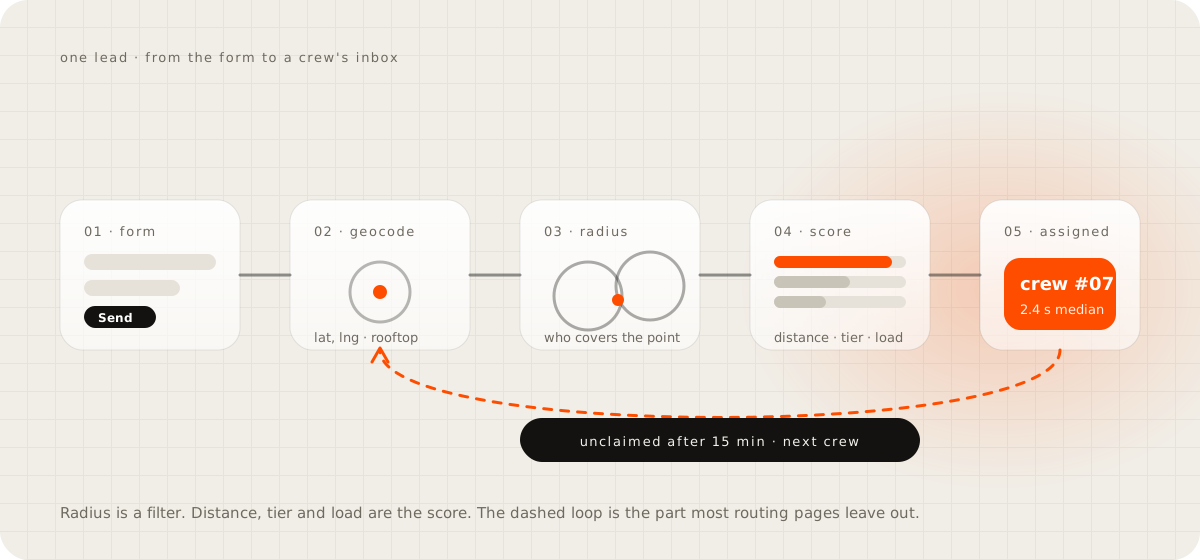
The short version Turn the address into a point on the map, keep only the crews whose service radius covers that point, and score them on distance first, plan tier second, and how booked they are this week third. The top score gets the lead and a 15 minute window to claim it. When the window closes unclaimed, the next crew gets it. Run it in a system you own, so nobody pays a CRM seat for every installer in the network.

Why a list of zip codes is the wrong map#
The usual first attempt is a spreadsheet: one column of zip codes, one column of who covers each. That is what LeadSquared's help page describes: a CSV of zip codes and user emails uploaded into the CRM, the same zip on several rows to share it round robin. It works on the first day. It breaks at the edges.
A zip code is not a territory. The Census Bureau puts it plainly. The Postal Service assigns ZIP Codes to delivery routes, which makes them "a point-based dataset unsuitable for mapping", and not every valid ZIP Code has a mapped area at all. So the list makes a crew responsible for all of a mail route or none of it, when the honest answer is that they cover the west half. A lead from a zip nobody typed in lands on the default user, which in a small business is the owner's phone at midnight.
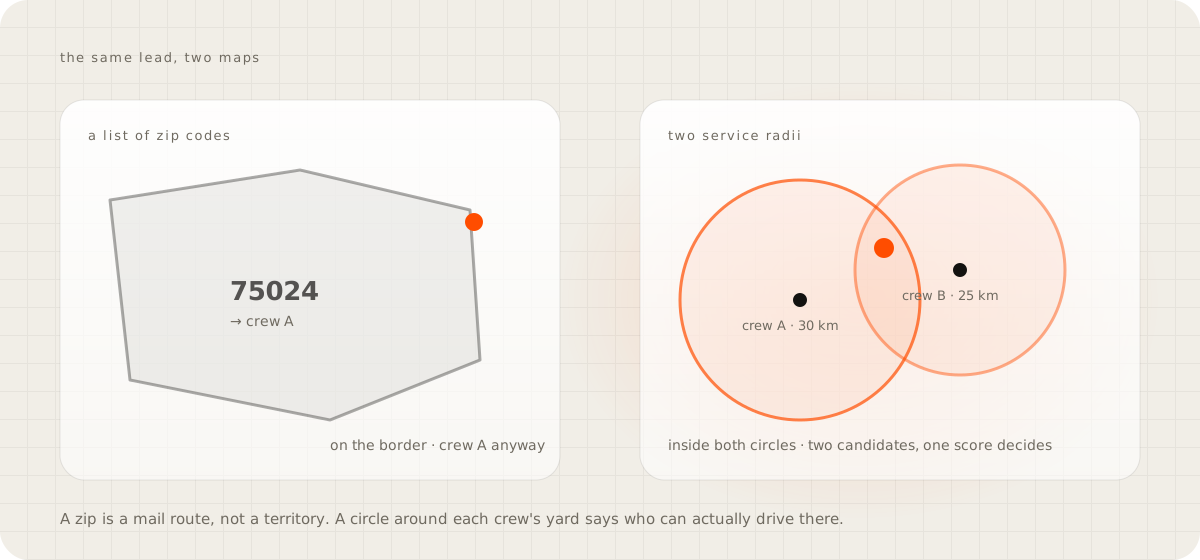
The kickoff note for the installer hub said it would route "by plan and territory". By the time it shipped there was no territory table in it. Every installer has a home point and a service radius in kilometres, every lead is a point, and the only question is whether the point sits inside the circle. Two circles over one driveway is not a conflict, it is two candidates to score. Storepoint's dealer-locator guide lands in the same place: territories drawn on a map, allowed to overlap, premium dealers boosted to the top.
Geocode the lead first, and know how rough the answer is#
Geocoding turns a street address into a latitude and a longitude. Google's Geocoding API returns the point with a location_type that says how far to trust it. A ROOFTOP result means a street address, RANGE_INTERPOLATED is a guess along the road, and GEOMETRIC_CENTER or APPROXIMATE means all it had was a town or a postal code. It also flags a partial_match when it could place only part of the address. Route on an approximate point as if it were a rooftop and a driveway on the edge of town lands in the wrong circle.
The hub geocodes on the server the moment the lead arrives, Google first and TomTom as the fallback, and keeps each result for 30 days so a repeat address costs nothing. Two things about that design still bother me: the geocoder runs inside the form request with an 8 second timeout, so a slow provider becomes a form that hangs. And on a fresh install with no API key, every incoming lead sits at "pending location" with nobody assigned until the key goes in. Neither is fatal, and neither appears on a vendor page. Ask for the street address, keep the zip as a check, and log the moment a geocode fails so the lead cannot vanish.
To clean a backlog before you build anything, the Census Geocoder is free and takes a batch of up to 10,000 addresses, interpolated from Census address ranges. I have not put a live form on it and would not. For last year's spreadsheet it is the right tool.
Nearest, round robin, or a score#
Round robin is fair and blind: lead one to crew A, lead two to crew B, and crew B does not cover that town. Nearest-only is the opposite failure, where the crew closest to the busiest suburb drowns and the others get nothing and leave the network. The CRMs that sell routing know this. Plauti, for one, offers a territory filter with round robin inside it, a "Distance Mode that routes records to the nearest available rep", and capacity models with an SLA reassign. That is the right shape, and it lives inside a CRM, so the subscription comes first and the routing is rented on top.
The hub does it as a score with a hard filter in front. Radius first: a crew whose circle does not cover the point is not in the running. Distance then carries 70 percent of the score in bands, from 100 points inside 10 miles down to 10 points past 50. Plan tier carries the other 30, with premium at 100, pro at 65 and basic at 30. The weights and the bands are settings, so the owner can move them without me.
Load is not a weight, it is a cap. Each installer has a minimum and a maximum per day, week and month. The engine fills everyone to their minimum before anyone goes past it, then to the maximum, then queues the overflow. If no circle covers the point the radius can widen in steps, 15 to 70 kilometres, when the owner allows it. If that fails, the lead is left unassigned and the owner is told, because a wrong crew is worse than an empty slot.
You can watch the mechanism on the routing desk on the homepage. Lead #4821 arrives, passes four checks, is geocoded to Plano, and twelve installers are scored. The card shows the winner's math: start at 100, lose points for distance, gain for tier, lose for every job already booked that week. Send a lead with your own zip and it routes in front of you.
What happens to the lead nobody claims#
Assignment is where the software pages stop, and it is where the money is lost. The email the hub sends to the crew ends with a deadline: claim it by a time 15 minutes out, or it reroutes. The customer's text says the same thing from the other side, a named crew and a call within 15 minutes. When the window closes with no claim, the next crew on the score list gets the same email, and the owner sees it happen in the log. Nobody has to notice.
The window is 15 minutes for a reason. James Oldroyd, then at MIT, ran the Lead Response Management study on InsideSales.com data from six companies and more than 15,000 leads. The odds of qualifying a lead fell 21-fold when the response stretched from 5 minutes to 30. In March 2026 Workato sent demo requests to 114 B2B companies. More than 99 percent failed to respond within five minutes, nearly one in five never replied by email, and the companies using lead routing tools still averaged 3 hours 32 minutes.
Routing alone does not fix response time. The reroute does, because it makes waiting cost the crew the lead.
The first version of the hub shipped with a 48 hour response deadline, switched off by default. That is not a reroute, it is a reminder about a lead that has already hired someone else. The same version queued every lead for a nine o'clock morning batch unless real-time distribution was switched on, so a form sent at 11 pm sat until breakfast. Both defaults were mine and both were wrong; if you build this, the deadline is minutes and the batch does not exist. The longer argument on speed is in the guide on how fast a small business should reply to a lead.
"My crews will fight over who gets the good zips"#
They fight over a zip list because a list is all or nothing and somebody drew it. A score changes what the argument is about. Distance is a fact. Tier is something the crew chose and pays for. The caps mean nobody is buried and nobody is starved.
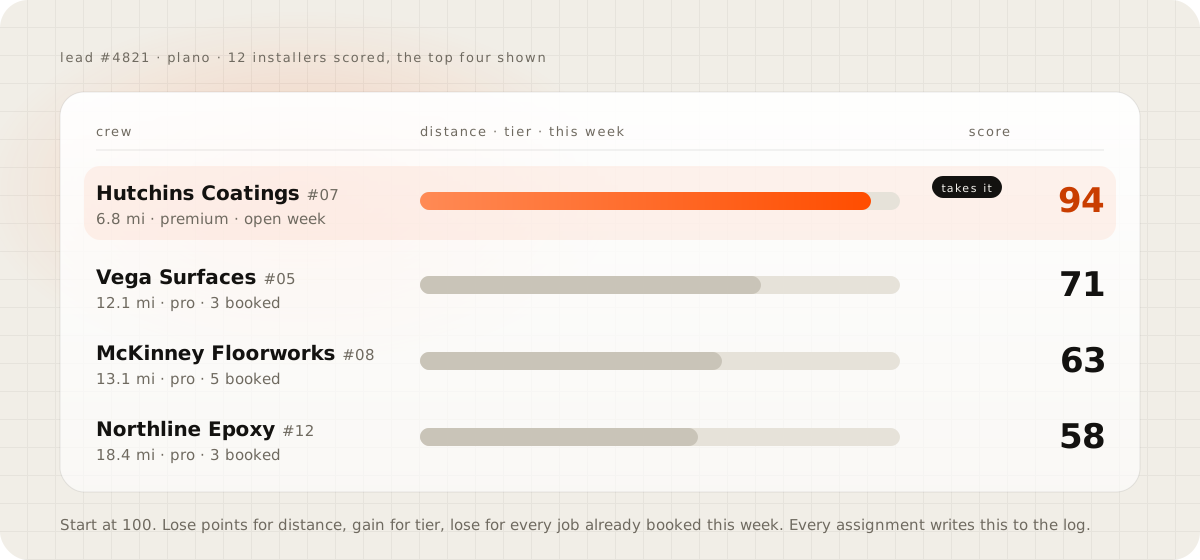
And every assignment writes its math to the log. When crew #05 asks why #07 got lead #4821, you open one screen: 6.8 miles against 12.1, premium against pro, an open week against three jobs booked. I have not measured whether that ends the arguments. It does end the guessing, because the reason is on the screen before anyone has to defend it.
When I would not build this#
Two or three crews in one town do not need it. A group text and a rule, first to reply takes the job, gets most of the benefit for nothing, and the owner can still see who is slow. Build the system when the map covers more than one metro, or when leads arrive while nobody is awake. Build it when the crews are independent businesses who need to see the math before they trust the split.
Then be honest about the cost. A geocoding key with a monthly bill, a server that runs the score and sends the emails, someone who fixes it when a provider changes its API, and a dashboard the owner will open. What that dashboard should hold, and why it belongs in a database you own, is the guide on a private back office.
What you do not pay is a CRM seat for every installer. What you do not get is a fix for a crew that never calls back. Routing puts the lead in the right inbox in seconds, and the reroute limits the damage when that inbox is ignored. Neither one makes a phone call. The message that arrives at 11 pm and needs an answer, not a crew, is a different problem, and the inbox that answers from your own pages is the guide for it.
Do this today#
Export last month's leads with their addresses into any map tool that accepts a spreadsheet, and draw each crew's honest radius around their yard. Count two things: leads that fall outside every circle, and leads that fall inside two. The first number is work you should be refusing or subcontracting. The second is every lead where a list of zip codes picked a crew for a reason nobody could explain, and where a score would have. Then send a lead through the routing desk with your own zip and watch the path it takes; the build follows the same steps as every system I ship.
Questions people ask
Can I assign leads by zip code without a CRM?
Yes. A spreadsheet that maps each zip to a crew and a form tool that emails by rule will do it in an afternoon. It fails at borders, on zips nobody typed in, and on the lead a crew ignores, because nothing moves it on.
Is nearest better than round robin for lead routing?
Neither on its own. Nearest buries the crew by the busiest suburb and starves the rest; round robin sends leads to crews who do not cover the town. Filter by radius, score on distance and tier, and cap each crew's load.
How does geocoding a lead work?
A geocoder takes the address and returns a latitude and longitude with a precision level. A full street address comes back at rooftop precision; a zip alone comes back as an approximate centre, so ask for the street and treat a zip-only point as rough.
What should happen to a lead the crew ignores?
Give the crew a short claim window, 15 minutes in the hub I built, and when it passes hand the lead to the next crew on the score list without anyone having to notice. A reply two days later is the same as no reply.
How fast can automatic routing assign a lead?
The hub I built assigns in 2.4 seconds median from the form post, geocode and scoring included. The crew has the email before the customer has left the page.
Sources
- ZIP Code Tabulation Areas, U.S. Census Bureau
- Census Geocoder documentation, U.S. Census Bureau
- Geocoding requests and responses, Google Maps Platform
- Zip based lead distribution, LeadSquared help centre
- How to route leads by territory and keep round robin fair, Plauti
- Dealer locator with exclusive territories, Storepoint
- The Lead Response Management study, Oldroyd and InsideSales.com
- B2B lead response times from 114 companies, Workato, March 2026