On a mid-range phone in Google's PageSpeed test, a Jotform lead form showed nothing for six seconds and then appeared whole. A Typeform lead form put its first screen up in two and a half seconds, then took until the same six-second mark to draw its main content. On the way it downloaded 619 KB of JavaScript to Jotform's 266. Those are medians of six runs across three public forms from each company's own template gallery, on 15 September 2026.
Jotform vs Typeform is usually argued on looks, one question at a time against the whole form on one page. For a business collecting leads, four other things decide it. The load on a phone, the bill at your volume, what happens the day the monthly allowance runs out, and whether a lead lands in your CRM once. None of the nine pages ranking for this search measured any of them, and eight are written by Jotform itself or by a company that ends by pitching its own product.
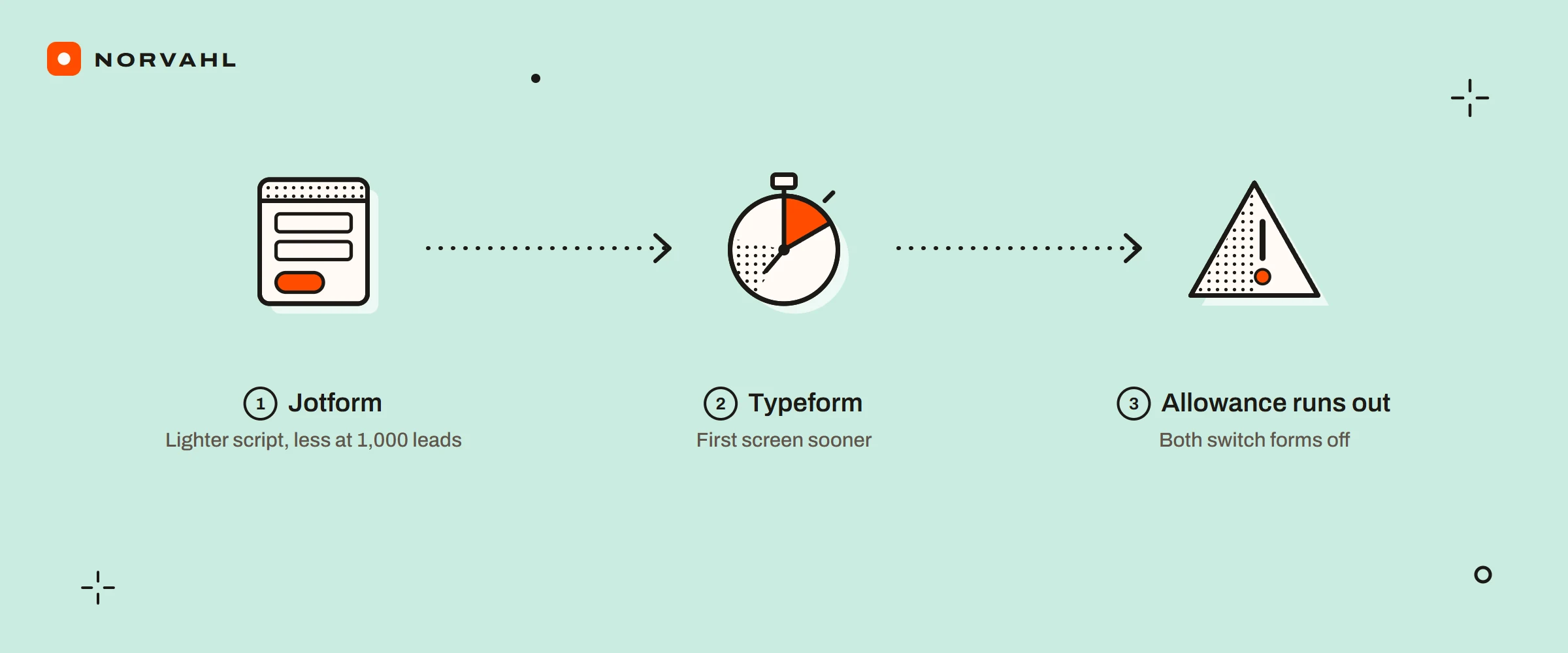
The short version For a lead form, Jotform downloads less than half the script, barely blocks a phone, and costs less at 100 or 1,000 leads a month. Typeform shows its first screen sooner and costs slightly less at 5,000 a month on yearly billing. Both switch your forms off when a monthly allowance runs out, which matters more in a busy month than either one's looks.
How fast each lead form loads on a phone#
I picked three pairs from the two template galleries: a short lead form, a longer business lead form and a contact form, each opened as a live published form. Google's PageSpeed Insights ran every form twice in its mobile test, which loads the page on an emulated mid-range phone over a throttled connection. The questions inside each pair are not identical, so read this as how each tool's forms behave, not as a race between two copies of one form.
| Median of six runs | Jotform | Typeform |
|---|---|---|
| First content on screen | 6.0 s | 2.5 s |
| Main content on screen | 6.1 s | 6.1 s |
| Time the phone was blocked | 0 ms | 533 ms |
| JavaScript downloaded | 266 KB | 619 KB |
| Whole page, lightest to heaviest form | 791 to 901 KB | 762 to 951 KB |
| PageSpeed score, lowest to highest run | 62 to 65 | 44 to 67 |
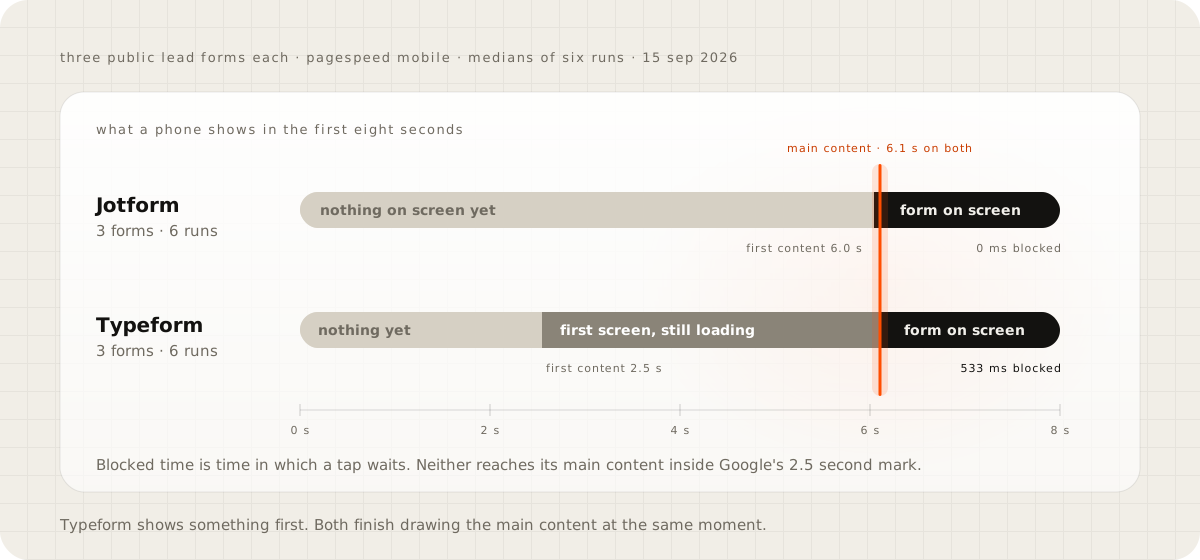
Google calls the main-content number largest contentful paint, and it counts 2.5 seconds or less as good, so neither form passes on this test. Typeform's welcome screen appears early, and then its script keeps the phone busy. Blocked time is time in which a tap waits for an answer. Jotform's form arrives late and all at once, and once it is there the phone is free.
Embedded on your own site, the picture shifts again. On 15 September, Typeform's embed script was 14.5 KB compressed, and it loads the form into a frame. On phones, an embedded Typeform opens as a full-screen pop-up behind a start screen unless the embed code turns that off. The script embed Jotform serves for the first form was 4.75 KB compressed, and it builds a plain frame in the page.
What each costs at 100, 1,000 and 5,000 leads a month#
Jotform sells plans with several limits at once: submissions, form views, stored entries and uploads. Typeform sells responses a month. Here is the cheapest plan that covers each volume, from Jotform's and Typeform's pricing pages on 15 September 2026:
- At 100 leads a month, Jotform Starter is free. Typeform needs Basic, $336 a year billed yearly or $468 monthly, because its free plan stops at 10 responses.
- At 1,000, Jotform Bronze costs $408 a year billed yearly or $468 monthly. Typeform needs Plus, $672 or $948, because Basic tops out at 750.
- At 5,000, Jotform Gold costs $1,188 or $1,548. Typeform Business costs $1,092 or $1,548.
Jotform's free plan has a catch at 100 a month. It keeps 500 entries in total, so it is full in five months, and after that it deletes the oldest entry to make room for each new one. Its 10,000 monthly form views count every load of a page carrying the form, whether anyone types or not.
Typeform's catch is newer. Its help centre says submission emails for accounts opened from 20 May 2026 run through Automations, which need a $25 a month add-on on Plus or higher. Its free plan article still lists emails to yourself, so the two disagree. Test it on your own account before you count on an email for every lead.
What happens the day the allowance runs out#
Jotform sends an email and a dashboard warning first. Any monthly limit counts: submissions, form views, payments, signed documents or upload space. Reach one and the forms are switched off, showing a Form over quota message until the month resets or you upgrade.
Typeform warns at 90 and 100 percent. At 100, every form in the account goes Private and visitors see a closed message until the next month. With auto-upgrade on, the forms stay open and the account moves up a response tier at a prorated charge. That higher tier stays on later bills until you switch auto-upgrade off and downgrade, and the switch starts on when you upgrade from the free plan.
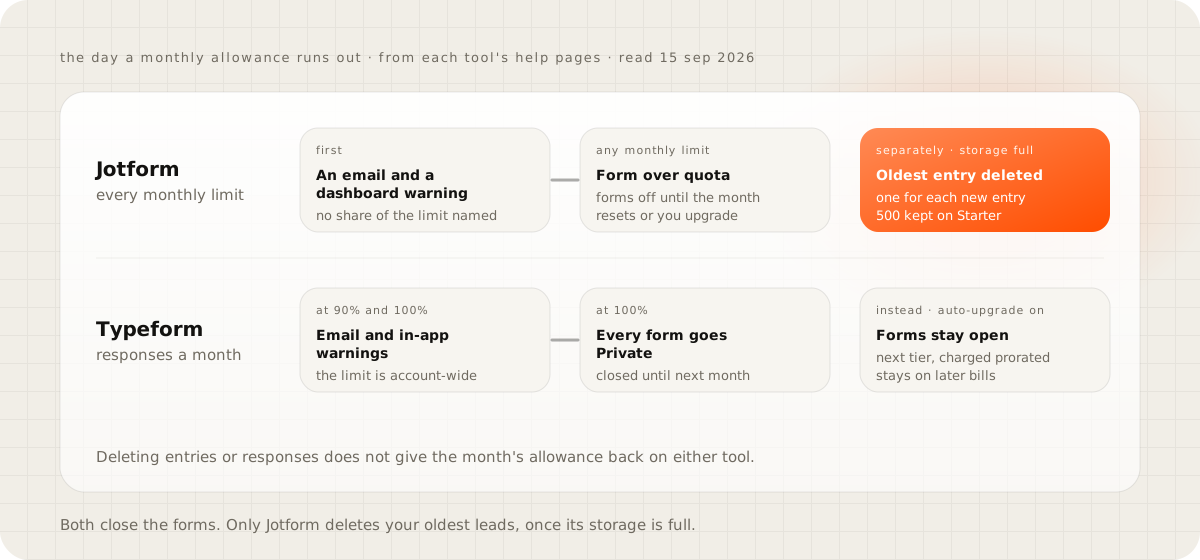
If your leads come in waves, around a trade show or a seasonal campaign, buy for the peak month or accept the auto-upgrade and set a reminder to step back down. Deleting entries or responses does not give the month back on either tool.
Where each lead goes after Submit#
Getting the lead to a person is where the two differ most. Jotform's HubSpot integration creates contacts, deals or tickets, and can update an existing record when the fields you choose match. Its help pages name no plan for it. Typeform's HubSpot integration maps answers to HubSpot contacts, companies or deals, and its own help articles disagree about which plan it needs.
The duplicate problem shows up on Pipedrive. Typeform's classic Pipedrive integration creates a new record for every submission and cannot update an existing person or deal, so a repeat enquiry becomes a second lead. Its webhooks retry a failed delivery every two to three minutes for ten hours after certain errors. They also warn that duplicates can happen, so the receiving system has to match on the response token. Jotform's webhook help gives a 30-second timeout and describes no retry.
Both problems are solved on the receiving side, whichever tool sends the lead. The receiver has to recognise a repeat enquiry as the person already in the pipeline, and hold on to a delivery it could not pass on. The contact form on this site handles the first in its own database: a second message from someone whose first is still unanswered joins that open lead instead of starting another.
For fewer than a hundred leads a month and one person answering them, Jotform's free plan and its HubSpot integration cover this, as long as someone checks the CRM for doubles each week.
Does one question at a time convert better?#
Typeform's help centre says the average typeform is completed 47 percent of the time, counting submits against opens, with no period, sample or method given. Jotform's blog says its one-question Cards forms are 36 percent more likely to be completed, from its own user research, with no sample either. Both are vendors grading their own format.
The independent research is older, it tests surveys rather than lead forms, and it points both ways. In 2009, Toepoel, Das and van Soest found that fewer questions on each screen meant fewer skipped questions. In 2014, Mavletova and Couper found that on phones a scrolling survey was faster, had fewer technical problems and was rated better than a paged one. For a lead form of five fields, I would cut fields before I changed the layout.
Spam and where the data lives#
Jotform's CAPTCHA field uses hCaptcha by default, with reCAPTCHA or its own JotCAPTCHA as options. Typeform's spam filter is an invisible reCAPTCHA from Plus up. Suspected spam waits in a folder for 60 days, does not count toward the limit, and never reaches webhooks or integrations. How the checks themselves compare is in Cloudflare Turnstile vs reCAPTCHA.
For data in the EU, an existing Jotform account can move to Google's servers in Frankfurt. Typeform hosts in the EU only for new Enterprise or Growth Custom customers, and its payment question does not work there. One detail catches people out on Typeform: file-upload links become public once they are sent on to an export, an integration, a webhook or an email.
If your site runs on WordPress, the same choice between plugins is in Gravity Forms vs WPForms.
Load your own form on mobile data#
Open your live form on a phone using mobile data, not wifi, and count the seconds until you can type in the first field. Then open the account's usage page and see how much of this month's allowance is already gone. If the form takes longer than five seconds, I would look at the embed before I blamed the tool. If two thirds of the allowance is gone with a week left, I would change the plan before the campaign rather than after it.
Questions people ask
Can Jotform and Typeform take payments?
Both can. Jotform counts payment submissions separately, from 10 a month on the free Starter plan to 1,000 on Gold. Typeform takes payments from its Basic plan with a Stripe account, offers PayPal too, and says Apple Pay and Google Pay do not work inside an embedded form.
Does Typeform's free plan connect to Google Sheets?
Yes. Typeform lists Google Sheets among its free plan integrations, adding a new row for each completed or partial response. The free plan allows 10 responses a month, so it suits a test rather than a live lead form.
Which one will sign a HIPAA business associate agreement?
Jotform offers HIPAA features on Gold and Enterprise, and a covered entity signs the agreement inside the account. Typeform signs one only for Enterprise and Growth Custom customers, whose prices come from its sales team.
Sources
- Pricing, Jotform
- Understanding your account usage and limits, Jotform
- Understanding your form view limit, Jotform
- How to integrate Jotform with HubSpot CRM
- How to send submission data via a webhook, Jotform
- How to add a CAPTCHA field, Jotform
- How to store your data on EU servers, Jotform
- Pricing, Typeform
- Response limits, Typeform Help Center
- Auto-upgrade your response limits, Typeform Help Center
- Send leads from Typeform to Pipedrive, classic integration, Typeform Help Center
- Webhooks, Typeform Help Center
- Send email notifications when someone submits your form, Typeform Help Center
- Embed your form, Typeform Help Center
- Spam prevention, Typeform Help Center
- What's the average completion rate of a typeform, Typeform Help Center
- Step-by-step forms, Jotform blog
- Design of web questionnaires, the effects of the number of items per screen, Field Methods, 2009
- Mobile web survey design, scrolling versus paging, Journal of Survey Statistics and Methodology, 2014
- Largest Contentful Paint, web.dev
- PageSpeed Insights