A Google Sheet stops at 10 million cells, and nothing you can buy lifts it. When someone on a Google business account asked the help forum how to add more, the product expert said the cap covers every file and cannot be raised. Another 84 people marked the same question. Airtable stops sooner and more politely: its Team plan holds 50,000 records a base, and everyone who can edit is a paid seat.
Airtable vs Google Sheets is a question about which wall you meet first, and Excel belongs in the same answer. I read the limits of all three on their makers' own help pages on 15 September 2026, and ordered them by how long each one lasts. Fifteen of the eighteen pages I opened for these searches come from companies selling software or builds. None of them puts the limits side by side or says what the screen shows when you reach one.
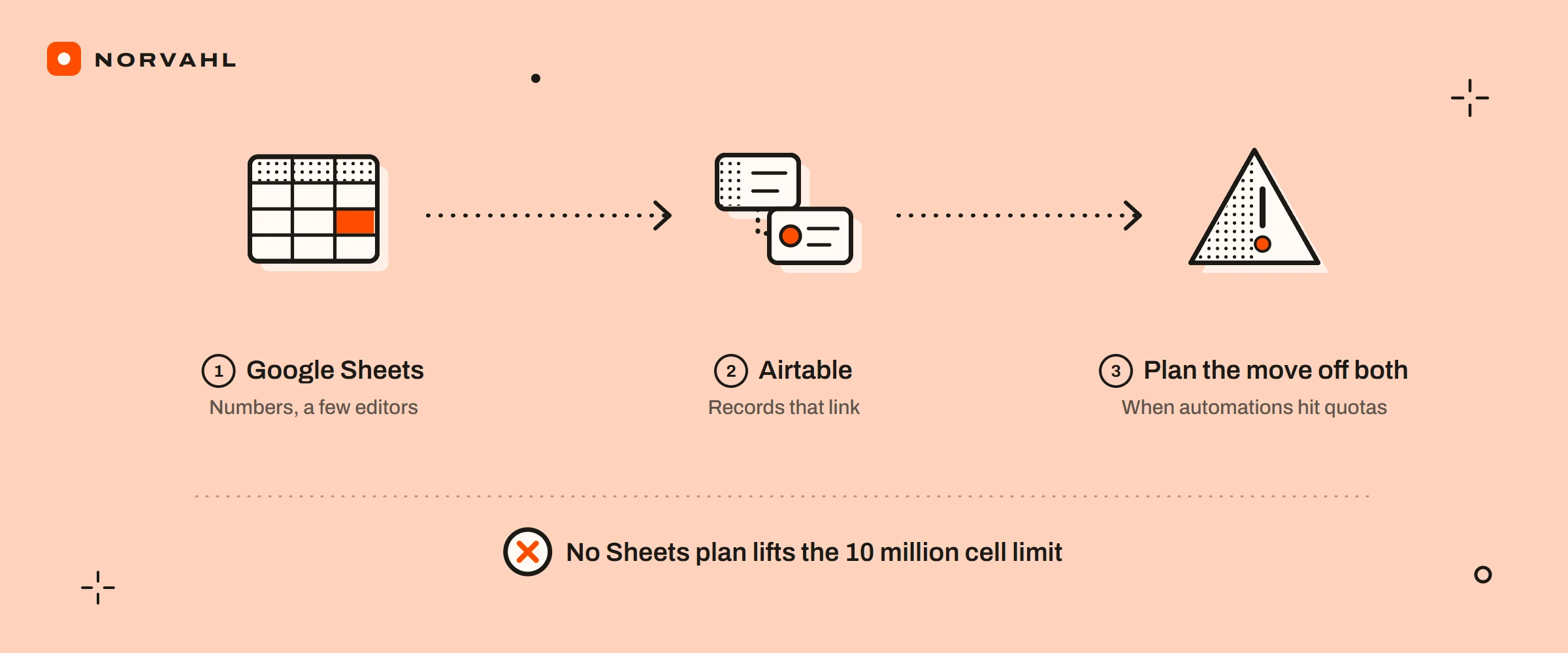
The short version Keep a list in Google Sheets while it is mostly numbers and a handful of people edit it, and move it to Airtable once records need to link to each other. Plan the move off both when the automations start hitting their quotas, not on the day the file stops taking rows.
The six walls, and what each one says#
Every limit here comes from the tool maker's own help pages, and each one arrives as a message on somebody's screen. The order is how long the wall lasts, because that is what separates an afternoon's nuisance from the end of the tool.
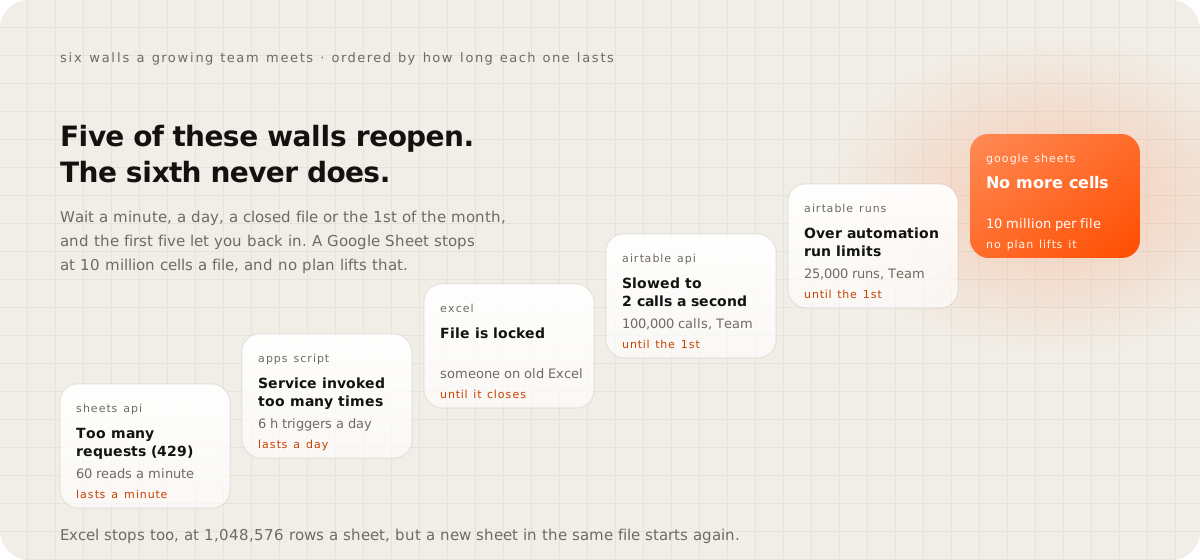
Four of them reopen on a timer. Google's Sheets API allows 60 reads and 60 writes a minute for each person on a project, and answers anything faster with a Too many requests error. Its automation tool, Apps Script, runs up to six minutes at a time and six hours of triggers a day on a Workspace account.
On Airtable's Team plan, the API slows to two calls a second after 100,000 calls in a month. Automations show an over-limit error after 25,000 runs. Both last until the first of the next month.
Excel's wall lasts as long as one person. Co-authoring works only when the file sits in OneDrive or SharePoint and everyone runs a current Excel with AutoSave on. If one person opens it in a version that cannot co-author, everyone gets File is locked until that copy closes.
The sixth wall has no timer. Google caps each spreadsheet at 10 million cells or 18,278 columns, and the only ways past are to split the data across files or to move it somewhere built to hold it.
Here is every number in one place, for the plan most teams start paying for.
| Google Sheets | Excel for Microsoft 365 | Airtable Team | |
|---|---|---|---|
| Size | 10 million cells per spreadsheet | 1,048,576 rows by 16,384 columns per sheet | 50,000 records per base |
| People editing | up to 100 open tabs or devices | co-authoring needs OneDrive or SharePoint and a current Excel | every editor and commenter is a paid seat |
| Automation | Apps Script: 6 minutes a run, 6 hours of triggers a day on Workspace | macros run in desktop Excel, not in the browser | 25,000 runs a month, 50 automations per base |
| Connecting other apps | 60 reads and 60 writes a minute per user | data connections refresh in desktop Excel only | 100,000 API calls a month, 5 a second per base |
| Price per person | $7 a month, Business Starter billed yearly | $7 a month, Business Basic billed yearly, web apps only | $20 a month billed yearly, $24 monthly |
Airtable vs Google Sheets when the whole team works in one list#
For a list the whole team works in, I look at the people before the size. A Google Sheet can be edited from up to 100 open tabs or devices at once, and past that only the owner and some editors can keep editing. Anyone with edit rights sees the version history. Viewers do not.
Airtable bills people instead of cells. Every person with edit rights on even one base is a paid seat, and on the Team plan so is someone who can only comment. On Business at $45 a seat, commenters are free. Read-only users, form submissions and share links cost nothing on either.
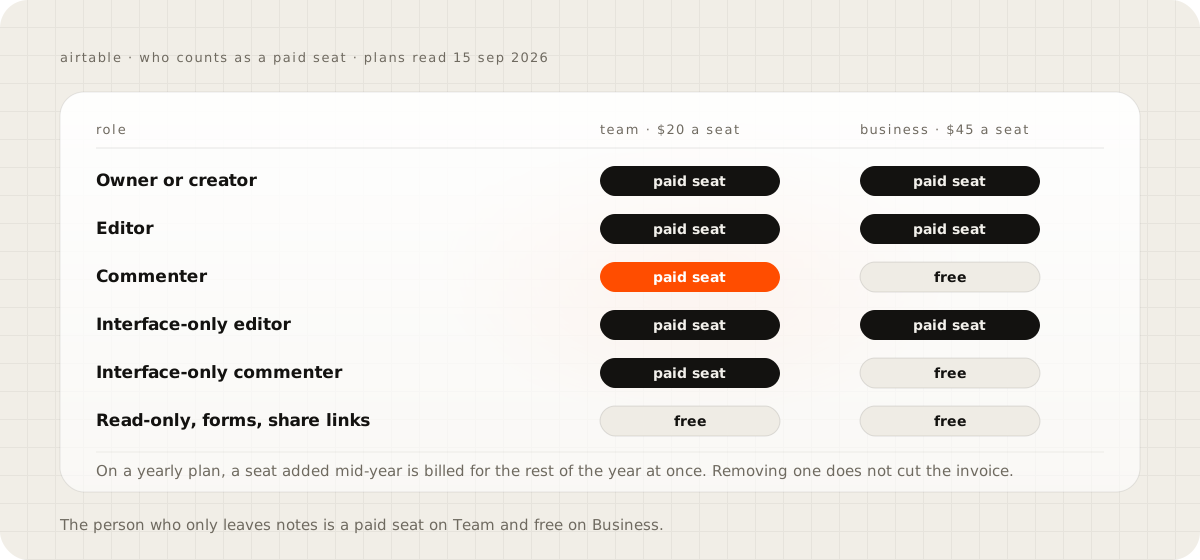
Two billing rules catch people out. On a yearly plan, a seat added mid-year is charged for the rest of the year at once, and removing one does not reduce the invoice. People outside the business, a contractor or a customer, need the Portals add-on, from $120 a month for 15 portal seats on Team.
Size comes later, and then it comes hard. Team holds 50,000 records a base and Business 125,000. In 2022 a recurring-service business told Airtable's community it kept one record per visit, about 50,000, and needed more records rather than more people. It saw no plan between the one it had and Enterprise.
Airtable vs Excel for a team sharing one workbook#
Excel's grid is the biggest of the three: 1,048,576 rows by 16,384 columns on every sheet, and a new sheet in the same file starts again. What stops a team is sharing it. Co-authoring needs the workbook in OneDrive or SharePoint, and it needs every person on a current Microsoft 365 Excel.
The cheapest business plan is the trap. Microsoft 365 Business Basic, $7 a user a month billed yearly, gives people Excel in the browser and on phones only. Excel in the browser cannot run macros or build a Power Pivot model, and it cannot open a workbook over 100 MB from SharePoint. Refreshing a data connection needs the desktop app, which starts at $10 a user on Apps for business.
Airtable is the other kind of tool. Records link to other records. Forms and interfaces sit on top, and automations run when something changes or on a schedule, at $20 to $24 a seat. If the workbook is a model someone builds and everyone else reads, keep Excel. If it is a list of customers, jobs or orders that several people update all day, it wants to be a database, and Airtable is the nearest one you can rent.
Google Sheets vs Excel for business#
The price does not decide this one, because it is the same to the cent. Google Workspace's three business plans cost $7, $14 and $22 a user a month on a yearly commitment. Microsoft's Business Basic, Standard and Premium cost the same, paid yearly. Month to month, both charge $8.40, $16.80 and $26.40.
The difference is where the work happens. Sheets lives in the browser and is shared by default, and its automation runs inside Apps Script's daily quotas. Excel's full strength is on the desktop, and sharing it well means OneDrive, current versions and the right licence for everyone. If your people work in the browser and edit the same file all day, pick Sheets. If one or two people build models and the rest read them, pick Excel.
When a business should leave all three#
The signs arrive before the wall does, and the help forums are full of them. Owners split a sheet into files by year, archive old records into a second base to stay under the cap, or break a script's work into batches to fit the six-minute limit. One team that ran its sales pipeline in Sheets for fourteen months wrote that it spent about two hours a week fixing errors. Each workaround says the same thing: the list has become the business's system.
The move is to a small app of your own, with your records and the links between them in a database, the screens your team uses, and roles for who can see and change what. Published surveys do not price internal database apps on their own. The nearest bands are GoodFirms' 2026 survey of more than 100 software companies, where 14.1 percent charge under $30,000 for a small project, and Clutch, whose most common project size is $10,000 to $49,999.
Running it costs less than one seat, before the time to look after it. On Cloudflare, the Workers paid plan is $5 a month with 10 million requests included. Its D1 database includes 5 GB of storage and 50 million written rows a month on that plan. Ten editors on Airtable Team cost $2,400 a year billed yearly, and $5,400 on Business.
The desk behind this website is a small working example. Its leads and visits sit in its own database, along with the reports built from them, on Cloudflare's free plan, which allows 100,000 requests a day. How the desk works is in the private back office guide, and what a build like it costs is in what custom software costs.
Stay where you are if the list fits one sheet, fewer than five people edit it and nothing breaks at 2 am when a script stops. Stay on Airtable if Team holds your records with room to spare and nobody on the seat list only comments. A build is worth it when the seats and the workarounds cost more each year than looking after an app, and not before.
Count three things this week#
Open your biggest spreadsheet or base and count the cells across every tab, or the records in the base. Then count the people who can edit it and the automations that touch it. I would plan the move once the first number passes half its limit, or once the second grows faster than the business.
Questions people ask
Is Airtable free?
There is a free plan with up to 5 editors, 1,000 records and 1 GB of attachments per base, 100 automation runs and 1,000 API calls a month, and two weeks of history. Paid plans start at $20 a seat a month billed yearly.
What happens when an Airtable base reaches its record limit?
The Airtable help pages I read do not say. Answers in its community forum say new records are refused after a grace period and existing records are not deleted. The fixes people use are splitting records into tables by year, archiving old records into another base, or upgrading.
Will Google start charging for the Sheets API?
Standard use costs nothing extra. Google's usage limits page, updated on 3 September 2026, says going over the quota is planned to incur charges to a Google Cloud billing account later in 2026.
Sources
- Files you can store in Google Drive, Google Drive Help
- Share files from Google Drive, Google Docs Editors Help
- Usage limits, Google Sheets API
- Quotas for Google Services, Apps Script
- Google Workspace pricing
- Excel specifications and limits, Microsoft Support
- Collaborate on Excel workbooks at the same time with co-authoring, Microsoft Support
- Excel for the web service description, Microsoft Learn
- Compare all Microsoft 365 business plans
- Airtable pricing
- Airtable plans overview
- How Airtable collaborators impact billing
- Managing API call limits in Airtable
- Troubleshooting Airtable automations
- Airtable vs Google Sheets, a year of automations, Cotera
- Custom software development cost survey 2026, GoodFirms
- Software development pricing guide, Clutch
- Workers pricing, Cloudflare developer documentation
- D1 pricing, Cloudflare developer documentation